Configuring a stop-loss order means more than drawing an exit line on a chart. The software must attach the instruction to the correct position, interpret the distance correctly and confirm that the broker has accepted it. A trailing stop adds another question: what keeps adjusting the stop when you close the application?
This guide covers initial stop placement, trailing settings and the checks needed before relying on either. For the broader workflow of opening, modifying and closing CFD positions, see our guide to CFD order management tools.
Choose the Right Protection Order
A fixed stop-loss sets a price condition for closing a position. For a long position, the stop normally sits below the current market; for a short position, above it. Once a trade moves into profit, the stop can also sit beyond the entry price to protect some of that gain.
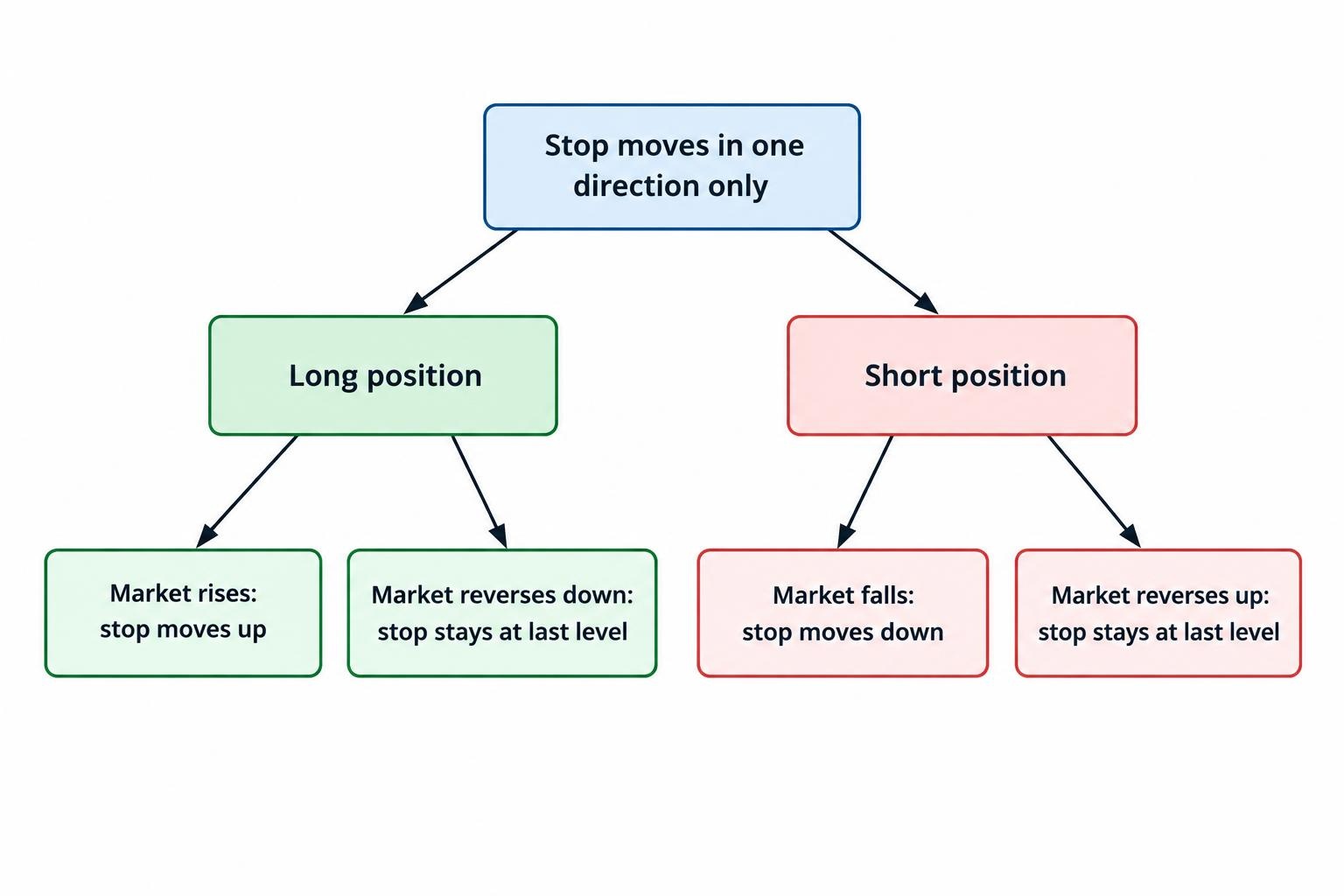
A trailing stop adjusts the stop level when the market moves in your favor. It moves upward behind a rising market for a long position, or downward behind a falling market for a short position. It does not normally reverse direction when the market turns against you.
A stop-limit order serves a different purpose. Once triggered, it permits execution only at the limit price or better, creating a risk that the exit remains unfilled. The SEC investor bulletin on stop, stop-limit and trailing stop orders sets out this distinction for stock orders. Check whether your CFD platform offers an equivalent closing instruction: a pending stop-limit entry order is not automatically protection for an existing position.
An ordinary stop price is a trigger, not a guaranteed execution price. Trailing that trigger does not remove execution risk.
Match the Stop Distance to the Cash Risk
Choose the intended exit level and position size together. Moving a stop farther away without reducing the position increases the planned loss. Selecting a small margin requirement does not make that loss smaller.
For a CFD with a constant monetary value per index point, a basic estimate is:
Planned price loss = entry-to-stop distance × monetary value per point for the whole position.
Suppose a hypothetical long index CFD opens at 8,000 with an initial stop at 7,960. The distance is 40 index points. If the whole position gains or loses $2 per point, the planned price loss is $80, before commission, financing, currency conversion or execution differences.
If the chosen exit level were instead 7,940, the distance would become 60 points and the same position would carry a $120 planned price loss. Keeping that estimate at $80 would require a smaller position, subject to the contract’s permitted size increments. These figures illustrate the calculation, not a recommended stop distance or risk allowance.
Check the units before entering anything. An index point, a platform point and the smallest permitted price increment may differ. If a hypothetical contract uses increments of 0.1, then 50 such increments represent five index points, not 50. Use the instrument’s contract specification rather than carrying assumptions across from another market.
Enter and Confirm the Initial Stop-Loss
Attach the initial stop within the opening ticket where the platform supports it. If the position already exists, modify that position rather than placing an unrelated pending order.
In MetaTrader 5, the position’s “Modify or delete” window accepts stop levels as prices or distances in points. Broker conditions determine whether the requested level is valid. The MetaTrader 5 position modification instructions cover these controls and chart-based amendments.
- Select the exact position. Check the account, instrument, direction and position identifier, especially when several trades share the same symbol.
- Choose the attached Stop Loss field. Do not substitute a new buy-stop or sell-stop entry ticket unless the platform explicitly provides a linked closing instruction.
- Enter the price or distance. Confirm the selected unit, permitted price increment and minimum distance from the relevant market quote.
- Submit the amendment. Wait for confirmation. A value typed into a ticket is not an accepted instruction.
- Inspect the position again. Read the stored stop price and recalculate the planned loss using the actual entry fill and position size.
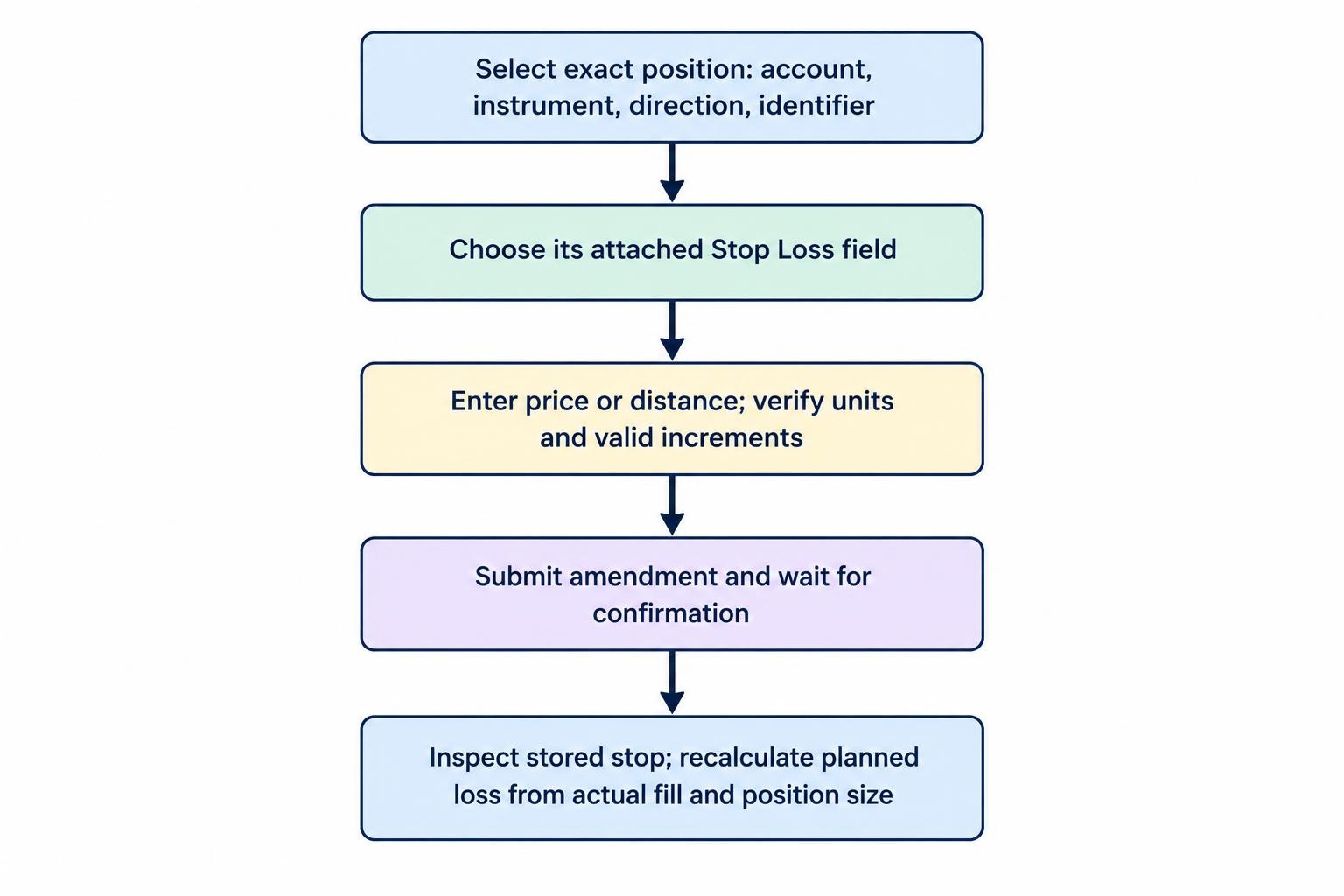
Use the same verification after dragging a stop line on the chart. Check the resulting number, not just its visual position. Keep an initial protective stop separate from any trailing feature that has not yet activated.
Configure Trailing Activation, Distance and Step
Trailing controls differ between platforms. Some expose only a distance; others provide separate activation and update settings. Write down the intended behavior before translating it into the available fields.
Activation determines when trailing begins. Distance determines how far the stop follows behind the reference price. Step, where offered, determines how much further favorable movement is required before another amendment. Also check whether the software uses a fixed distance or a percentage.
A narrow distance leaves less room for a reversal, but it also gives ordinary price fluctuations less room. A wider distance allows more movement while giving back more unrealized profit. There is no setting that avoids both trade-offs.
A Worked Trailing Stop Example
Assume a hypothetical platform supports separate activation and step settings. A long index position opens at 8,000, with an initial stop at 7,960. Trailing activates after 60 points of favorable movement, follows 40 points behind the bid and updates in 10-point steps.
| Bid price | Trailing status | Stop level |
|---|---|---|
| 8,040 | Not activated | 7,960 |
| 8,060 | Activates | 8,020 |
| 8,090 | Advances with the market | 8,050 |
| 8,070 | Does not move backward | 8,050 |
| 8,050 | Stop condition reached | Exit requested; fill may differ |
At the 8,050 stop level, the indicated price gain from entry is 50 points. At $2 per point, that represents $100 before costs and execution differences. It is not a guaranteed $100 profit.
For a short position, reverse the direction: favorable downward movement lowers the trailing stop, which remains above the reference price. Do not copy the long-position arithmetic unchanged into a short-position template.
Check the Trigger Price and Where Trailing Runs
Bid, Ask or Another Trigger Condition?
The price visible on a chart is not necessarily the price used to activate a stop. Display both bid and ask where possible, then check the configured trigger method.
Consider a hypothetical short position with a stop at 5,050. If its trigger uses the ask, an ask quote of 5,050 can activate the stop even while a bid-only chart shows 5,047. The three-point spread accounts for the apparent mismatch. Comparing the stop only with the displayed candle would miss the relevant quote.
In cTrader, the default “Trade side” trigger uses bid for long positions and ask for short positions. Other settings can use the opposite quote or require two consecutive qualifying ticks. Its built-in trailing protection also runs on the server and remains active after the session ends. These behaviors are documented in the cTrader trade protection settings.
Choose the trigger deliberately. Requiring extra confirmation changes when an exit activates; it does not make the eventual execution price certain.
Will Trailing Continue When the Application Closes?
MetaTrader 5’s built-in trailing stop runs in the trading platform, not on the broker’s server. Closing the platform stops further trailing adjustments, although an already established server-side stop-loss remains in place.
Its standard trailing mechanism also waits until profit in points reaches the selected trailing distance before issuing the stop placement command. Enabling trailing therefore does not necessarily create immediate protection. Both behaviors are covered in the MetaTrader 5 trailing stop operating rules.
For any plugin, script or external trading tool, ask the same questions: where does the adjustment logic run, what connection does it require, and what stop remains if it fails? Do not assume that closing a mobile application, shutting down a desktop terminal and disconnecting an external service have identical effects.
During a demo check, record the stored stop before disconnecting and inspect it after reconnecting. Confirm whether it remained fixed or continued advancing.
A Break-Even Stop Is Not Necessarily a Break-Even Trade
Moving the stop to the entry price protects a price level, not automatically the net result. Keep commission, financing and other applicable charges in the calculation, alongside possible slippage.
Suppose an illustrative trade has $8 in combined opening and expected closing charges, excluding spread effects already reflected in the entry and exit prices. At $2 per index point, four points of favorable price movement would be needed to offset those charges, assuming no other costs or execution differences. Financing accumulated later would change that estimate.
If the platform offers a break-even offset, calculate it from the actual cost structure rather than choosing an arbitrary positive number. Avoid counting the spread twice when working from executable entry and exit prices.
Also decide which control takes priority. If a break-even tool, trailing feature and trading script can all amend the same stop, test their interaction before enabling them together. Prefer one clearly defined owner for routine stop adjustments.
Troubleshoot Rejected, Missing or Unexpected Stops
A rejected amendment: inspect the returned message before submitting again. Check the stop’s direction, distance, price increment and the instrument’s current trading conditions. Read back the accepted stop afterward. Do not assume the requested replacement took effect or that an earlier level remains unchanged.
A stop that appears to trigger early: compare the correct bid or ask stream with the trigger rule and timestamp. Save the position identifier, requested level, quote record and execution details. A chart screenshot alone may not show the quote that mattered. Our guide to CFD price feeds and execution quality covers the broader comparison process.
A trailing stop that stops advancing: check whether it has activated, whether the required favorable movement occurred, and whether its application or service is connected. Review modification messages before changing the distance.
After adding to, reducing or reversing exposure, inspect the protection again. Treat any change in position size as a reason to recalculate the cash risk, even if the displayed stop price appears unchanged.
Keep Stop Protection Separate From Margin Protection
A position stop and an account margin closeout address different conditions. Do not treat the presence of a stop as proof that the account has enough capacity to withstand losses elsewhere.
Under the framework covered by ESMA’s Q&A on guaranteed stops and margin closeout, even a position carrying a guaranteed stop can close before that stop price when account margin protections intervene. That distinction matters when evaluating any promise of position-level protection.
If a ticket offers a guaranteed stop, review its contractual coverage, charges, eligible instruments and amendment rules. Confirm that it was actually selected and accepted. An ordinary trailing stop should not be treated as an equivalent feature.
Test account pressure separately from stop placement. Use CFD margin closeout scenarios to examine how several positions could affect available margin, rather than extending this stop configuration exercise into an account-wide risk model.
Test the Configuration Before Relying on It
Use a demo environment to check one long and one short position. Observe initial placement, trailing activation, a favorable move, a reversal and a disconnection. Where supported, also check a partial close and a position-size change.
Record the requested settings and the accepted stop prices. Verify what disabling trailing actually does: stop further adjustments, remove the stored stop, or require a separate action. A successful demo confirms the behavior you observed there; it does not establish that live fills will match.
For unattended scripts or external tools, pair the stop configuration with trading bot monitoring and emergency controls. Before leaving any position unattended, verify the accepted protective level, the process responsible for future amendments and the action to take if that process fails.