Connecting investing software to brokerage accounts should reduce manual work without giving an app more access than it needs. The practical approach is to confirm account coverage, choose the narrowest permissions available, connect one account first, then check the imported records before relying on the results.
The connection deserves as much attention as the software’s charts. Missing transactions, stale balances or duplicated accounts can make a polished dashboard misleading. When comparing investing software, assess the quality of its brokerage integration separately from its analysis features. A successful login is only the start.
Choose the Right Brokerage Connection Method
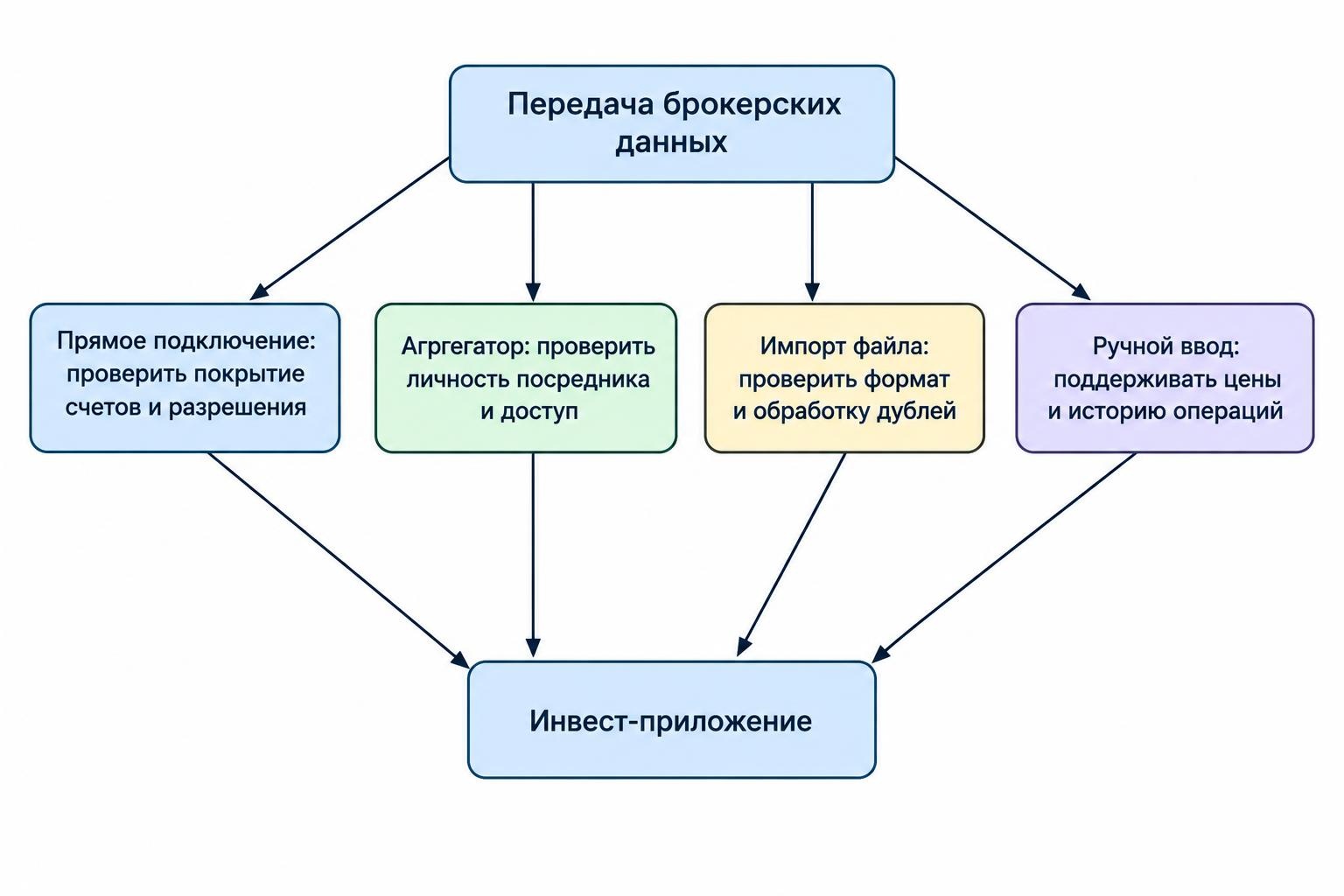
Start by separating two questions: who moves the data, and how you authorize access. Software may connect directly to a brokerage or use an intermediary called a data aggregator. Either route needs scrutiny; “direct” is not a substitute for checking permissions and imported records.
| Connection method | What to check | When to consider it |
|---|---|---|
| Direct brokerage integration | Supported accounts, authorization process, available fields and refresh schedule | When the application offers a documented connection to your brokerage |
| Data aggregator | The intermediary’s identity, access permissions and support arrangements | When consolidating accounts from several institutions |
| CSV or supported file import | Required columns, date formats, transaction categories and duplicate handling | When automatic access is unavailable or unwanted |
| Manual entry | How prices, cash movements and transaction history will be maintained | For a small number of unsupported holdings |
In a broker-hosted OAuth authorization flow, you approve access through the brokerage’s authorization system. The application receives an access token rather than your brokerage password. Tokens represent permissions and access duration under the IETF OAuth 2.0 authorization framework. OAuth does not automatically mean read-only access: inspect what the application requests.
File imports avoid an ongoing account connection, but they create a different maintenance task. Keep an untouched copy of each original export and test the importer with a small sample before uploading years of history.
Confirm Account and Data Coverage Before Signing Up
Do not stop at finding your brokerage’s logo on a compatibility page. Ask whether the connection supports your account’s country, brokerage entity and account type. Check individual, joint and retirement accounts separately rather than assuming one supported login covers everything.
Then establish what “supported” actually means. Request confirmation of holdings, cash balances, transactions, fees, dividends, cost basis and currencies. Treat any unanswered field as unverified, particularly if the software needs it for a calculation you plan to use.
For portfolio tracking software, the useful test is whether the connection supplies enough information to maintain an accurate record, not whether it can display today’s account total.
Ask about historical coverage too. Can the application retrieve records from account opening, only a recent period, or holdings without earlier purchases? If older records require file imports, confirm that manual history can coexist with the automatic feed without duplication. Establish whether that import requires a higher subscription tier before paying.
Connect With the Narrowest Permissions Available
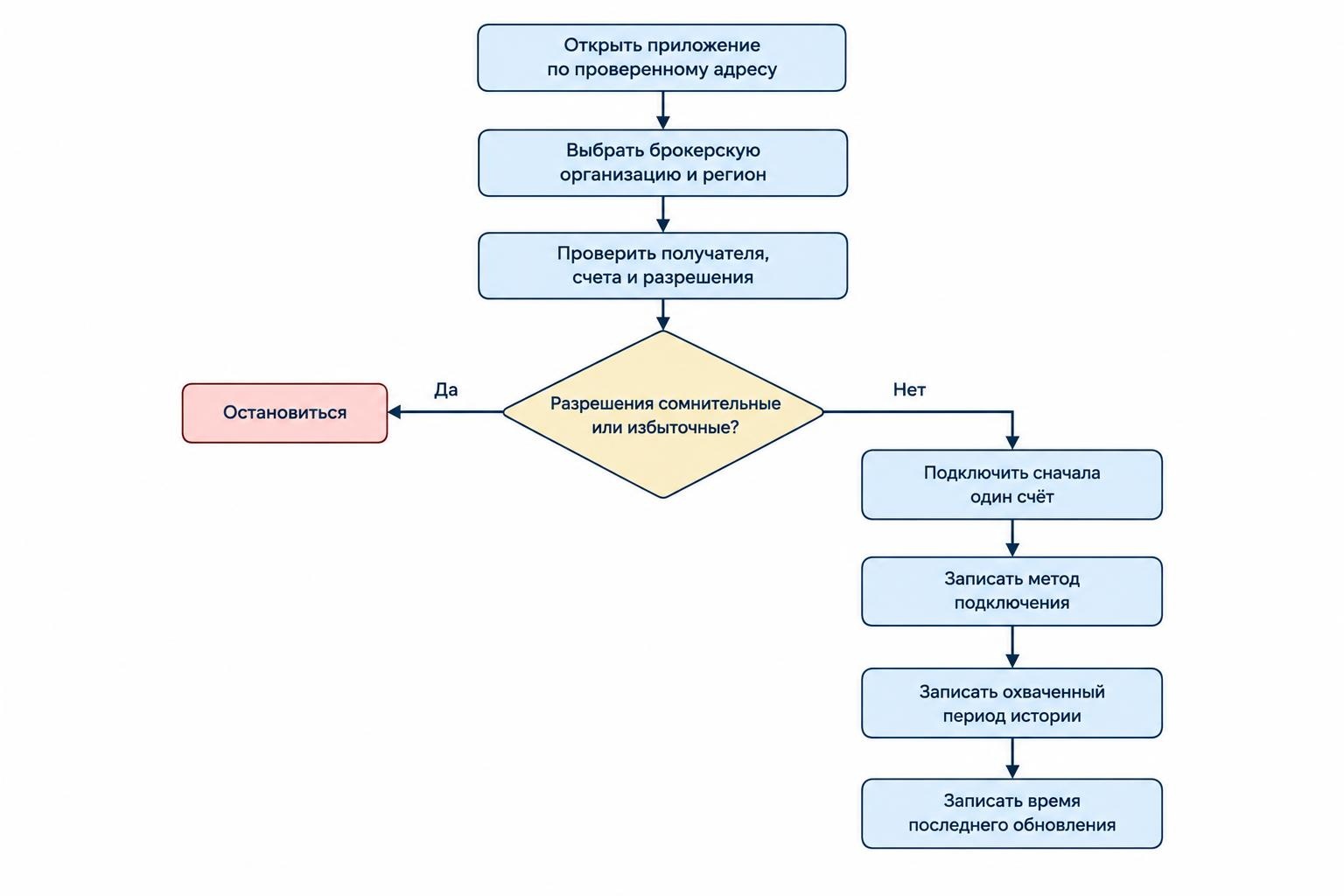
A tracking application should not need permission to place trades or move money simply to display investments. If the consent screen includes those powers, stop and establish why they are requested. Do not approve broader access just because it is the default option.
Check who receives the information, whether another provider participates, how long records are retained and how access can be withdrawn. These are central concerns in FINRA’s warning about financial data aggregation risks. Read-only access still exposes financial information; it is a restriction on account actions, not a promise of complete privacy.
Use a controlled setup process:
- Open the application yourself. Begin from a verified address or installed app rather than an unsolicited connection message.
- Select the correct institution. Check the brokerage entity and account region before entering credentials.
- Review the authorization screen. Identify the recipient, selected accounts and requested permissions.
- Connect one account first. Avoid expanding an untested setup across your entire portfolio.
- Record the result. Note the connection method, account nickname, imported history range and last successful update.
Protect both the brokerage login and the investing application with separate passwords and multifactor authentication where available. Enable brokerage alerts and keep devices updated. The SEC’s guidance on protecting online investment accounts covers these safeguards and recommends minimizing data sharing.
Keep access tokens and API keys out of spreadsheets, screenshots and support messages. If setup asks you to create a key, inspect its permissions and expiry options before saving it in the application.
Verify the First Import Against Brokerage Records
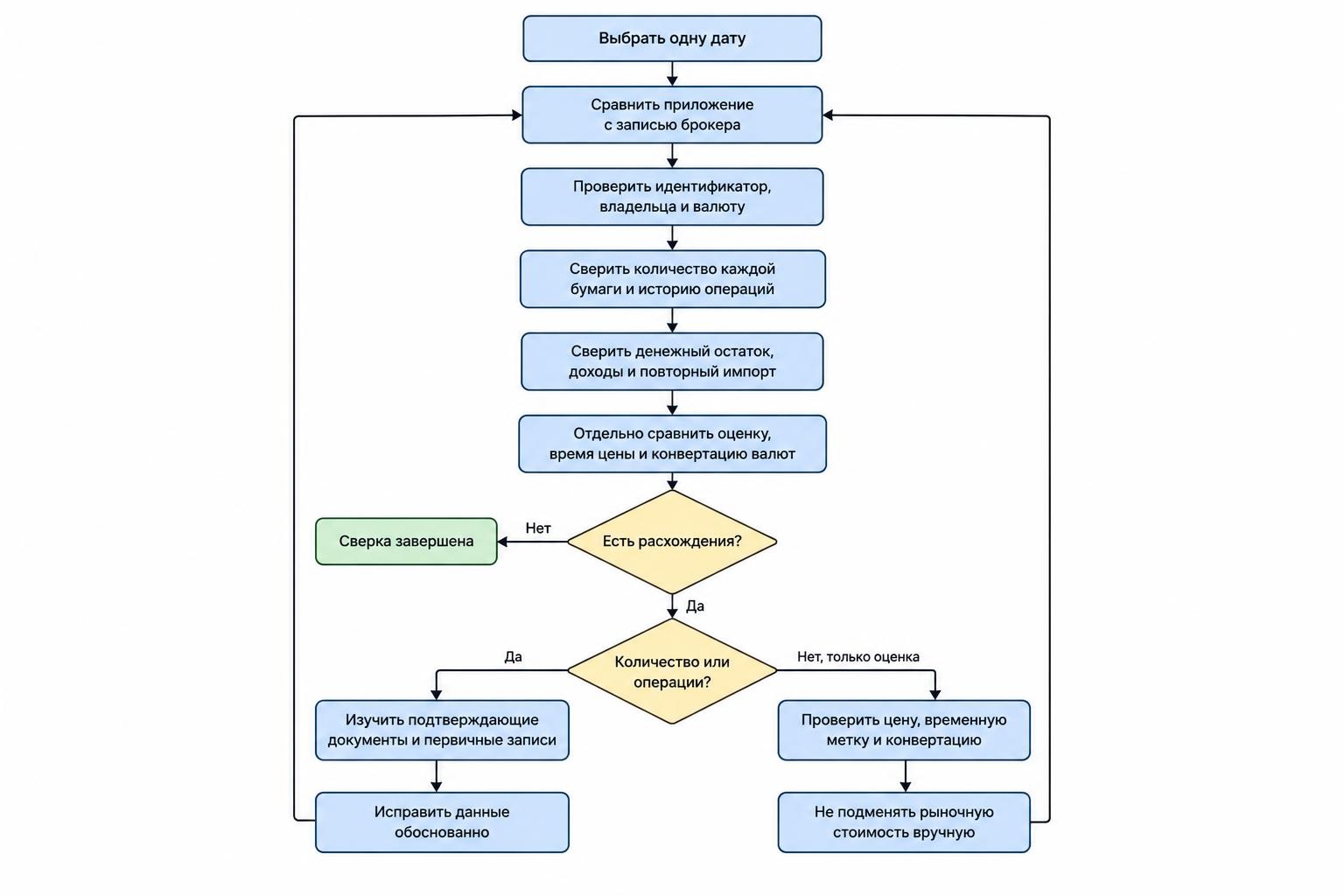
Do not connect the remaining accounts until the first import passes a basic reconciliation. A green tick is not an audit.
Choose a common comparison date. Match the imported account’s identifier, ownership and currency to the brokerage account. Then check each holding’s security identity and quantity, followed by cash and recent activity. Investigate differences before editing anything.
Use statements and trade confirmations to check transactions, purchase or sale prices, quantities and fees. FINRA’s account statement and trade confirmation checklist identifies the records worth reviewing and recommends contacting the brokerage about unexplained entries.
Separate Quantity Errors From Valuation Differences
Suppose the brokerage shows 100 shares and the application also shows 100, but the displayed values differ. Compare the price timestamp, currency conversion and valuation method before assuming the holding import failed.
If the application shows 90 shares, start with transactions instead. Look for a missing purchase, sale, transfer or corporate action. Correcting a quantity mismatch by manually changing the market value hides the problem rather than resolving it.
Check Income, Reinvestments and Cash
Test a dividend through its full sequence: income received, any withholding or fee, and any reinvestment purchase. Check that the application has not classified the income as an outside deposit or counted the reinvestment twice. This is a useful acceptance test for dividend tracking software.
For a simple hypothetical account, assume the starting balance is $10,000 in cash. A $2,000 purchase with no fees should leave $8,000 cash and the purchased holding. If a tracker retains the full $10,000 cash balance alongside that holding, the total is wrong even if the security imported correctly.
Check cost basis separately from market value. Do not replace missing purchase information with the current price just to remove an empty field. Keep a record of any manual correction and its supporting document.
Check What “Automatic Updates” Actually Means
Ask the provider for its normal update schedule and what happens after a failed refresh. Look for separate timestamps for account synchronization and security prices. Require the application to make stale data visible rather than leaving you to infer its age.
As one documented example, Plaid’s Investments documentation states that it checks investment data at least once per day on market days, with frequency depending on the institution. Most holding changes are detected overnight. Its on-demand refresh capability is an optional addition, not proof that every application using Plaid offers immediate updates.
Match the schedule to the job. For a monthly allocation review, you might accept a reconciled overnight update. For a decision involving current cash or a recent trade, check the brokerage directly. Do not assume that an application’s refresh button forces the institution to deliver new records immediately.
Troubleshoot Without Creating Duplicate Records
When an import stops working, preserve the existing history before disconnecting anything. Record the last successful update, error message, affected account and missing date range. Export the application’s records if that option is available.
If authorization fails, check the software’s documented reauthorization process and confirm that you can access the brokerage independently. Complete any legitimate security prompts through the verified brokerage interface. Do not disable multifactor authentication simply to make a connector work.
If an account is missing, review the accounts selected during consent and ask support whether that account type is covered. Avoid repeatedly adding the same institution without checking what each attempt created.
If balances or transactions are duplicated, inspect overlapping file imports, old connections and manual opening entries. Work out which record should remain before deleting anything. Reconcile the result after the change.
Check performance calculations only after fixing the underlying records. Before trusting portfolio performance analysis tools, verify that deposits, withdrawals and transfers carry the right classifications. A contribution should not masquerade as an investment gain.
For support requests, provide masked account identifiers, timestamps and transaction examples. Never send a brokerage password, authentication code or complete API key.
Disconnect Properly When Switching Applications
Plan the exit before replacing the software. Export transactions, holdings, manual adjustments and any reports you need. Check that the export contains usable records rather than just a summary chart, then store it securely.
Stop the connection through the provider’s documented controls and review any connected-app permissions available at the brokerage. Treat disconnecting access and deleting stored information as separate tasks.
For connections using Plaid, Plaid’s app disconnection instructions state that disconnecting stops future sharing through Plaid, but the application may retain information it already collected. Deleting those records requires contacting the application directly.
When moving to another tracker, choose a clear handover date. Check how the replacement application handles imported history before enabling its automatic feed. Otherwise, the same purchase could arrive once through an export and again through the new connection.
Judge the Integration Before Committing
Use a trial period to test four things: complete account coverage, accurate records, visible update status and a workable exit. Include at least one ordinary transaction and one event that matters to your portfolio, such as a dividend, transfer or foreign currency holding.
Keep a short discrepancy log and ask the provider to resolve unexplained differences before upgrading. Accept the connection when it produces records you can reconcile and permissions you are comfortable granting. If it cannot meet those tests, consider a supported file import or another application rather than granting broader access and hoping the numbers improve.