Portfolio tracking software brings investment accounts, holdings, cash movements and returns into one place. Its value is not another chart. It is a reliable answer to practical questions: what do you own, where is your money concentrated, and how much of your account growth came from investments rather than fresh deposits?
Within the broader category of investing software, portfolio trackers focus on recording and reporting existing investments. Choose one around your accounts, reporting needs and willingness to maintain the data. A polished dashboard cannot rescue an incomplete transaction history.
What Portfolio Tracking Software Should Record
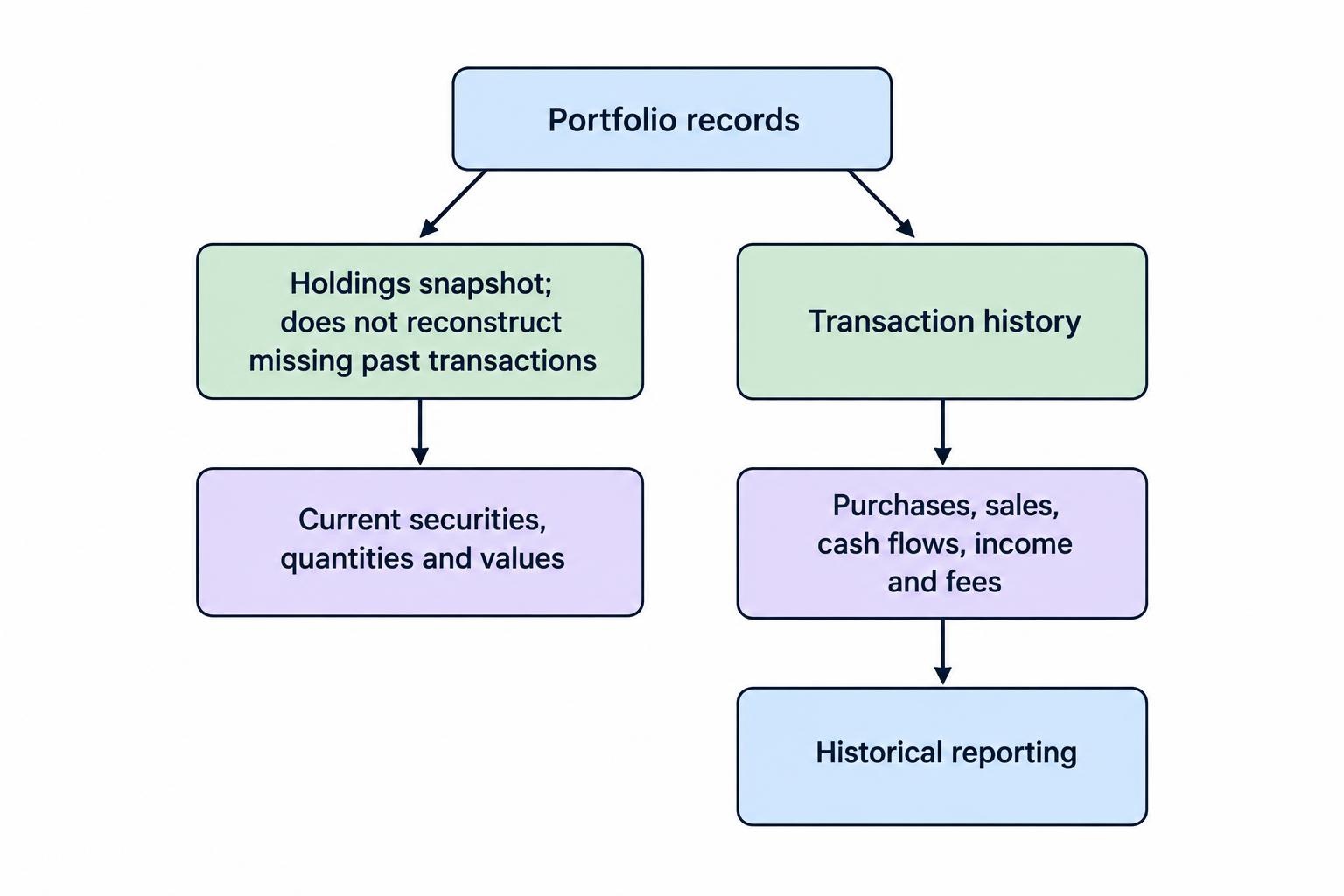
Start by separating a holdings tracker from a transaction based tracker. A holdings tracker records what you own and its current value. A transaction based tracker also records how you reached that position: purchases, sales, deposits, withdrawals, dividends and fees.
A snapshot may be enough for checking account balances and allocation. Historical performance needs more detail. Importing your current share quantities does not reconstruct purchases made several years ago, and an opening balance should not masquerade as a complete investment record.
| Record | What to check | Why it matters |
|---|---|---|
| Holdings | Correct security, exchange, currency and quantity | A matching ticker alone may identify the wrong listing. |
| Transactions | Dates, quantities, prices, charges and transaction types | Historical reports depend on more than current balances. |
| Cash | Deposits, withdrawals, income and account transfers | Cash movements must remain separate from investment gains. |
| Valuations | Price timestamps and manual valuation dates | Old prices can make a current portfolio view misleading. |
| Adjustments | Splits, mergers, reinvestments and corrections | Unrecorded changes can distort quantities and returns. |
Also decide what belongs in the portfolio. An investment account view, a retirement portfolio and a household net worth statement serve different purposes. Including your home may help with net worth reporting, but it should not automatically enter the benchmark comparison for your stock portfolio.
Test Account Connections Before Comparing Dashboards
A provider listing your financial institution is a starting point, not proof that the connection meets your needs. During a trial, check whether it imports current balances, individual transactions or both. Ask how far the history extends and whether the connection covers your exact account type.
Use one representative account first. Choose an account containing a purchase, a sale, a dividend and a transfer if possible. Compare the imported records with a statement covering the same period. That exercise reveals more than scrolling through sample screenshots.
Look for a visible last successful update time, clear connection errors and a way to correct imported records. Establish whether a later refresh preserves those corrections. Our guide to connecting investing software to brokerage accounts covers connection methods and permissions in more detail.
Keep file imports in the comparison. A monthly CSV upload may suit an investor making occasional purchases better than a connection that needs frequent repairs. Avoid importing overlapping files until you know how duplicate detection works; otherwise, one purchase can acquire an unwanted twin.
Separate Investment Returns From Account Growth
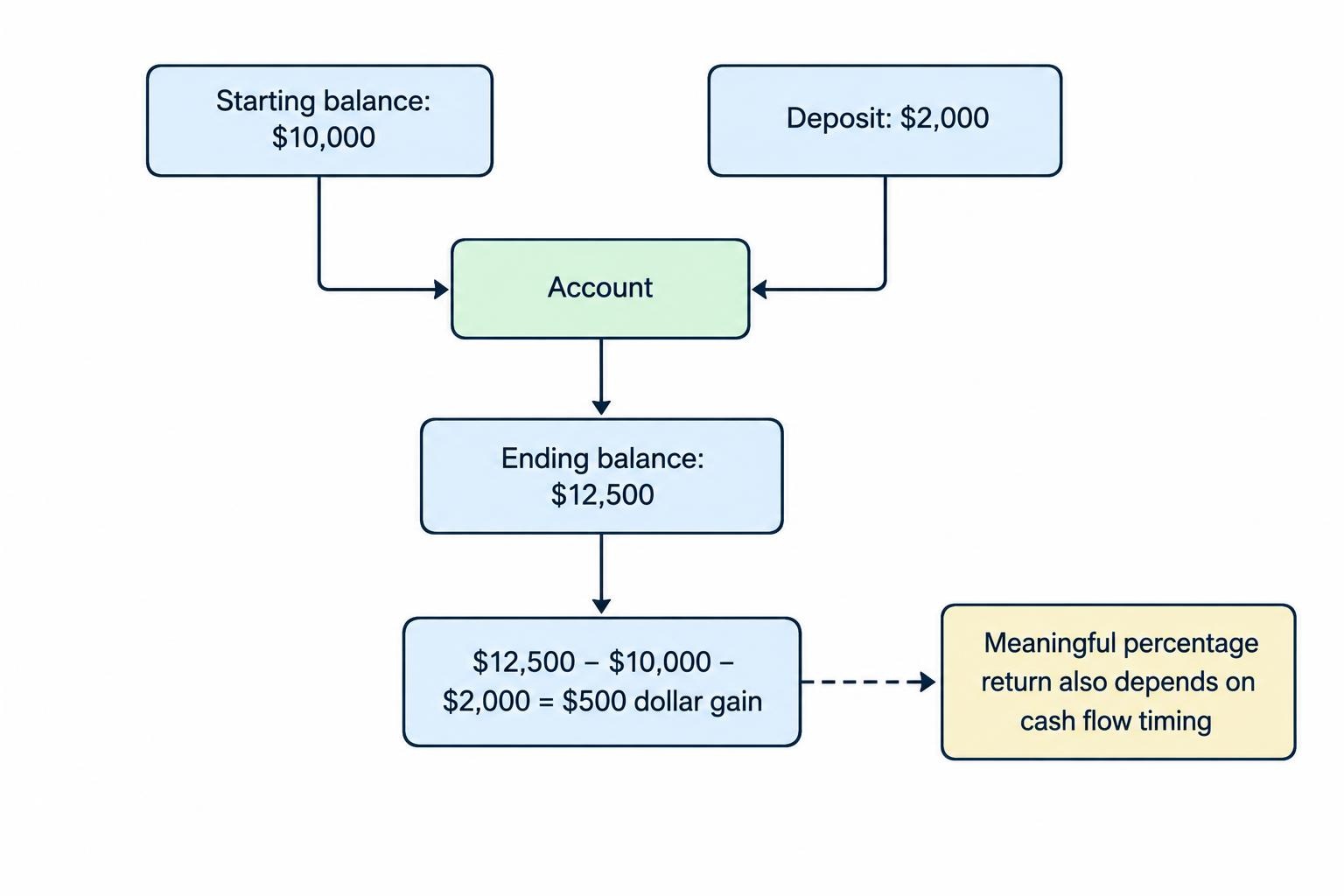
Suppose an account starts at $10,000, receives a $2,000 deposit and finishes at $12,500. Its balance increased by 25%, but that does not establish a 25% investment return. After subtracting the contribution, the dollar gain is $500. Calculating a meaningful percentage return also requires attention to when the money arrived.
Check which return measures the tracker provides. A time weighted return removes the effect of external cash flows, making it useful for assessing investment performance. A money weighted return reflects the timing and size of those flows, making it useful for measuring your invested money’s experience. The distinction is set out in the CFA Institute GIPS handbook’s return calculation guidance.
Neither measure should appear as an unexplained percentage. Look for a stated reporting period, clear treatment of income and fees, and a distinction between cumulative and annualized results. Two reports can disagree without either being broken if their settings differ.
Benchmark comparisons need consistent dates, currency and income treatment. Comparing a dividend inclusive portfolio return against a price only index creates an uneven contest. For a closer review of benchmarks and reporting methods, use our guide to portfolio performance analysis tools.
Check Income, Currency and Portfolio Exposure
Dividend records should distinguish cash received from income reinvested into more shares. A reinvestment needs both the income record and the associated purchase, without creating a fictional new contribution from you. Verify that withholding and transaction charges match your records where those fields are relevant.
Keep paid income separate from forecasts. An estimated annual dividend total is a planning assumption, not cash already earned. If income reporting drives your choice, our dividend tracking software guide covers payment records, reinvestments and forecasts.
For investments held in different currencies, choose a consistent reporting currency. A foreign share’s local price movement and the exchange rate movement both affect its value in your home currency. Ask whether the software separates those effects or combines them into a single return.
Allocation reports deserve similar scrutiny. Decide whether you need broad categories such as stocks, bonds and cash, or more detailed views by region, sector and account. If you want a fund’s underlying holdings included, verify that the tracker supports that analysis rather than assuming the fund name tells the whole story.
Define how cash and unclassified assets enter the percentages. Otherwise, allocation figures can look tidy while leaving part of the portfolio out. Tools for setting target weights and comparing them with current holdings are covered separately in our asset allocation tools guide.
Review Permissions and Data Privacy
Account aggregation creates a second place where sensitive financial information may be accessible. Before connecting anything, identify the software operator, any connection provider involved, and the information each receives. FINRA’s guidance on financial data aggregation risks highlights credential sharing, privacy concerns and the need to review access terms.
For a reporting tool, prefer access restricted to the information it needs. Check the actual authorization screen rather than relying on a “secure connection” badge. If trading or money movement permissions appear, establish why they are requested and whether you can decline them.
Review multifactor authentication, account recovery and access revocation. Also read the deletion policy: disconnecting an account, cancelling a subscription and deleting stored records are different actions. Ask what remains after each one.
A desktop application requires a different maintenance plan. Protect the device and its backups, and check whether files enter cloud storage through your own synchronization settings. Whichever format you choose, avoid sending account statements or transaction exports through unsecured support channels.
Two Portfolio Tracking Approaches Worth Comparing
Product examples help clarify the choice between a hosted reporting service and a desktop application. The following are examples of different approaches, not a ranking or a claim of hands on testing. Test either against your own records before committing.
Sharesight: Dividend Tracking With Confirmation Checks
Sharesight supports automatic dividend records for supported holdings, alongside trade entry through confirmation emails, spreadsheet uploads or manual input. Its dividend tracking documentation also instructs users to confirm automatic transactions and verify figures against dividend statements.
That workflow is worth evaluating if investment income is central to your reporting. During a trial, check your exchanges, securities and reinvestment arrangements. Test an actual payment from your records, including any withholding and currency conversion, rather than judging the tool by its forecast calendar alone.
Pay attention to the remaining manual work. Automation is useful when it reduces reconciliation, not when it hides discrepancies behind a completed status icon.
Portfolio Performance: Desktop Reporting and Classification
Portfolio Performance is an open source desktop application. Its official application overview documents transaction history, statement imports, customizable classifications, allocation reporting, and both time weighted returns and internal rates of return.
This approach is worth assessing if you prefer desktop software and want control over how investments are grouped. Test the import process with your own statements and examine how corrections flow through the reports.
Include maintenance in the decision. Establish where the portfolio file lives, how you will back it up and whether you can restore it successfully. Control over the records is valuable only if keeping those records usable remains manageable.
Compare Subscription Cost With the Work It Removes
Price the version you would actually use. Check restrictions on holdings, portfolios, history, benchmarks, exports and report access. If a free plan exists, assess it against your normal workload rather than an almost empty demonstration portfolio.
Keep the tracker’s subscription separate from investment costs. Transaction charges and ongoing investment expenses reduce the money available to earn returns, a distinction covered in the SEC investor bulletin on fees and portfolio value. Check which charges the tracker includes and whether any are already reflected in valuations before deducting them again.
Export access belongs in the buying decision too. Request a sample export containing transactions, dates, quantities, prices, currencies and fees. A PDF chart is not a portable investment history. Check whether you can retrieve your records before cancellation and whether custom classifications survive the export.
Set Up a Portfolio You Can Reconcile
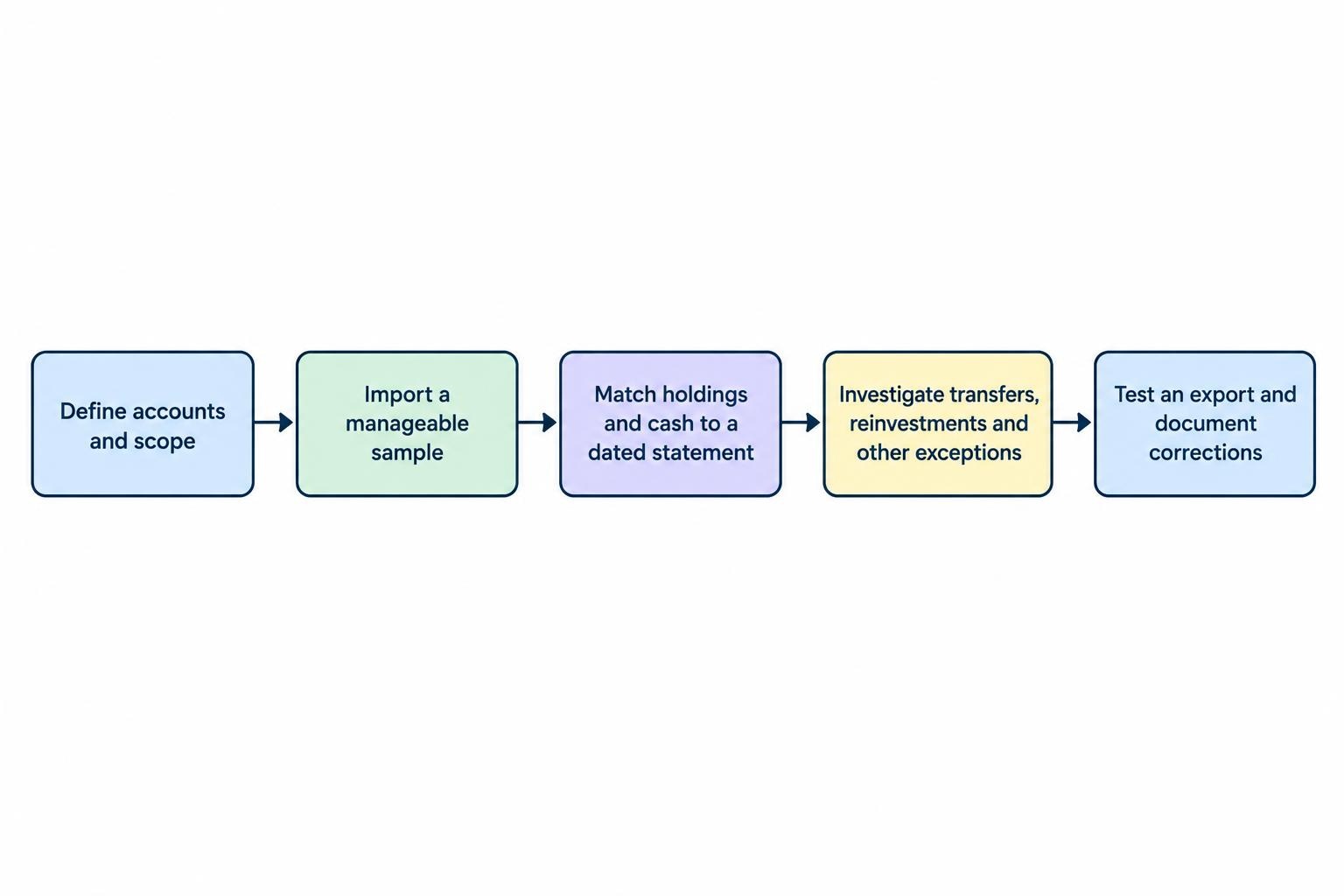
Begin with a defined scope and a sensible starting date. If complete historical records are unavailable, an accurate opening snapshot may be preferable to a partly reconstructed history. Label the reporting period honestly and do not treat later calculations as evidence of earlier performance.
- Define the accounts. Decide whether the tracker covers one account, all investment accounts or household assets, and keep those views distinguishable.
- Import a manageable sample. Start with one account and a period you can verify before adding years of transactions.
- Match quantities and cash. Reconcile holdings and cash balances against the same dated statement before reviewing return charts.
- Investigate exceptions. Check transfers, reinvestments, corporate actions and unrecognized securities rather than forcing balances to match with unexplained adjustments.
- Save and test an export. Confirm that you can retrieve usable records and document any manual corrections you made.
Transfers need particular care. Moving investments between two included accounts should not create household investment profit. It may still count as a flow when reviewing either account on its own, so check the reporting level before changing the records.
After setup, establish a review schedule that fits your activity. Reconcile after imports and unusual transactions, retain official statements and tax documents, and investigate discrepancies before relying on reports.
The right portfolio tracking software makes routine checks easier and errors easier to find. Choose the tool that handles your accounts accurately, explains its calculations and lets you leave with your records intact. More charts are optional. A dependable investment history is not.