Multi-account forex trading platforms let one operator place, allocate and monitor trades across several accounts from a central interface. They reduce repeated order entry, but introduce another responsibility: checking that each account receives the intended position size, protection and exit instructions.
The right setup depends on whether you trade your own accounts, manage client accounts under written authority, or provide a strategy that other traders copy. These arrangements are not interchangeable. Compared with ordinary forex trading platforms, the allocation rules and account controls deserve more attention than the charting package.
Multi-Account Trading, MAM, PAMM and Copy Trading
“Multi-account” describes a capability, not one standard account structure. A platform might send separate orders to several accounts, allocate a combined order, distribute trading results, or copy activity from a strategy account. Similar interfaces can hide very different mechanics.
| Arrangement | How it generally works | What to check |
|---|---|---|
| Multi-account terminal | One interface submits and manages orders across selected accounts. | Account eligibility, server compatibility and individual order results. |
| MAM | A multi-account manager applies allocation settings across managed accounts. | Available sizing methods, account exclusions and individual exits. |
| PAMM | A percentage allocation management module distributes positions or trading results using percentage shares. | Whether allocation concerns trade volume or profit and loss, plus withdrawal arrangements. |
| LAMM | A lot allocation management module distributes trades using lot amounts or ratios. | Whether smaller accounts receive disproportionately large exposure. |
| Copy trading | Activity from a provider account triggers corresponding trades in follower accounts. | Sizing, execution differences and what happens when copying stops. |
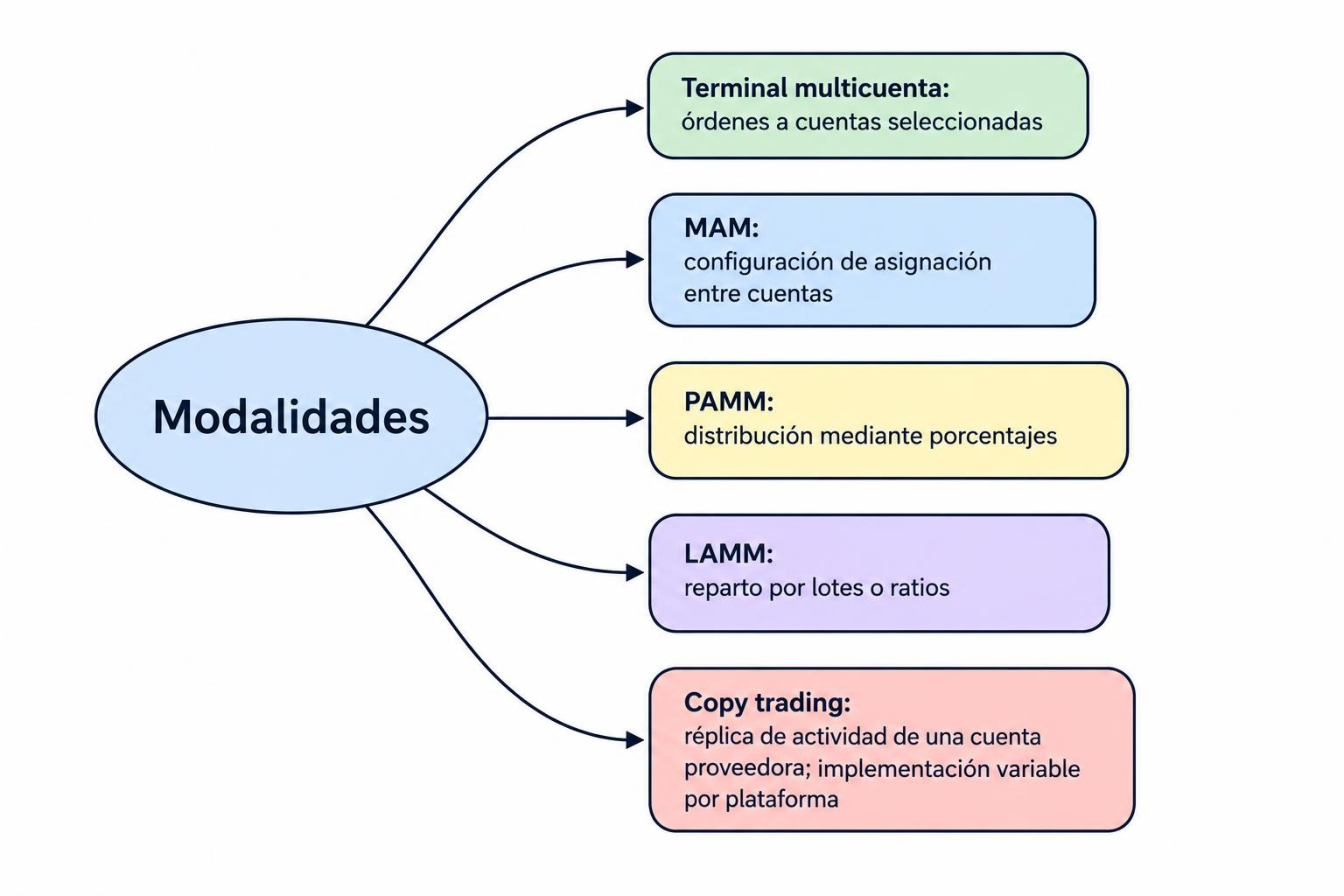
These labels are not reliable substitutes for documentation. A MAM product may include a PAMM mode, while another distributes separate orders to each account. If you only need to replicate your own trades, forex trade copier software may be a closer fit than a managed-account system.
How Trade Allocation Changes Account Risk
The allocation method determines how much exposure each account receives. Start here, rather than with the maximum account count. Managing 100 accounts badly is not an upgrade from managing five properly.
Fixed Lots Versus Proportional Allocation
Fixed allocation can assign the same trade size to every account. That is simple, but equal lots do not mean equal risk. A position of 0.30 lots represents a much larger commitment for a $5,000 account than for a $50,000 account.
Under a proportional equity allocation, an account’s share of the total equity determines its share of an order. Consider three hypothetical accounts with equity of $10,000, $30,000 and $60,000. Their combined equity is $100,000. A three-lot order would allocate 0.30, 0.90 and 1.80 lots respectively, before rounding or other restrictions.
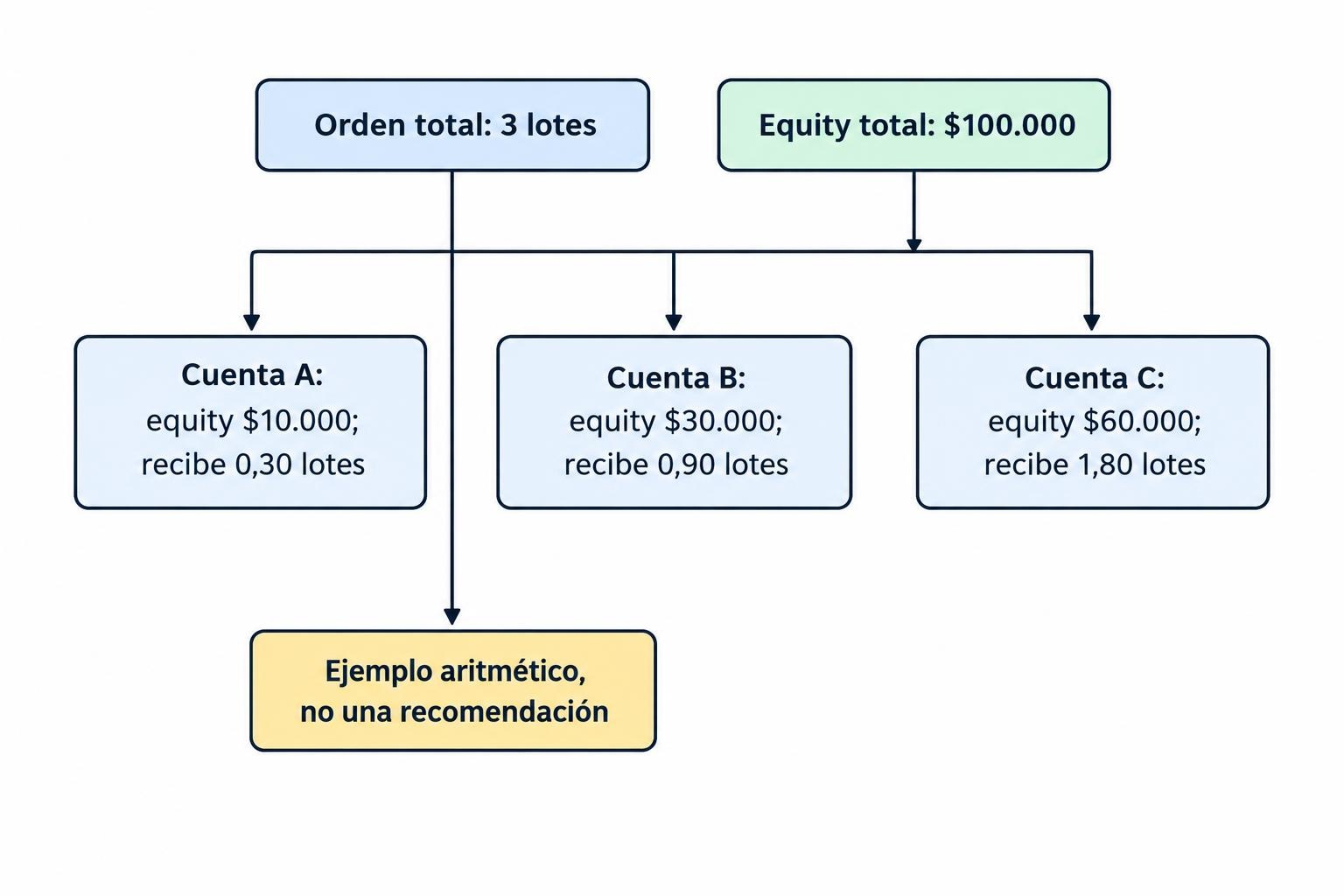
This example assumes the same account currency, instrument specifications and execution conditions. It illustrates allocation arithmetic, not a recommended trade size.
Balance, Equity and Stop Distance
Balance reflects completed account activity; equity also reflects unrealized trading results. Allocating by balance can overlook losses on open positions. Allocating by equity accounts for those losses, but the resulting trade sizes change as equity changes.
Neither method automatically equalizes risk at the stop loss. That also depends on entry price, stop distance, contract size, currency conversion and costs. If you require a defined cash risk per account, ask whether the system calculates it from those inputs or simply applies a volume multiplier.
Minimum order sizes matter too. A calculated allocation of 0.003 lots cannot be represented exactly where the minimum trade is 0.01 lots. Establish whether the platform rounds, skips the account or uses another allocation mechanism. Small accounts are where neat percentages can become untidy positions.
Platform Examples: Different Tools for Different Arrangements
Named products help illustrate the choices, but they should not be treated as a ranking. Broker implementation, account permissions and local availability can change what an operator can actually use.
MetaFX MAM5 for MetaTrader 5
MetaFX MAM5’s documented functions include centralized account management, volume allocation and profit-and-loss allocation modes, equity monitoring, partial closures and support for Expert Advisor trading. It uses an MT5 server integration rather than acting as a universal account switcher.
That distinction matters during selection. Confirm that the broker supports the required integration and allocation mode. An MT5 account alone does not establish access to that broker’s MAM arrangement. Also establish which settings the manager can change and which remain under broker administration.
cTrader Copy
cTrader Copy illustrates a strategy-copying arrangement rather than a conventional discretionary management console. Funds allocated to a strategy move into a separate copy-trading account under the investor’s cTrader ID.
The cTrader Copy allocation documentation specifies an equity-to-equity model: investor equity divided by provider equity, multiplied by provider trade volume. It also identifies reasons a trade might not copy, including insufficient margin or an unavailable instrument. Deposits and withdrawals can resize existing positions. Check these behaviors before assuming that a follower account will reproduce the provider’s results.
Compatibility Matters More Than the Account Limit
Before comparing capacity, prepare an inventory of the accounts you need to connect. Record their broker, server, platform version, account currency, position accounting mode and permitted instruments. Ask the provider to confirm that exact combination rather than accepting a broad “supports MetaTrader” statement.
Position accounting deserves its own check. A hedging account can hold separate opposing positions, while a netting account combines activity into a net position for an instrument. Ask how the allocation system handles an opposing order, partial closure or manual adjustment on each account type.
Instrument names also need checking, but matching names is only the start. Contract sizes, minimum volumes, volume increments and trading sessions must match the intended allocation. An instrument with a familiar symbol can still have different trading specifications.
Finally, identify where each component runs. Determine whether allocation continues when the operator’s computer disconnects, whether an automated strategy needs a running terminal, and who maintains the server integration. “Server based” does not answer every uptime question.
Execution Records Must Show What Each Account Received
A successful master order does not prove that every account received the correct allocation. Require account-level records showing intended volume, executed volume, fill price, timestamps, rejected instructions and subsequent changes. The record should also preserve the allocation settings used at the time.
For U.S. retail forex bunched orders, NFA’s allocation requirements for multiple accounts address predetermined, non-preferential allocations and account-level trading capacity. The notice also addresses split and partial fills. Combined master equity is not a substitute for checking what each individual account can support.
Operationally, ask what happens if only some accounts receive an entry or exit. Does the system flag the mismatch, retry automatically, or wait for intervention? A retry should not create a second position where the first instruction succeeded but its confirmation was delayed.
Compare execution at account level rather than relying on a blended result. A reasonable average can hide poor fills in smaller accounts. Spread and slippage monitoring tools can help separate allocation errors from differences in trading costs and execution prices.
Risk Controls Must Work Per Account
A group equity figure can conceal a weak account. One account may approach its margin threshold while the group still appears healthy. Assess account-level controls alongside limits for the whole trading arrangement.
Useful controls include maximum position size, instrument exposure limits, minimum free margin alerts and a way to exclude an account from new entries. Check whether exclusion leaves existing positions under management. Disabling new allocations and abandoning open trades are very different actions.
Define emergency actions precisely. “Stop trading” might mean block new entries, cancel pending orders, stop copying, or close positions. Those actions should not share an ambiguous button. Broader trading risk control panels can bring these states together, but the underlying platform still needs to execute the intended action.
For a concrete example, cTrader Copy’s equity stop loss controls stop copying and close copied positions when the threshold is breached. Its documentation also states that final equity can fall below that threshold because of volatility, gaps, liquidity or technical factors. An automated exit instruction is not a guaranteed account value.
Separate Trading Access From Administrative Access
Give each operator only the permissions needed for their role. Trading, changing allocation ratios, approving fees and managing withdrawals should not automatically belong to the same login. Use individual credentials, multifactor authentication where supported, and records of administrative changes.
For client arrangements, document how trading authority is granted and revoked. The exit process should remain usable if the manager becomes unavailable.
Compare Fees and Reports, Not Just Software Charges
Request a written breakdown covering platform charges, account fees, trading commissions, financing costs and any manager remuneration. Establish who pays each charge and whether it applies per account, per trade, per period or as a percentage.
Performance fees need more detail than a headline rate. Ask which profits qualify, whether unrealized results count, when fees become payable, and how deposits and withdrawals affect the calculation. Where a high-water mark applies, establish how the system adjusts it after losses and cash movements.
For a simple illustration, a 20% fee on $1,000 of eligible profit produces a $200 charge. That arithmetic says nothing about whether the fee agreement correctly identifies eligible profit.
Reporting should let you reconcile each account against broker records. Look for separate figures for realized profit and loss, unrealized results, commissions, financing and manager fees. A consolidated dashboard is useful for supervision; it should not replace individual account statements.
U.S. Access and Account Management Rules
Software availability does not establish permission to manage customer accounts. U.S. retail forex arrangements need a separate review of the counterparty, manager, account structure and applicable registration requirements.
The NFA regulatory guide for forex account managers states that exercising trading authority over customer forex accounts requires commodity trading advisor registration, subject to the exceptions described there. It also states that such managers may not receive or hold customer funds; those funds must remain with the FCM or RFED counterparty.
Do not treat a MAM or PAMM label as regulatory approval. Confirm the actual legal arrangement before connecting customer accounts, accepting trading authority or agreeing to compensation. Managing your own accounts is a different use case from operating a client management business.
Test the Arrangement Before Expanding It
Begin with a demo environment that resembles the intended account mix. Use different account sizes rather than identical balances, because identical accounts can conceal allocation problems. Then test the events most likely to expose differences:
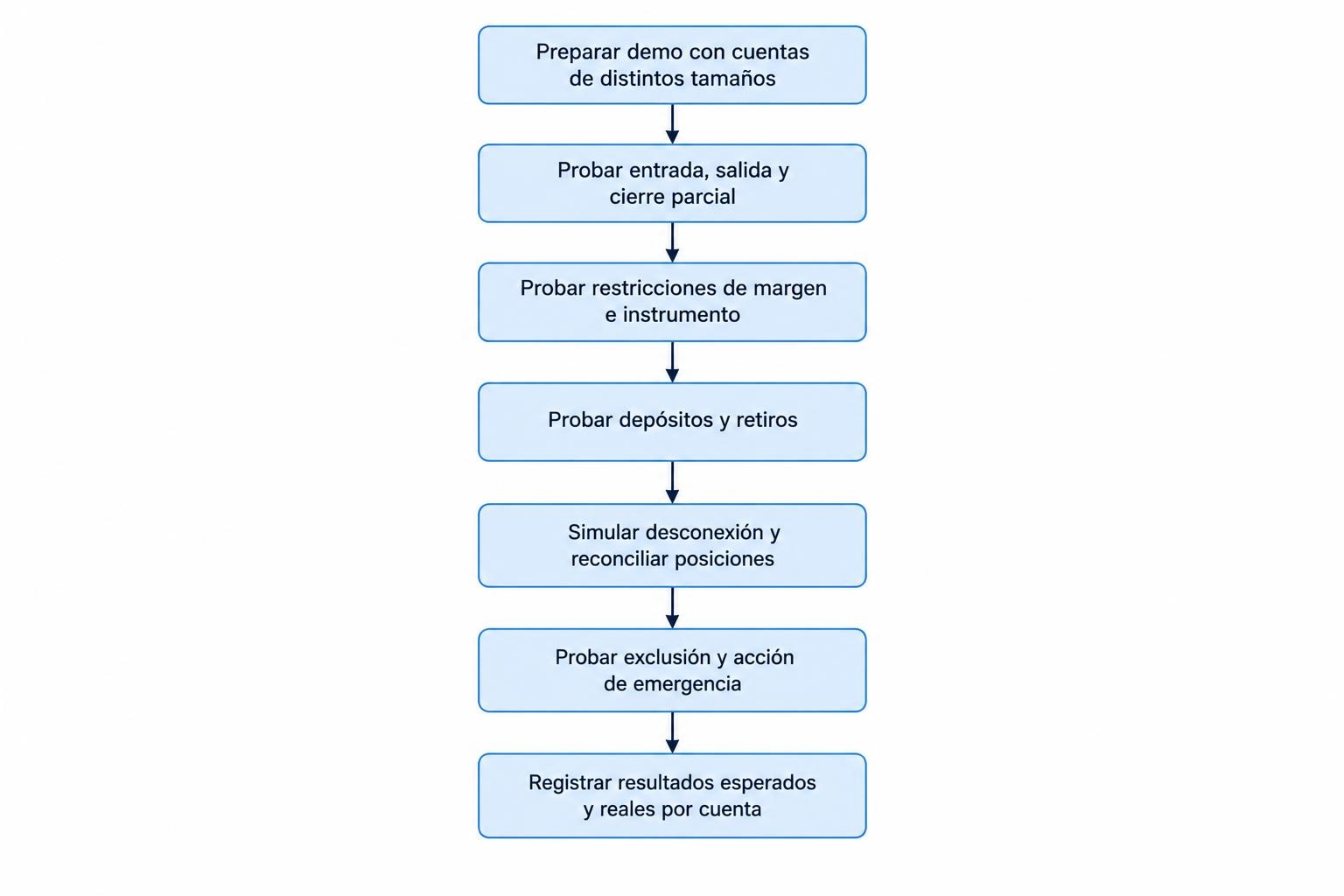
- Entry and exit: Place an order, modify its stop, partially close it and close the remainder.
- Account restrictions: Test low free margin, minimum volume constraints and an unavailable instrument.
- Cash movements: Check how deposits, withdrawals and fee deductions affect allocations and open positions.
- Connection failure: Disconnect and reconnect a component, then reconcile positions before allowing further entries.
- Emergency intervention: Exclude one account, block new trades and test the documented closure procedure.
Record expected and actual results for every account. Demo testing verifies workflow and allocation logic; it does not establish future live execution quality. Any later live validation should use deliberately small exposure and a documented stopping condition.
Choose the platform whose behavior you can explain account by account: how it sizes trades, records failures, handles cash movements and ends trading authority. Centralized execution saves work. Clear allocation and reliable controls make that saved work worth having.