Algorithmic trading platforms turn trading rules into repeatable actions. They provide the environment for developing a strategy, testing its behaviour, connecting it to an account and supervising it once orders start moving. The platform is the machinery; the strategy still has to justify putting money at risk.
Within automated trading software, platforms differ most in where they run, how strategies are built and how much of the execution process they control. Some combine research and live trading. Others produce signals but leave order handling to another application. Choose around that distinction before comparing chart layouts or subscription plans.
What Should an Algorithmic Trading Platform Do?
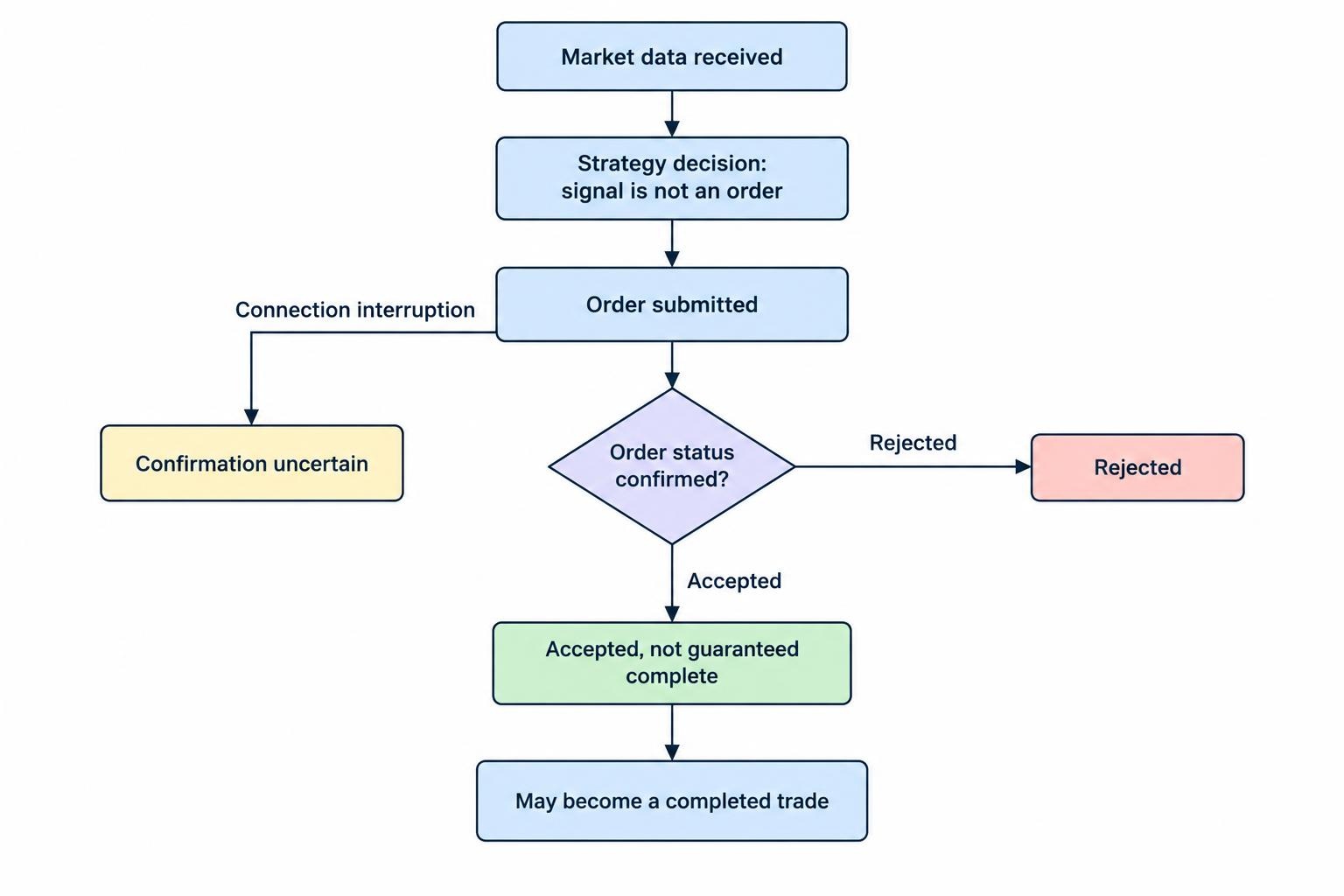
A useful platform should support a traceable path from market data to trading decision to order result. You should be able to establish what information the strategy received, why it acted, which order it submitted and what happened next.
That sounds straightforward until a connection drops between submission and confirmation. A signal is not an order, and an accepted order is not necessarily a completed trade. Judge platforms on how clearly they expose those differences, not just how quickly they display a notification.
Start with your intended workflow. A daily portfolio strategy needs dependable scheduling, portfolio accounting and sensible data handling. An intraday strategy also needs close attention to quote freshness, order updates and recovery after interruptions. Paying for speed you do not need makes little sense; ignoring reliability you do need makes even less.
| Requirement | Question to answer | Evidence to request |
|---|---|---|
| Strategy development | Can it express your entry, exit and sizing rules? | A working prototype, not just an indicator screenshot |
| Account connection | Does it support your intended account and instruments? | Current integration documentation and a paper account test |
| Live operation | Where does the strategy run, and who maintains it? | Deployment, restart and incident procedures |
| Portability | What can you retain if you leave? | Code, parameter, transaction and log exports |
Three Platform Approaches Worth Distinguishing
The following examples illustrate different architectures rather than a ranking. A product can fit one workflow well and be unsuitable for another. Confirm current account compatibility and feature access before subscribing.
Integrated research and deployment: QuantConnect
QuantConnect provides a workflow spanning research, backtesting and live deployment. Its Local Platform feature documentation covers running research notebooks, backtests and live algorithms locally or in QuantConnect Cloud. It also distinguishes local and cloud responsibilities for data, computing resources and project handling.
This approach is worth assessing if you want research and deployment within a shared framework. Test the entire route with a small strategy: load the required data, run a historical test, deploy to paper trading and inspect the resulting orders. A successful research notebook alone does not establish that the live workflow fits your needs.
Terminal based automation: MetaTrader 5
MetaTrader 5 uses programs called Expert Advisors, or EAs, for automated trading. Its algorithmic trading documentation covers these programs and their development using MQL5, alongside links to testing and optimisation tools.
For this model, assess both the development environment and the account connection. Can you inspect the program’s decisions? Can you reproduce its behaviour in testing? Where will it run during trading hours? Treat compatibility with an existing EA as a starting point, not proof that the surrounding setup is ready for unattended operation.
Chart signals and external applications: TradingView
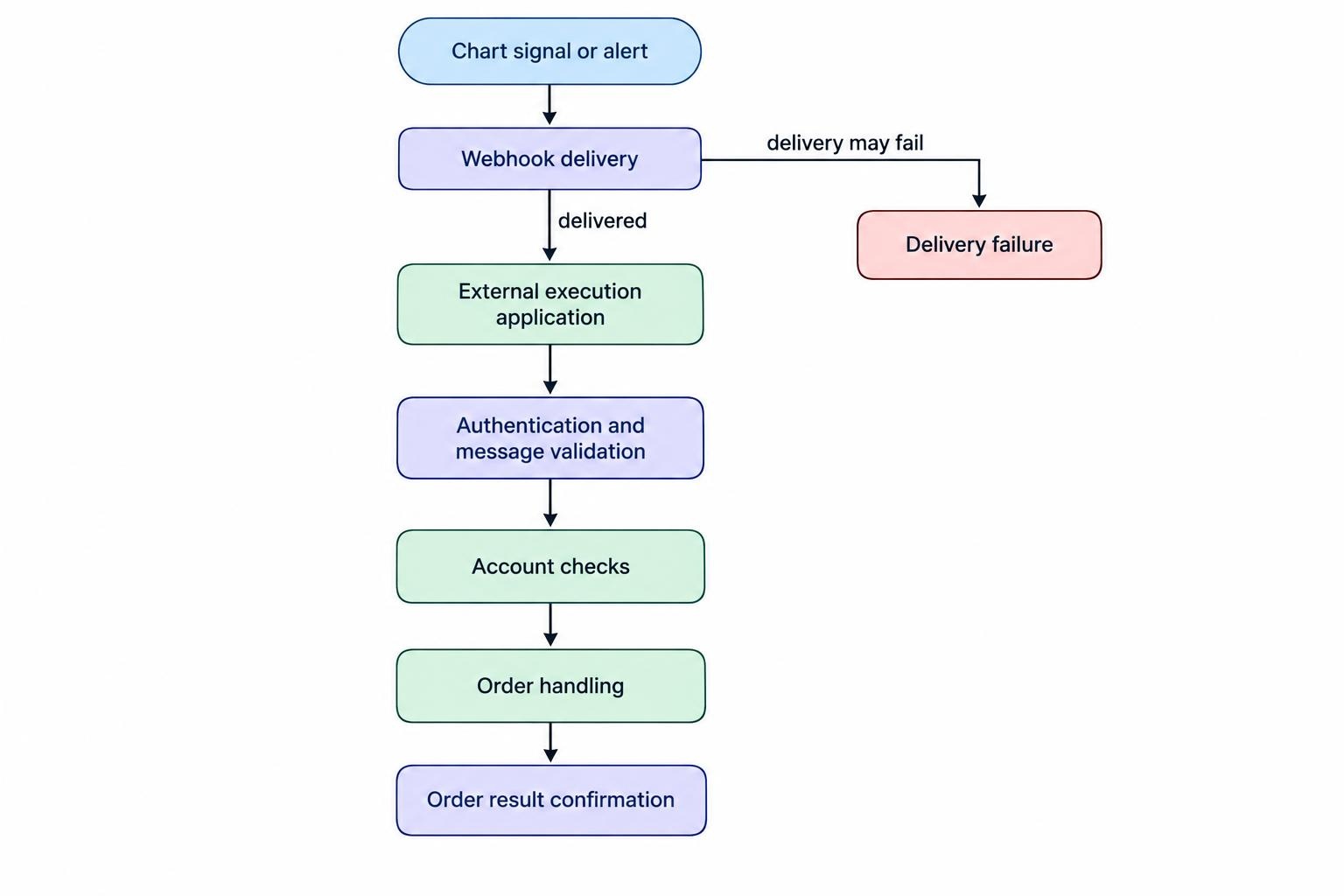
TradingView illustrates why signal generation and execution should be evaluated separately. Its webhook alert documentation describes sending an HTTP request to an external application when an alert triggers. It also warns that webhook delivery can fail and provides a delivery status in the alert log.
An alert delivery mechanism is not, by itself, a complete order management system. If an external execution service is involved, assess it separately: authentication, message validation, account checks and confirmation of results all need attention. Check the applicable terms and data permissions before designing around this arrangement. Do not treat a chart notification as evidence of a filled trade.
Choose Between Visual Rules and Custom Code
Visual builders are worth considering when your rules fit a clearly defined set of conditions. During a trial, build the awkward parts first: competing entry and exit signals, trading session restrictions and position sizing after a loss. Simple demonstrations rarely expose the boundaries that matter.
Evaluate no-code trading strategy builders by the rules they can express and the behaviour you can inspect. Ask whether they export editable code, a proprietary project file or only performance reports. Those are very different forms of ownership. A project that cannot leave the service creates a switching cost even if the monthly fee looks modest.
Custom code deserves consideration when the strategy requires unusual data, portfolio logic or detailed control over order decisions. But a familiar language is not enough. Check supported libraries, debugging tools, package versions and whether the same project can run in both testing and production.
If Python is your preferred route, review the work involved in building trading bots with Python before choosing a platform around language support alone. Establish who will maintain dependencies and investigate failures. The relevant question is not just “Can this run my code?” It is “Can this run my code predictably, with enough evidence to diagnose a problem?”
Check Broker and Instrument Compatibility Early
Do not postpone account compatibility until after developing the strategy. Require confirmation for the exact account type, instruments and order instructions you intend to use. A broad “supports stocks” label does not answer questions about fractional quantities, extended trading hours or particular order conditions.
Where the setup depends on an API, inspect the supported actions and returned information. Can the platform retrieve working orders, completed trades and current positions? How does it identify rejected requests? What happens when access credentials expire? The separate guide to broker APIs for automated trade execution covers that connection layer in more detail.
Make account reconciliation part of the trial. Ask the platform to compare its expected positions with the account’s actual holdings before allowing new activity. Include a restart test rather than assuming the application resumes exactly where it stopped.
Restart behaviour requires particular care. QuantConnect’s live deployment and restart documentation states that restarts create a fresh algorithm instance rather than preserving all internal state. It distinguishes recovered account information from information the strategy must rebuild or persist. Whatever platform you assess, request an equally clear explanation of what survives an interruption.
Evaluate Testing Quality, Not the Prettiest Equity Curve
Use historical testing to examine whether the platform represents your strategy sensibly. Before comparing returns, check its assumptions about commissions, spreads, execution prices, order timing and position sizing. Ask whether those assumptions can be inspected and changed.
Take a small sample of trades and reconstruct them manually. What data was available when the decision occurred? When could the order first have reached the market? What price did the simulator assign? A report that cannot answer those questions offers little help when live results differ.
Dedicated trading strategy backtesting software may deserve a separate assessment if research requirements exceed the platform’s built-in tools. Keep the selection decision focused: can you reproduce a test, identify its data and settings, and retain the strategy version that produced it?
Then use paper trading to inspect operation in real time. Compare intended orders with simulated orders, check timestamps and confirm that alerts arrive. Treat this as an operational rehearsal, not proof of achievable live returns. Set acceptance criteria before the trial so a profitable week does not distract from unresolved faults.
Assess Deployment, Risk Controls and Security Together
Choose the runtime arrangement explicitly. For a local installation, decide who handles power, network access, operating system updates and application restarts. For a hosted service, request details about maintenance, outage notifications, resource limits and access during an incident. Moving an application elsewhere does not remove the need for an operator.
During assessment, disconnect a data feed or stop the application in a controlled paper environment. Observe whether it alerts you, prevents fresh orders and reconciles the account before resuming. Do not accept “automatic recovery” without a demonstration of what gets recovered.
Require separate controls for stopping new entries, cancelling working orders and closing positions. These actions are not interchangeable. A strategy can stop running while existing exposure remains. Review trading bot monitoring and emergency stop controls when defining the operational safeguards your chosen platform must support.
For account security, request the narrowest access needed. Where permissions are configurable, avoid granting withdrawal access to a process that only needs trading functions. Check how credentials are stored, rotated and revoked, and whether logs expose sensitive values.
Also ask who can edit a live strategy. For shared accounts, separate development access from permission to deploy changes. Retain a record of the active strategy version and parameters. When an unexpected trade appears, “someone changed something” is not a useful audit trail.
Compare the Full Cost of Running the Platform
Build a cost estimate around the intended workload, not the cheapest advertised subscription. Request pricing for the number of live strategies, computing resources and data subscriptions you expect to use. Include historical data, hosting, connectors and any charges for additional research capacity.
Keep platform expenses separate from trading expenses, then assess them together. As a hypothetical example, $100 per month in software, data and hosting totals $1,200 annually. Against a $10,000 account, that equals 12% of starting capital before commissions, spreads or trading losses. This is a cost comparison, not a return target.
Check exit costs too. Establish what remains accessible after cancellation and how you can export projects, settings and transaction records. Avoid committing to a long subscription before testing the features that determine whether the service is usable.
Run a Practical Trial Before Committing
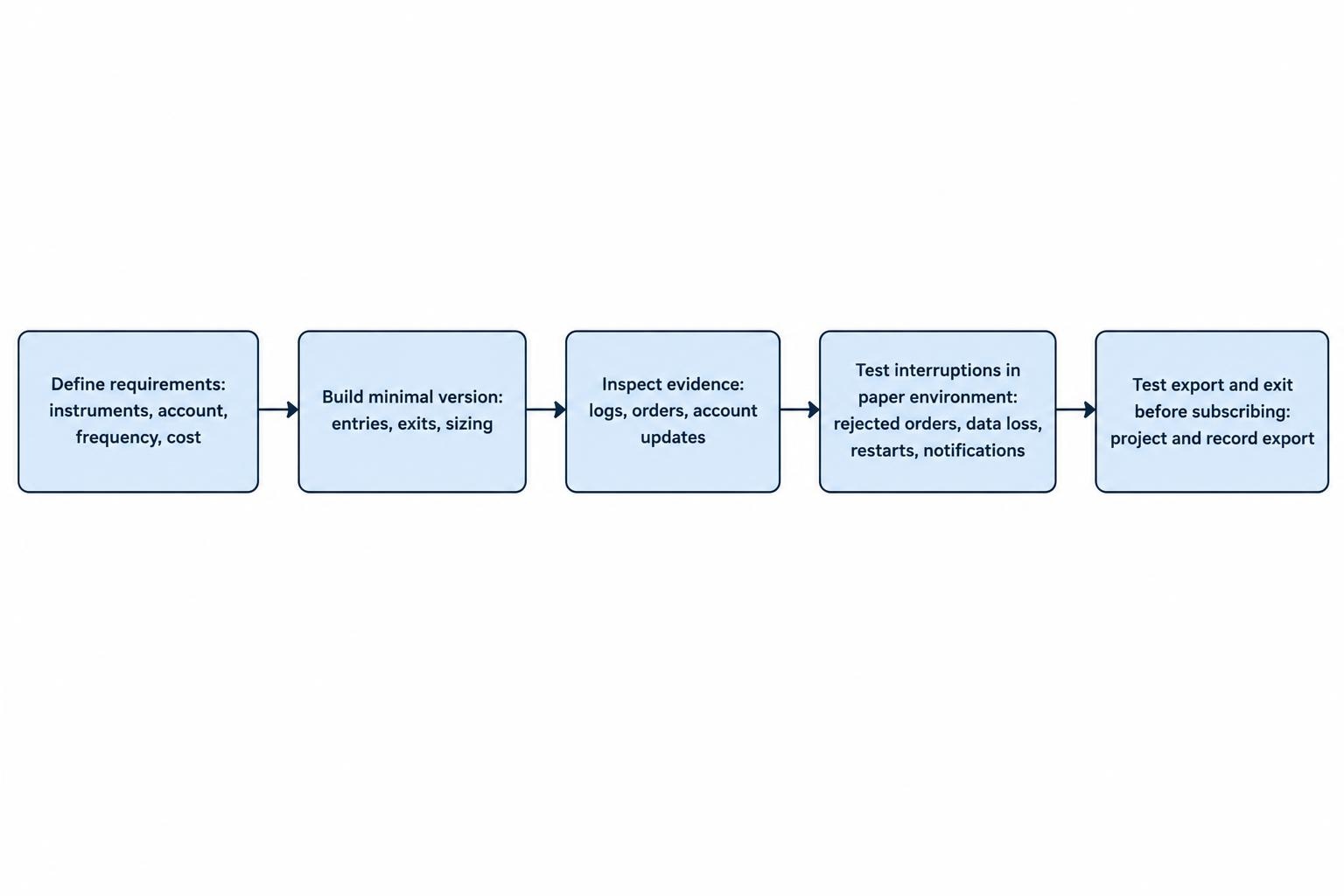
Use the same small strategy when assessing shortlisted platforms. Keep its rules and test conditions consistent so the comparison measures the software rather than different trading ideas.
- Define the requirement. Specify instruments, account, decision frequency, sizing rules and acceptable operating costs.
- Build a minimal version. Confirm that entries, exits and position calculations behave as intended.
- Inspect the evidence. Trace sample decisions through logs, orders and account updates.
- Test interruptions. Check rejected orders, unavailable data, restarts and operator notifications in a paper environment.
- Test the exit. Export the project and records before deciding whether to subscribe.
Reject guaranteed profit claims as a selection criterion. Promises of unusually high or guaranteed returns from AI trading systems are covered in the CFTC customer advisory on AI trading bots. Assess software through documented capabilities and observable behaviour, not advertised earnings.
The right algorithmic trading platform should let you express your rules, inspect their execution and remain in control when something breaks. Choose the environment that meets those requirements at a sustainable cost. Automation can make a process repeatable; it does not make a weak trading idea profitable.