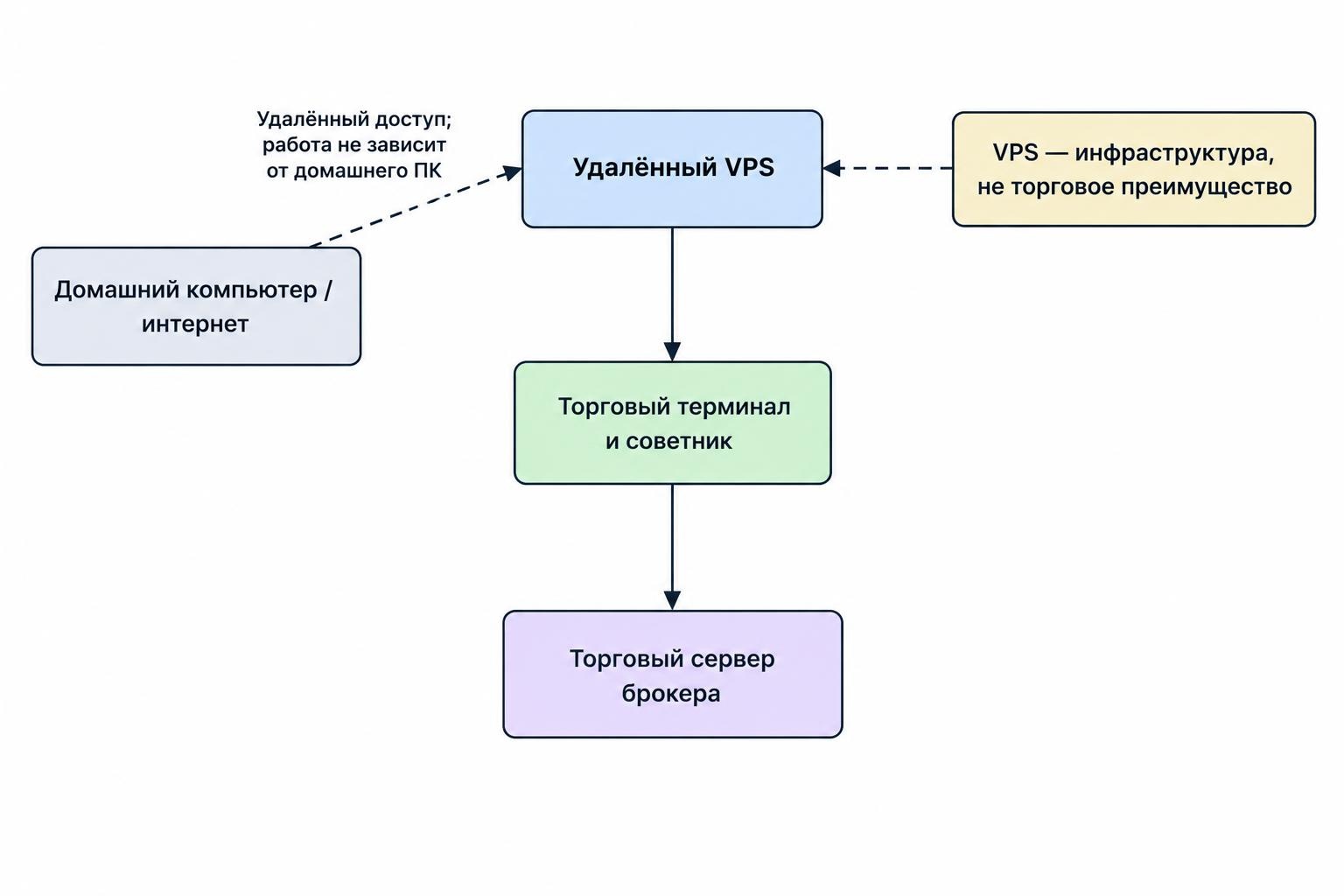
Forex VPS hosting lets trading software run on a remote server instead of relying on a computer at home. Its main purpose is continuity: keeping an Expert Advisor, trade copier or other trading application operating when your laptop is off or your local internet connection fails.
A virtual private server provides a virtual machine with allocated computing resources on hardware maintained by a hosting provider. It is not necessarily a separate physical computer; AWS’s explanation of VPS hosting describes that distinction. For trading, the useful questions are whether the software runs correctly, stays connected and recovers safely after an interruption.
A VPS does not improve a strategy’s trading rules or guarantee better execution. Treat it as infrastructure, not an investment edge.
When Forex Trading Software Needs a VPS
Start by identifying what must remain running while you are away. An automated strategy that checks prices throughout the trading session has a different hosting requirement from a charting application you open for an hour each evening.
Consider an Expert Advisor that adjusts exits as prices change. Before choosing hosting, establish which actions happen inside the terminal and which are handled elsewhere. Do not assume an exit managed by an EA will still operate if that EA stops. Map each protective action to the system responsible for it.
A VPS is worth considering when your forex trading software needs unattended operation, your home connection is unreliable or you want a separate machine reserved for trading. It may add little value if your workflow requires no running desktop application between manual trades.
Also check whether the software already runs in a hosted service. Renting another server makes no sense unless it has a job to do. Two hosting bills are not twice the protection.
Choose Between a Windows VPS and Platform Virtual Hosting
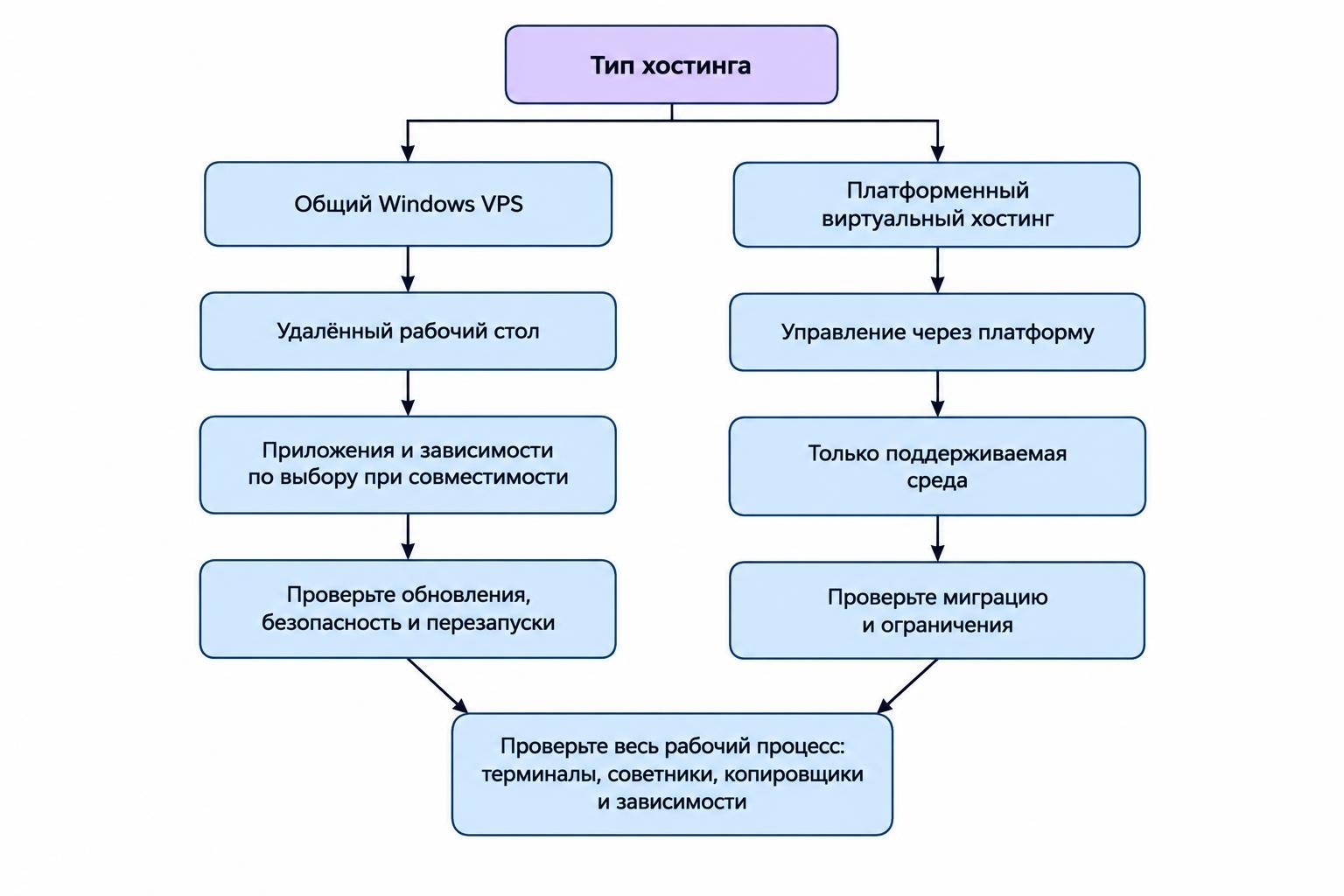
“Forex VPS” can describe different services. A general Windows VPS gives you an operating system to manage. Platform virtual hosting runs a supported trading environment without necessarily giving you an interactive desktop.
| Decision | General Windows VPS | Platform virtual hosting |
|---|---|---|
| Access | Remote desktop access, where included in the plan | Management through the trading platform or service controls |
| Software choice | Applications compatible with the operating system and provider rules | Programs and features supported by that hosting service |
| Maintenance | Confirm responsibility for operating system updates, security and restarts | Confirm responsibility for migration, settings and subscription management |
| Main compatibility check | Operating system, dependencies, licensing and available resources | Whether the complete trading environment can migrate and run |
MetaTrader 5 virtual hosting illustrates the distinction. Its virtual platform has no interactive user interface, prohibits DLL calls and does not transfer scripts. Synchronization moves the local environment to the hosted platform, not the reverse. Automated trading is allowed after migration even if it was disabled locally. These are operational constraints, not small print; check the MetaTrader 5 migration rules before transferring an EA.
Choose a general VPS if your workflow needs separate applications or dependencies that platform hosting cannot support. Choose platform hosting only after checking the complete workflow, rather than the trading terminal alone.
That distinction matters with forex trade copier software. Before ordering hosting, document the sender, receivers and any services they depend on. Establish which components must run together and what should happen when one disconnects.
Size the Server Around the Actual Workload
There is no useful universal rule that one VPS can run a fixed number of trading terminals. Build your requirement around the applications, charts, indicators and background processes you intend to use.
For a modest Windows deployment, you could evaluate a trial configuration with 2 virtual CPUs, 4 GB of RAM and 60 GB of storage. Treat that as an illustrative test configuration, not a platform minimum or a promise that it will support your setup. Check the operating system and application requirements before provisioning it.
CPU and Memory
Test with every intended terminal and trading program active. Record CPU and memory usage during startup, normal operation and a busy market period. Leave room for maintenance and temporary demand rather than accepting a server that only just copes.
Ask the provider whether CPU capacity is shared, dedicated or subject to a sustained usage allowance. Compare those terms alongside the advertised core count. Avoid choosing solely by the largest number on the pricing card.
Storage and Workload Separation
Budget space for the operating system, application data, price history, logs and updates. Set a log retention policy and an alert for low free space.
Keep research work away from live execution where practical. Run demanding backtests and optimization jobs on another machine, or schedule them outside the live workload and test the effect first. A live trading server should not also become the place where every experiment goes to stretch its legs.
Measure Latency to the Trading Server
Select a location using the broker’s actual trading server, not its headquarters, regulator or marketing address. Ask which endpoint your account uses and whether the hosting provider offers a suitable trial or test environment.
For MetaTrader 5 virtual hosting, the VPS controls display ping between the hosted platform and the broker’s trading server. They also provide resource usage graphs and platform and EA journals. The MetaTrader 5 virtual platform monitoring documentation identifies these checks.
Separate three questions during evaluation: how responsive the remote desktop feels, how quickly the hosted terminal communicates with the trading server and how orders are handled. Do not use the first as proof of the other two.
A low ping number is useful, it is not a fill guarantee. Test the application’s behaviour and retain order records rather than turning one network measurement into a claim about trading performance.
Compare candidate locations at several times during the sessions you trade. Look for repeated connection problems and inconsistent response, not just the best reading. Keep account type, software settings and workload comparable so the exercise answers a clear question.
If execution quality is the reason for moving, use spread and slippage monitoring tools alongside the hosting checks. Record the requested and executed prices, timestamps and order outcomes. Otherwise, “the VPS feels faster” remains an impression rather than a useful comparison.
Set Up the VPS Without Creating Duplicate Trades
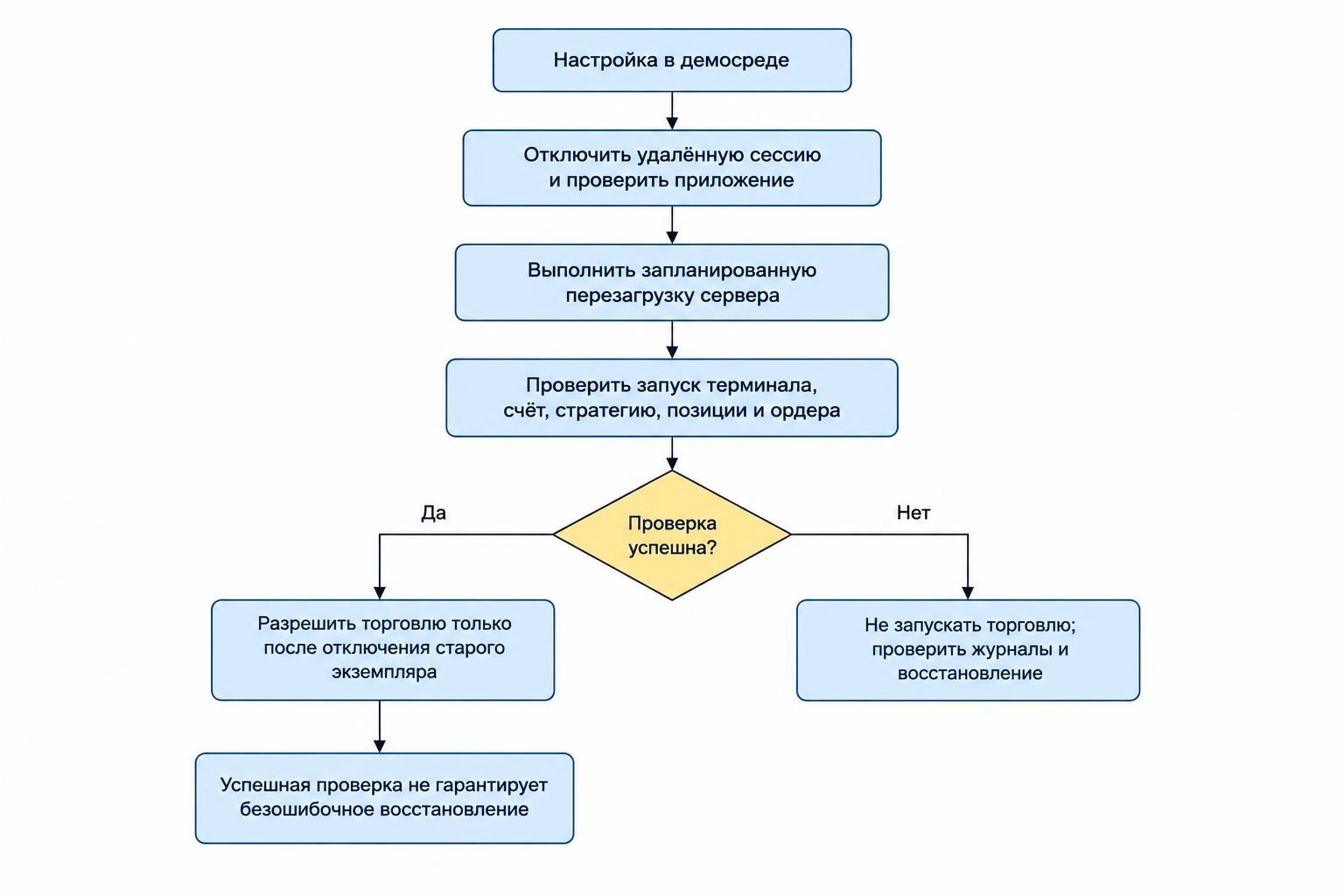
Use a demo environment for installation and recovery tests. Do not make a live account the first place you find a missing dependency or an incorrect restart setting.
- Inventory the deployment. Record the terminal version, account server, EA files, settings, indicators, dependencies and licensing requirements. Keep the record outside the VPS.
- Prepare the machine. Apply required updates, secure remote access and confirm the operating system is supported by the applications. Finish pending restarts before testing.
- Install from trusted distribution channels. Transfer only the files required for the workflow. Avoid importing an entire personal computer’s downloads folder and its accumulated surprises.
- Verify the configuration. Check account identity, symbols, order sizing, trading permissions and any time based rules. Match the intended configuration, not just the appearance of the charts.
- Test unattended operation. Disconnect your remote session, reconnect later and inspect application logs. Then perform a planned reboot and check the recovery sequence.
- Complete a controlled handover. Disable the old execution instance before authorizing the replacement to trade. Confirm which machine is responsible for each strategy and account.
Keep the old installation available for reference, but do not leave it trading “just in case.” A standby should have a documented activation procedure, including a check that the original instance is no longer submitting orders.
Secure Remote Access and Trading Credentials
Treat the VPS as a machine that can act on your trading account. Protect both the server login and the hosting control panel, and use different passwords for each.
Avoid exposing Remote Desktop directly to the public internet. Use an authenticated access layer, such as a properly configured VPN or remote access gateway, with multifactor authentication. Patch the operating system and remote access components, restrict administrative access and review login attempts. These controls follow the CISA recommendations for securing remote services.
Enable multifactor authentication on the hosting account where available. Secure its recovery email too. Review who can reset the server, replace credentials or access backups, rather than focusing only on the desktop password.
Do not leave passwords in text files or send them through support tickets. Ask how support staff obtain access and how temporary permissions are removed. Keep the server focused on trading rather than routine browsing, email and unrelated downloads.
Plan for Disconnects, Updates and Reboots
Closing a remote access window is not the same operation as shutting down the server. Windows Remote Desktop Services can preserve running programs in a disconnected session, but administrators can configure time limits that end those sessions. Check the Microsoft policy documentation for disconnected sessions and verify the policy applied to your VPS.
Test the distinction yourself before relying on unattended operation. Disconnect, wait longer than any configured timeout and inspect whether the application continued working. Avoid signing out when the deployment depends on applications running in that user session.
Then test a full restart. A successful server boot is only the beginning: confirm the terminal starts, reconnects to the correct account, loads the intended strategy and resumes in the expected state. Do not assume a shortcut in a startup folder proves the entire process works.
Agree a maintenance process with the provider. Ask who schedules updates, how notices arrive and whether emergency maintenance can occur outside that schedule. Do not disable security updates indefinitely to avoid restarts; arrange controlled maintenance and verify recovery afterward.
Monitor the Application, Not Just the Server
Define a healthy deployment in terms of the work it should perform. “Server online” is too narrow a test for an automated trading workflow.
Set checks for the terminal process, connection state, recent market data and strategy status. Use resource alerts to identify pressure on CPU, memory and disk space. Adjust stale data checks for trading hours so a normal market closure does not produce an evening of pointless notifications.
Where possible, send alerts through a channel that does not depend entirely on the trading application. Test delivery and document who should respond. For a broader control plan, use trading bot monitoring and emergency stop controls alongside the hosting checks.
Keep recoverable copies of configuration files and required program state outside the VPS. Test restoration on a nontrading instance. Before enabling a restored deployment, reconcile its account state with current positions and orders rather than trusting an older snapshot.
Document how to stop new orders, access the account through an independent route and decide whether restarting is safe. Recovery should be a procedure, not a race to click “Start.”
Compare the Full Cost Before Committing
Compare plans using the same operating system, resources, location and support scope. Ask whether the quoted price includes the Windows licence, backups, extra storage, taxes and renewal charges.
Read the service agreement before attaching much weight to an uptime percentage. Check what it measures, what maintenance it excludes, how outages are reported and what remedy applies. Do not equate an infrastructure commitment with a promise that your trading application will remain healthy.
Ask what “managed” includes. Does support cover only the virtual machine, or also operating system maintenance, terminal installation and recovery assistance? Get the boundary in writing.
Choose the smallest plan that passes your workload, security and recovery tests with room to spare. Commit for longer only after those checks. The right forex VPS is the one that supports a controlled, recoverable deployment—not simply the cheapest monthly price or the lowest advertised ping.