CFD trading software brings together market prices, charts, order entry and account monitoring. Its job is to help you analyse a trade, place it correctly and track the resulting exposure. A useful package makes those tasks clear without hiding costs or encouraging larger positions.
The distinction between software and the product matters. A contract for difference gives exposure to an underlying asset’s price movement without ownership of that asset. Gains and losses depend on the full position value, not just the margin deposited. CFDs remain high risk regardless of how polished the interface looks; ASIC’s Moneysmart guidance on CFD risks covers the product, pricing and counterparty risks.
Separate the Platform From the CFD Provider
The trading platform is the interface. The CFD provider supplies the account, available contracts, prices and execution terms. Separate analysis software may contribute charts, alerts or calculations without handling orders at all.
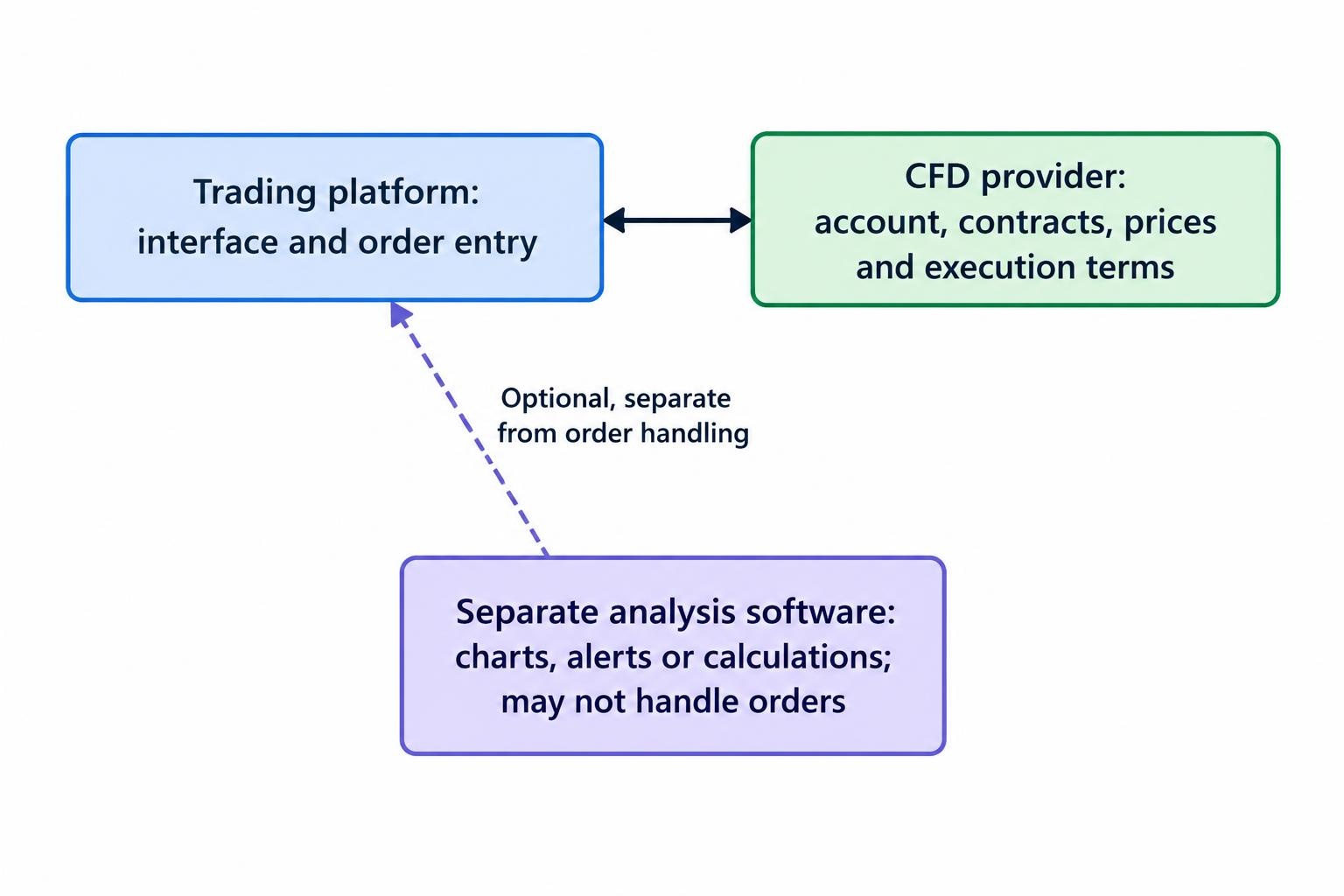
Assess these layers separately. An attractive charting package cannot compensate for unclear contract terms. Equally, a familiar platform name tells you little about the legal entity holding your money. Start with the provider and account agreement, then assess whether the software supports your trading process.
Check jurisdiction before downloading or funding anything. An offshore login is not permission to trade. The CFTC’s enforcement action concerning unlawful retail commodity CFDs illustrates why US customers must verify product legality rather than assume an overseas service is suitable. Confirm the contracting entity, its permissions and whether it can offer the intended product to you.
Choosing a CFD Trading Platform
Start with your workflow rather than a feature count. Someone monitoring positions around a full time job needs different controls from someone entering several trades during a market session. Write down the instruments, order types and devices you actually intend to use.
Third party platforms can combine analysis and trading functions. MetaTrader 5’s platform documentation, for example, covers charting, automated trading applications, account monitoring and desktop, web and mobile access. These are software capabilities, not a promise that every connected provider offers identical instruments or account settings.
| Format | Useful role | What to verify |
|---|---|---|
| Desktop application | Research, larger chart layouts and custom tools | Operating system support, updates and whether local tools need the application running |
| Web platform | Trading without a local installation | Browser compatibility, session expiry and order functionality |
| Mobile application | Position checks, alerts and urgent adjustments | Order amendment, partial closing and clear account identification |
| Separate analysis package | Research outside the execution interface | Price feed alignment, data charges and any trading connection |
Do not assume saved charts, indicators or order settings transfer between devices. Test the functions you depend on in each version. If you need a structured shortlist, use the criteria in comparing CFD trading platforms rather than choosing whichever application has the busiest toolbar.
Analysis Tools: Useful Charts Need Suitable Data
Prioritise readable charts, dependable watchlists, saved layouts and alerts you can configure precisely. A small set of indicators you understand is more useful than a screen covered in conflicting signals. More indicators does not mean more evidence.
Check what each chart represents. Establish whether it displays the provider’s CFD quote, an underlying cash market, a futures contract or another reference series. Confirm the timestamp, trading session and whether prices are live or delayed before using an external chart to make decisions in another platform.
Suppose you analyse an index futures chart but trade a cash index CFD. Treat them as related instruments, not interchangeable price series. Review their contract descriptions and session settings before expecting an alert on one to match an executable price on the other.
For event driven trading, assess calendar filters, time zone settings and notification timing. For company related CFDs, check access to earnings dates and contract adjustment notices. The requirement is practical: can you identify scheduled events before placing an order?
Historical analysis needs the same discipline. Before accepting a strategy result, inspect its data period, missing observations and cost assumptions. A chart showing an attractive entry is not evidence that the trade could have been opened and closed profitably.
Execution Tools: Check the Whole Order Process
A good order ticket should make the instrument, direction, quantity and order type obvious. Look for a clear distinction between units, contracts and lots, plus an estimated margin requirement before submission. Avoid relying on a quantity remembered from the previous trade.
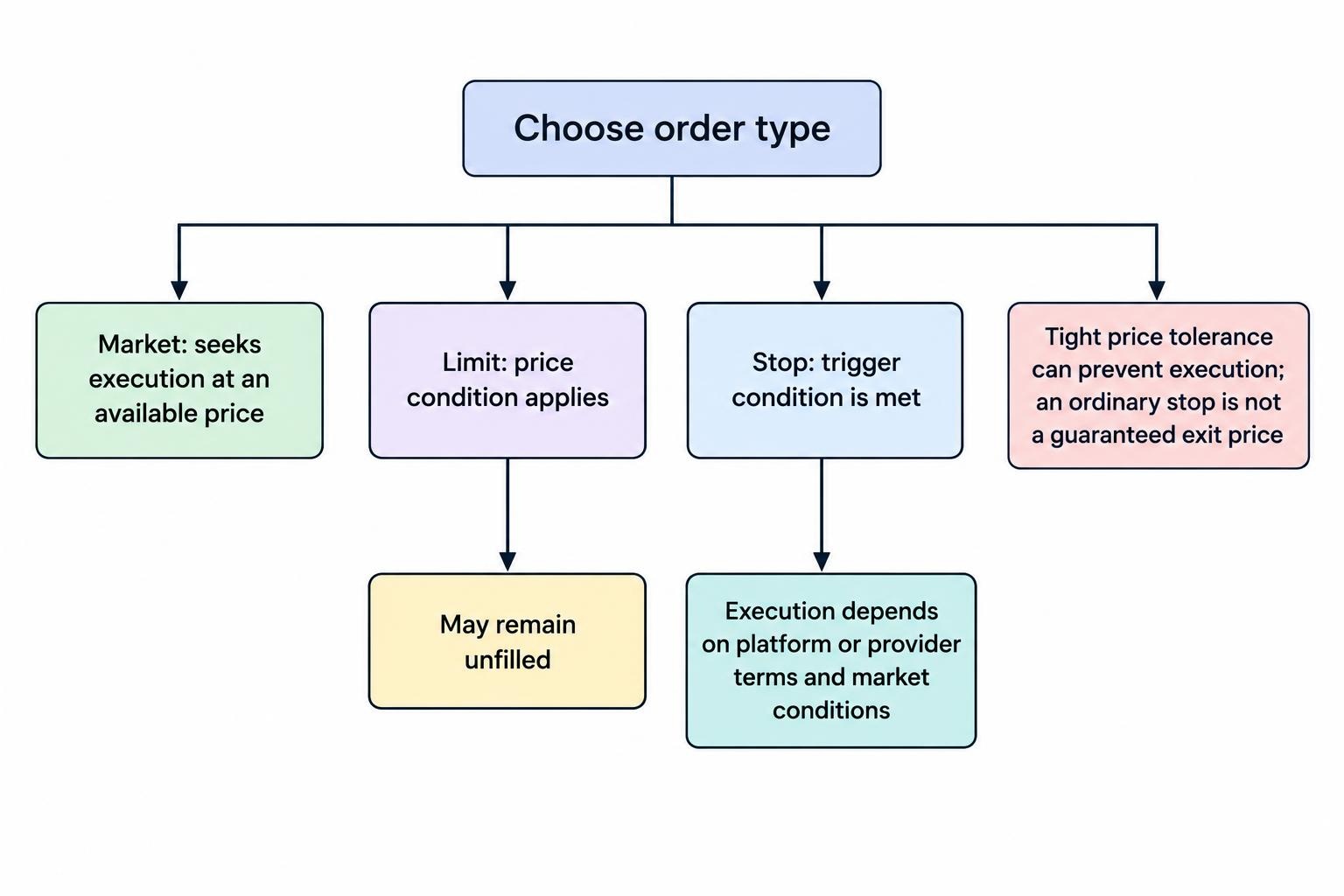
Market orders prioritise execution at an available price, while limit orders impose a price condition and may remain unfilled. Stop orders activate when their trigger conditions are met. Platform settings can change how those conditions work: the cTrader order documentation details market range controls and selectable trigger sides. A very tight price tolerance can prevent execution rather than deliver a better fill.
Test what happens after submission. Can you distinguish a rejected order from a pending one? Does the platform show partial fills? Can you amend a protective order without accidentally creating another position? After a connection failure, check account history before pressing the button again.
Also establish where protective instructions run. Ask which orders are stored on the provider’s server and which tools require your device or application to remain active. Treat an alert as a notification, not an instruction to close a position.
An ordinary stop loss should not be treated as a guaranteed exit price. Review the provider’s terms for gaps, slippage and any separately offered guaranteed stop facility. Keep execution records showing submission time, requested price, fill price and rejection messages. These records support a more useful assessment of CFD price feeds and execution quality than judging the platform by one unusually good or bad trade.
Margin and Account Controls
The account screen should make balance, equity, used margin and free margin easy to distinguish. Balance generally reflects completed account activity; equity includes the effect of open positions. An account can retain a positive balance while open losses put pressure on available margin.
Regulatory protections depend on the jurisdiction and client category. For UK retail accounts covered by FCA COBS 22.5 margin and account protection rules, firms must apply minimum opening margins, close positions as soon as market conditions allow when net equity falls below 50% of the required margin, and provide negative balance protection. These protections do not make the account’s funds safe from trading losses.
Configure your own warning levels before the provider’s closeout threshold becomes relevant. Useful controls include maximum order size, exposure alerts and a clearly displayed margin level. Check whether each control blocks an action, sends a warning or simply changes a number on screen. Those are very different forms of protection.
A Simple Position Sizing Check
Consider a hypothetical index CFD priced at 20,000 with exposure of $2 per point. Its notional exposure is $40,000. At an assumed 5% opening margin, it requires $2,000. A 100 point adverse move produces a $200 loss before costs: 10% of that opening margin, although the index moved only 0.5%.
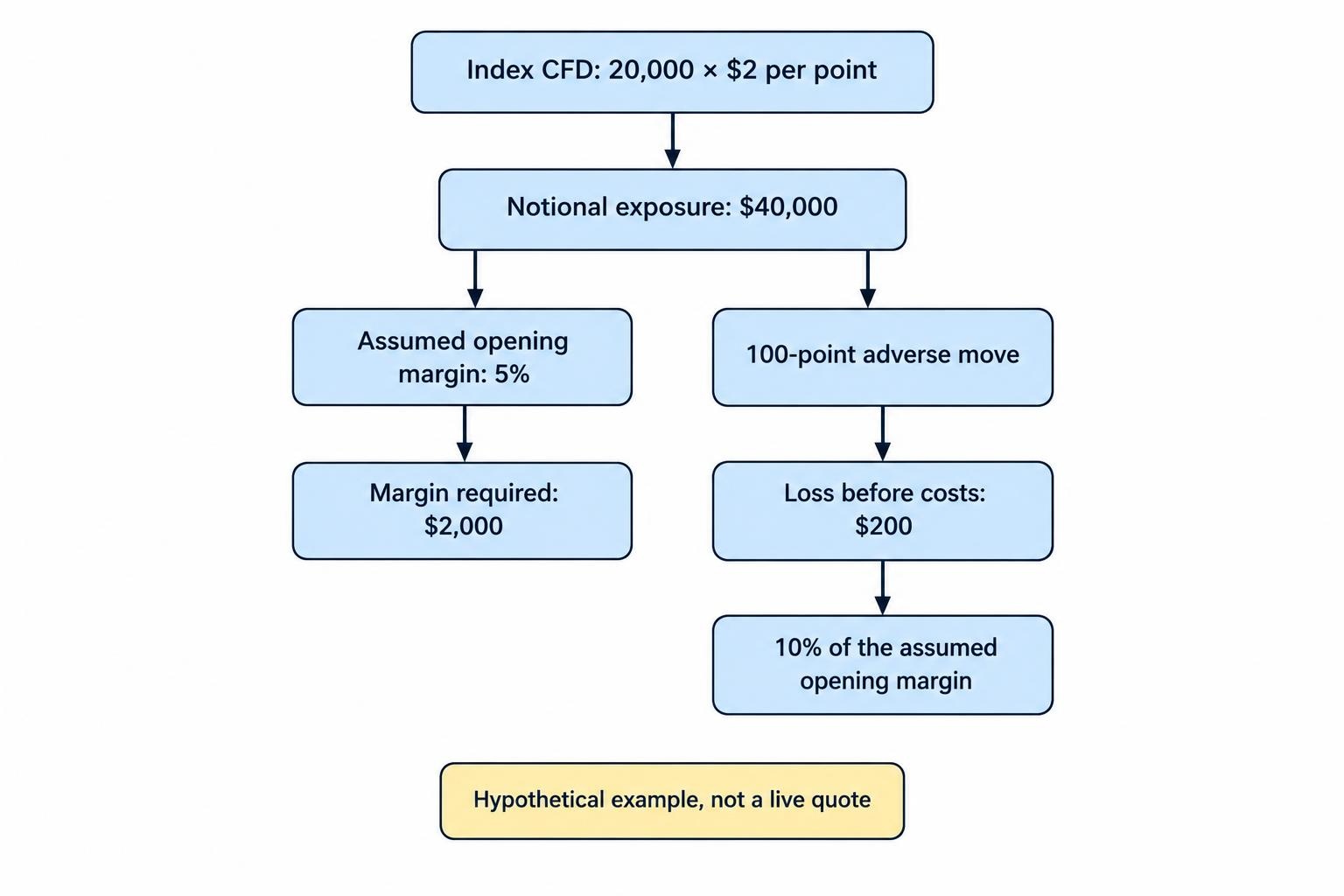
The example is arithmetic, not a live contract quote. It shows why software should display both exposure and margin. The amount required to open a trade is not the same as an acceptable loss. Use CFD margin and leverage calculators to check inputs, then compare the result with the provider’s actual contract specification.
Review exposure across the account too. Separate positions can still express the same market view. Set alerts around the combined risk you intend to hold, rather than treating each ticket as an isolated decision.
Calculate Trading Costs Before Comparing Software Prices
A free platform is not the same as free trading. Assess the proposed account’s spread, commissions, overnight financing, currency conversion and any data or software subscription charges. Read the fee schedule rather than assuming the number visible beside the buy button covers everything.
Use a realistic holding period when comparing costs. For a short trade, concentrate on entry and exit costs. For a position held across several financing cutoffs, inspect the applicable financing method and schedule. Do not assume that buying and selling carry identical charges.
Standalone calculators can help, but their assumptions need checking. Review the position value, direction, currency, rate and number of chargeable days. The guide to CFD overnight financing calculators covers those inputs without confusing an estimate with the amount eventually booked to an account.
Ask whether reports separate trading profit from charges. You should be able to reconcile the platform’s result with its account statement, including financing and conversion entries. A green profit figure is less impressive if it leaves half the bill off screen.
Security, Reporting and Everyday Account Management
Include account security in the selection process, not as an afterthought. Look for multifactor authentication, session controls and notifications for sensitive changes. Use a separate password and verify the official application or download route before entering credentials.
If you connect another application, inspect the permissions it requests. Give a research dashboard read access rather than trading authority wherever that meets the task. Review connected services regularly and remove access you no longer need.
For automated tools, ask how to disable new orders without losing sight of existing exposure. Check the recovery procedure after a restart and who to contact during an outage. Keep those instructions somewhere other than inside the application that may be unavailable.
Reporting deserves a practical test. Export a sample history and check for timestamps, order identifiers, quantities, prices, commissions and financing entries. Save account statements outside the platform so your records do not depend entirely on continued access to one service.
Test the Software Before Committing
Use a demonstration account to test operations, not to prove that a strategy will make money. Treat simulated results as evidence about the interface and your process, not a guarantee of live execution.
Run a short acceptance test on every device you intend to use:
- Place, amend and cancel a pending order, then confirm its status in account history.
- Open a simulated position, attach protection and test a partial close.
- Disconnect and reconnect, checking positions before submitting anything again.
- Export the activity and reconcile the displayed profit or loss with recorded charges.
Record any ambiguous behaviour. If closing a position, changing its size or cancelling an instruction takes guesswork, resolve that before proceeding. The guide to CFD order management tools provides a closer look at the controls involved.
Choose CFD trading software that makes exposure, costs and order status plain. Add paid analysis or automation only when it addresses a clear requirement. The strongest setup is not the one with the most features; it is the one you can operate correctly, monitor consistently and stop using when the risk no longer fits your plan.