Position limits define how much exposure a trading account, strategy or instrument may carry. Exposure alerts warn when activity approaches those boundaries. Configure them together: a warning should leave time to act, while an enforced limit should prevent an order from adding more exposure than your policy permits.
Start with the measurement, then define the threshold, response and reset conditions. This guide focuses on those settings within a trading risk control panel, rather than choosing position sizes for individual trades. The figures below are configuration examples, not recommended trading limits.
Define What Each Position Limit Measures
A field labelled “maximum position” is incomplete without a unit and scope. It might mean shares in one security, contracts in one futures product, dollar exposure in an account, or the combined exposure of several strategies. Record that definition beside the setting so users do not have to guess.
For shares, a basic notional calculation is quantity multiplied by price. Futures require the contract size or multiplier as well. The CME explanation of contract notional value sets out that calculation. Store the correct instrument details before applying a monetary cap; a contract count alone does not establish its dollar value.
Distinguish gross exposure from net exposure. A portfolio with $120,000 of long positions and $90,000 of short positions has $210,000 gross exposure and $30,000 net long exposure. A net limit alone would show a modest directional balance while overlooking the much larger total position.
Keep quantity, notional exposure, margin usage and estimated loss in separate fields. They answer different questions. For options, require additional risk measures and stress scenarios rather than treating contract notional or delta as a complete loss estimate. For currency trading, state whether each rule measures pair notional, individual currency exposure, or both.
Build Limits on Reconciled Account Data
Before activating a rule, identify every account and order route it covers. Include manual trades, automated strategies and positions entered outside the dashboard. Mark accounts that cannot supply current data as incomplete rather than displaying a reassuring zero.
Use a consistent instrument identifier, position direction, quantity, valuation price and reporting currency. Record the timestamps for position updates, prices and currency conversions separately. A fresh position update paired with an old conversion rate is not a fully refreshed exposure calculation.
The figures should reconcile with the live position and profit-and-loss dashboard. Investigate differences before raising thresholds to make a warning disappear. Common configuration checks include contract multipliers, duplicate account connections, missing fills and mismatched valuation prices.
For percentage limits, define the denominator. A cap based on current equity behaves differently from one based on equity at the session opening. If you choose current equity, specify what happens when falling equity causes an existing position to breach the percentage cap without any new trade.
Apply Limits at Several Levels
Configure separate boundaries for an individual order, an instrument, a strategy and the combined account group. Each catches a different problem. A small order can still breach an account cap, while an account with ample capacity should not automatically permit an oversized order in one instrument.
Add exposure groups where separate holdings share a common risk. Technology shares, a technology fund and an index position may overlap. Related holdings can create concentration despite having different names, a risk covered in FINRA’s guidance on concentrated and correlated investments. Use documented group membership rather than assuming different symbols mean independent exposures.
Require an order to pass every applicable rule. Passing the strategy limit must not override a tighter instrument or account boundary. Display the rule that caused a rejection, along with its remaining capacity.
Review defaults carefully. Specify what zero, a blank field and a disabled checkbox mean. Do not activate an unfamiliar platform until you have confirmed whether those settings block trading, remove a restriction or inherit another limit.
Include Pending Orders in Projected Exposure
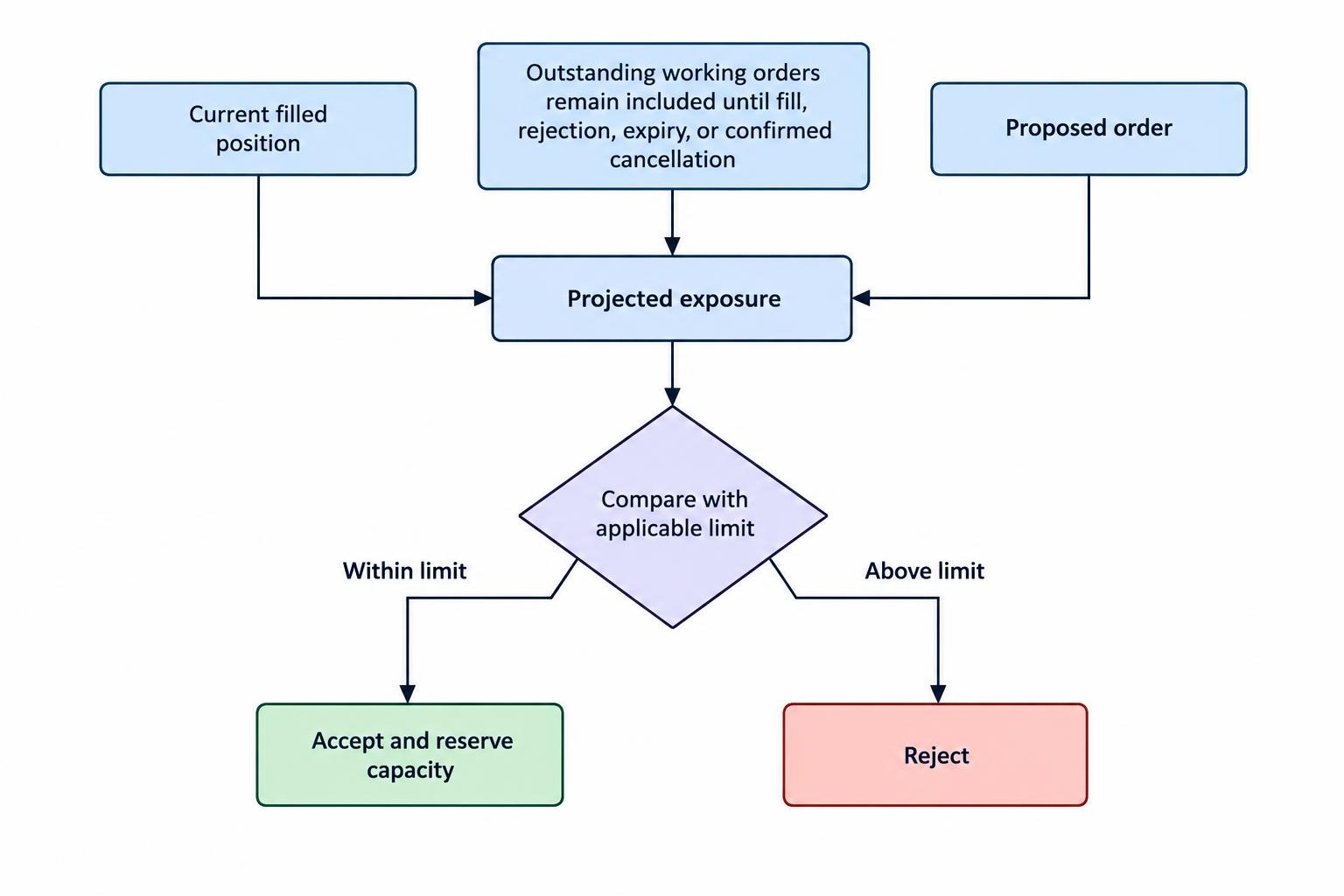
Check the position an order could create, not just the position currently held. For a straightforward long-only share position, combine the existing shares with outstanding buy quantities and the proposed purchase. Apply the chosen valuation method to that projected quantity before accepting the order.
Suppose an instrument cap is 1,000 shares. The account holds 700 shares and has an outstanding purchase for 200. A new purchase for 150 would take the projected position to 1,050, even though the filled position remains below the cap. The new order should fail that rule.
Working orders also feature in institutional controls: CME Globex Credit Controls documentation describes exposure calculations using open orders and fills. Your dashboard still needs a calculation suited to its instruments, order types and account structure.
Require the software to reserve capacity when accepting an order. Otherwise, two strategies could each consume the same available headroom. Keep that reservation until a fill, rejection, expiry or confirmed cancellation resolves the order. A cancellation request is not confirmation.
For replacements, test the additional exposure before accepting the change. Do not assume linked exit orders cancel one another until their actual handling has been verified.
Separate Warning Thresholds from Enforced Blocks
A warning invites a response; a hard limit changes what the system permits. Configure these as separate actions. Neither an email nor a red dashboard tile proves that an order will be blocked.
The distinction also matters in regulated market access. For covered US securities broker-dealers, the SEC market access rule requires controls reasonably designed to prevent orders exceeding preset credit or capital thresholds from entering the market. That broker obligation does not turn a personal dashboard into a regulatory control system.
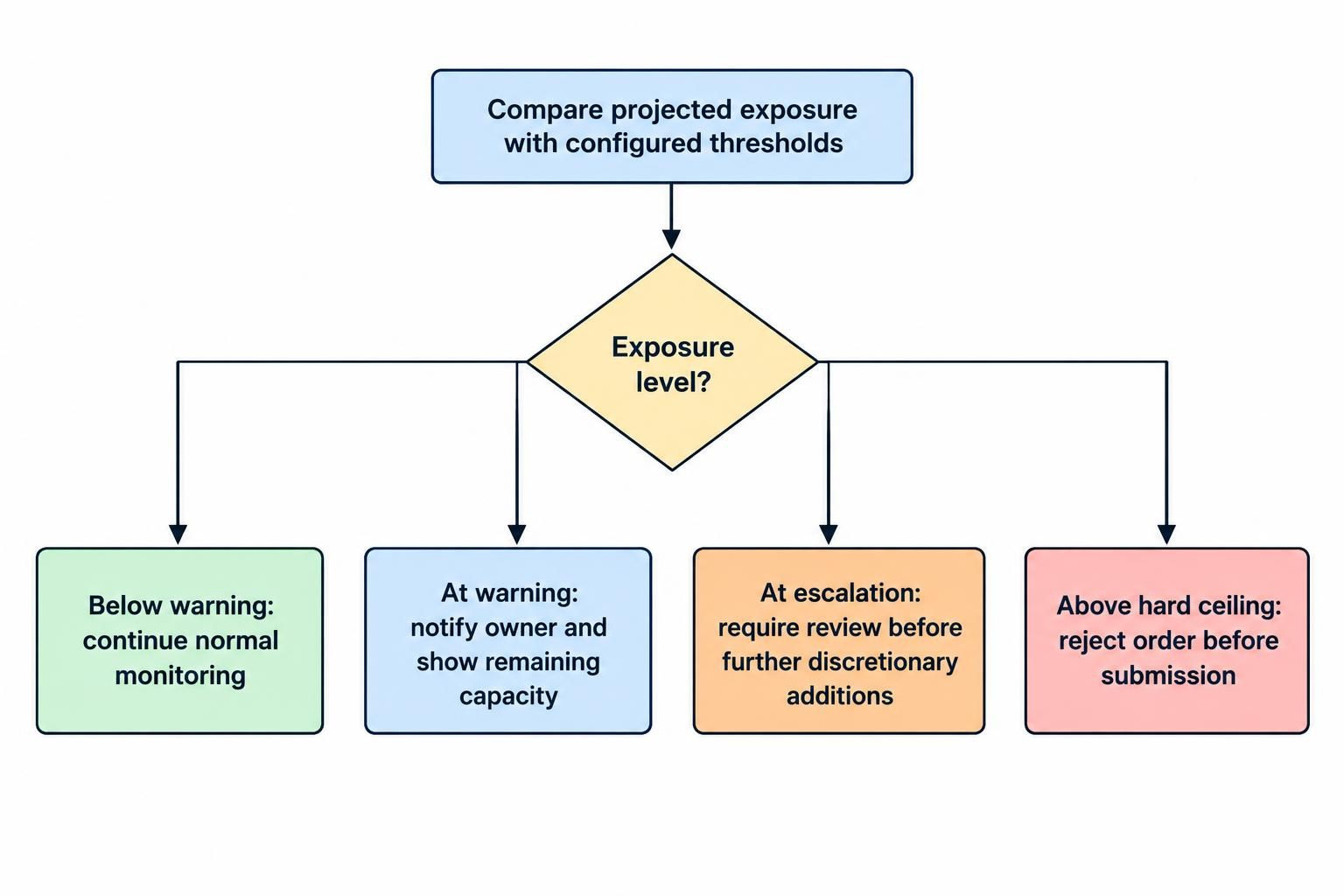
Use warning bands to create response time. The following example assumes a hypothetical $150,000 gross exposure cap. These percentages illustrate escalation logic, not suitable risk levels for an account.
| Stage | Example threshold | Configured response |
|---|---|---|
| Early warning | 70%: $105,000 | Notify the owner and show remaining capacity. |
| Escalation | 85%: $127,500 | Require review before further discretionary additions. |
| Ceiling | 100%: $150,000 | Reject orders that would take projected exposure above the cap. |
Make the boundary condition explicit. In this example, an order reaching exactly $150,000 passes; one exceeding it fails. Test both outcomes.
Place enforcement in a component that checks the relevant order route before submission. A display-only dashboard should identify itself as monitoring only. Also define the response to valuation breaches: blocking additions does not reduce a position that has already moved above its cap.
Make Exposure Alerts Actionable
Every alert should identify the breached rule, account group, instrument or exposure group, current utilisation, projected utilisation and remaining capacity. Include the event time, data freshness and whether the system issued a warning, blocked an order or detected an existing breach.
Assign an owner and an escalation route. For a solo trader, that may mean an on-screen warning followed by a phone notification. For a team, name the responsible role and a backup. An alert nobody owns is just a sound effect.
Use the wider trading alert and notification settings to handle delivery, acknowledgement and escalation. Test delivery with the dashboard closed, not only while watching its notification panel.
Control repetition without hiding deterioration. Send a fresh alert when severity increases, but avoid generating the same message on every price update. One possible configuration warns at 70% and rearms only after utilisation falls below 65%. Keep acknowledgement separate from resolution: acknowledging a breach must not clear it or restore trading permission.
Protect Exit Orders Without Creating a Bypass
A blanket trading block needs careful testing around exits. Define whether the restriction blocks all submissions or only those that increase the measured exposure. Preserve cancellation requests where appropriate, and establish a controlled route for reducing positions.
Judge a reducing order against the current position and outstanding orders, not its label. Selling 100 shares reduces a 100-share long position. Selling 150 would cross through zero and create a 50-share short position. Configure quantity checks or supported reduce-only handling to prevent an intended exit from becoming a new trade.
Check other limits too. Closing one leg of a hedge may reduce its instrument position while increasing another portfolio risk measure. An exception for exits should therefore have defined boundaries rather than bypassing every control.
Keep broader shutdown procedures in the trading bot monitoring and emergency stop controls. Exposure rules should specify when to invoke those procedures, without confusing “block additions”, “cancel orders” and “close positions”. Those are three different actions.
Define Behaviour for Stale Data and Disconnections
Set an acceptable age for each required data input, based on the trading process. Position updates, order acknowledgements, market prices and currency rates may need different freshness checks. Do not choose one timeout simply because the settings screen offers one box.
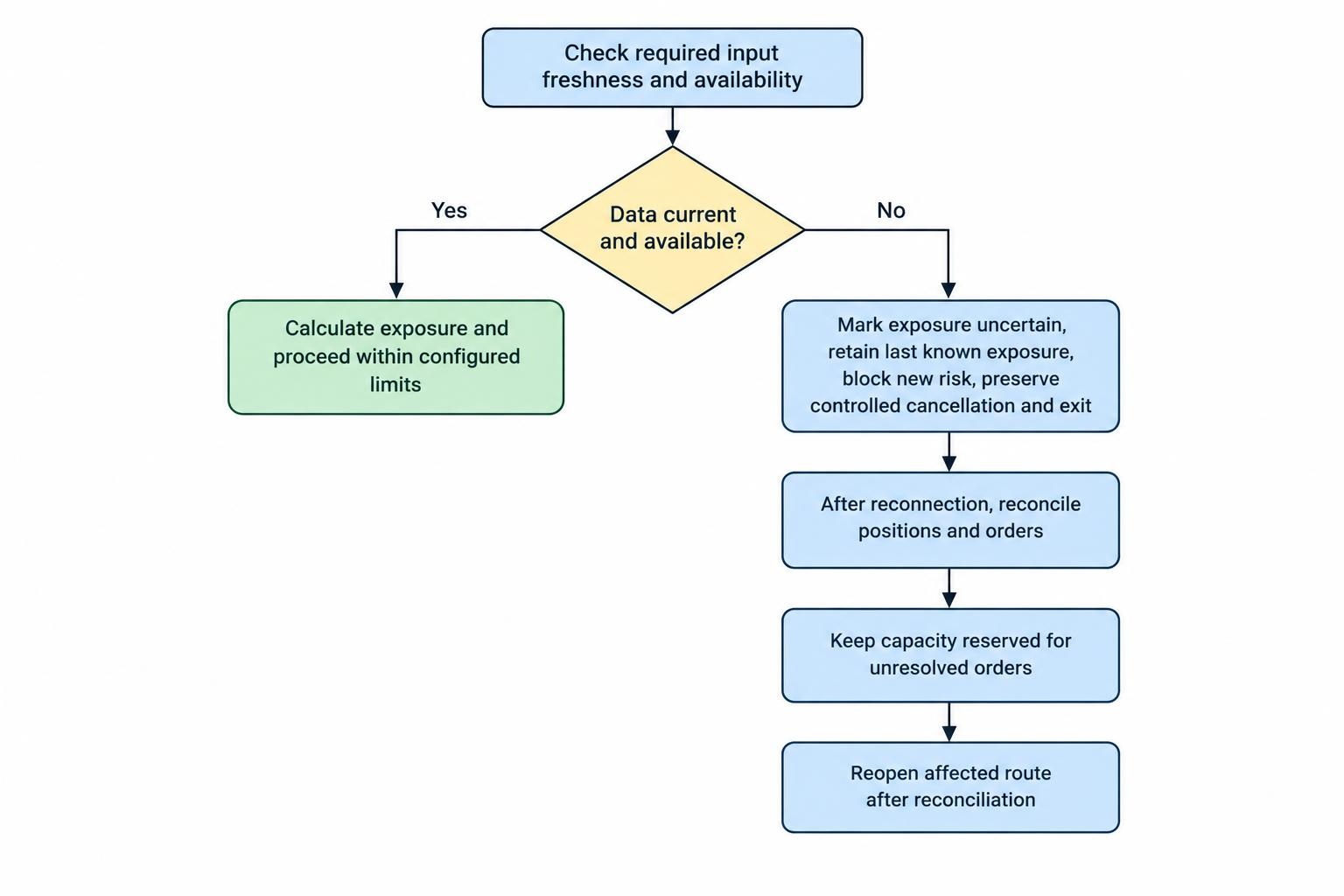
When required data becomes stale, mark the exposure figure as uncertain. A conservative configuration can block new risk while preserving a controlled cancellation and exit route. State whether that behaviour occurs automatically or requires operator approval.
Do not interpret a disconnected account as an empty account. Retain its last known exposure with a visible stale-data status, and avoid releasing capacity associated with unresolved orders. On reconnection, reconcile positions and orders before reopening the affected route.
Also test what happens if the dashboard itself stops running. Ask whether enforcement continues elsewhere, which component retains the active limits and whether settings survive a restart. Treat those as acceptance tests, not assumptions based on a product label.
Test Limits Before Enabling Live Enforcement
Begin in a simulation or observation mode where available. Compare projected decisions with expected outcomes, then test enforcement without exposing a live account to unnecessary trades. Use the same account mappings, instrument definitions and configuration version intended for production.
A compact test set should cover:
- Orders just below, exactly at and just above each boundary.
- Simultaneous orders from separate strategies sharing one cap.
- Partial fills, replacements and cancellations awaiting confirmation.
- Exit orders that could cross through zero.
- Missing prices, stale account data and reconnection.
- Price movements that create a breach without a new order.
Check the response as well as the calculation. Confirm that rejected orders never leave the controlled route, capacity reservations update correctly, alerts reach their owners and the event log records the reason. Repeat the tests after changes to order routing, account connections or instrument mappings.
Maintain a configuration record containing the rule owner, calculation method, threshold, action, reset conditions and effective time. Record changes with the previous value, new value, approver and reason. Add expiry times to temporary increases rather than leaving them in place indefinitely.
For broker-dealers covered by the rule, the SEC market access FAQs address evaluating and documenting threshold changes after orders have been blocked. For a personal dashboard, a written change process remains a useful discipline: review the exposure and the reason for the cap before changing it under pressure.
The finished configuration should make four answers visible: what is measured, how much capacity remains, what happens next and who responds. If any answer is missing, the control is not ready for unattended use.