A live position and profit and loss dashboard should answer three questions: what do you hold, what is it worth now, and how much has the account gained or lost? The useful part is not the changing numbers. It is whether those numbers use the right positions, prices, currencies and costs.
Within a trading dashboard and control panel, the positions view connects account activity with current market conditions. It should make a partial close, missing price or disconnected account obvious, rather than leaving the trader to investigate an unexplained change in the total.
What a Live Positions Dashboard Should Show
Start with a position table, then add account totals above it. Each row should identify the account, instrument, direction, quantity, average entry price, valuation price and unrealized P&L. Keep the instrument’s currency visible, particularly when the account contains assets priced in several currencies.
A practical minimum looks like this:
| Field | What it tells you | What to check |
|---|---|---|
| Account and instrument | Where the position sits and what is held | Exchange, contract expiry and account identity |
| Direction and quantity | The remaining long or short position | Shares, units, lots or contracts |
| Average entry price | The reference price for the remaining position | Cost basis method and fee treatment |
| Valuation price | The price used to calculate open P&L | Bid, ask, midpoint, last trade or settlement |
| P&L and costs | The current result and charges included | Gross versus net and posted versus estimated costs |
| Data status | How current the row is | Quote age, account update time and connection state |
Allow users to open the fills behind a position. A total without a traceable calculation is difficult to trust and harder to troubleshoot.
How Unrealized P&L Should Be Calculated
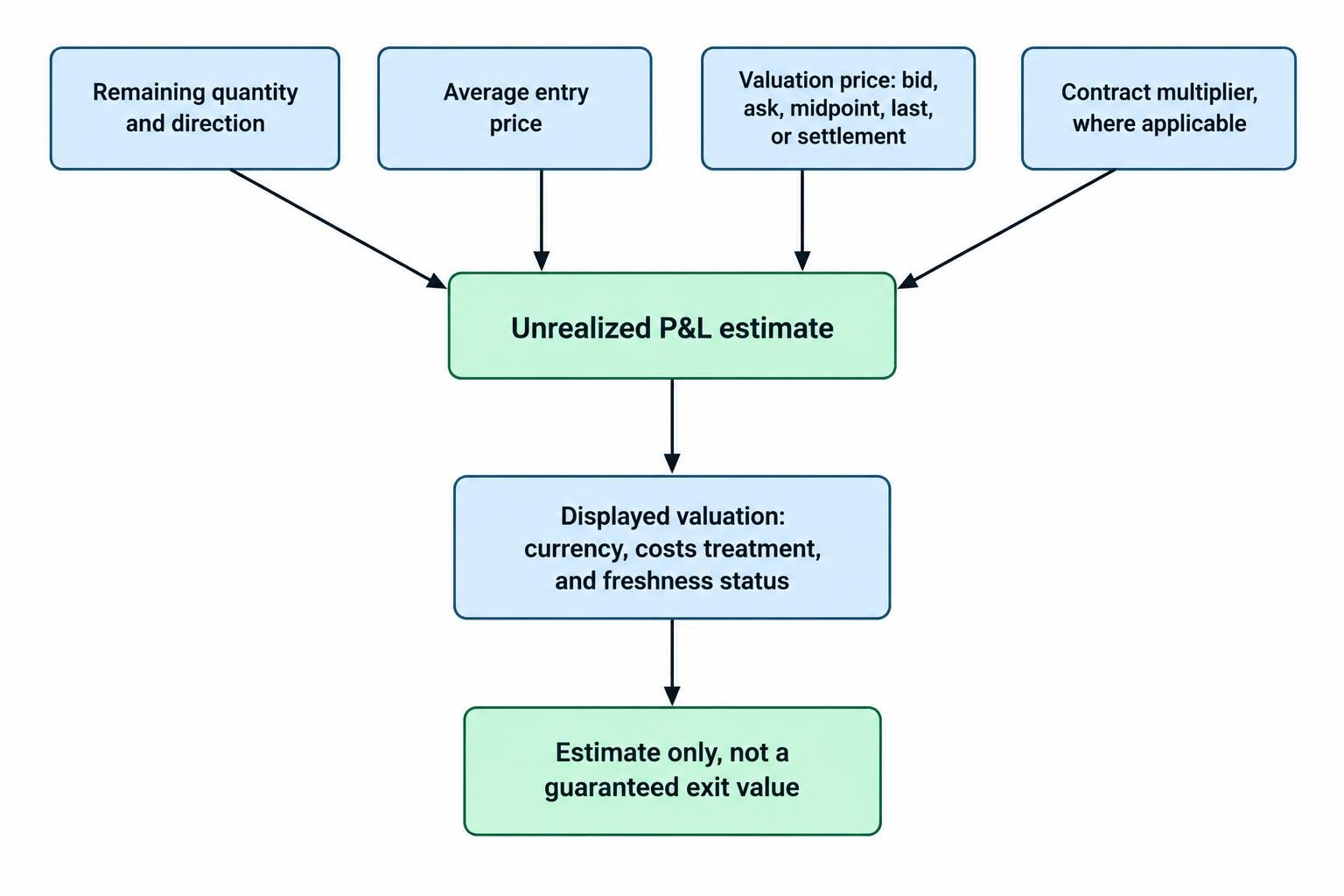
For a straightforward share position, unrealized P&L is the price difference multiplied by the remaining quantity. A long position gains when its valuation price rises above its entry price. A short position gains when its valuation price falls below its entry price.
The valuation price needs a label. A last trade, midpoint and closing side quote can produce different results. TradingView’s paper trading calculation, for example, uses the bid for long positions and the ask for short positions, rather than the last price shown on the chart. Its position P&L calculation documentation makes that distinction explicit.
Consider a hypothetical holding of 100 shares bought at $50.00. With a bid of $51.18 and an ask of $51.22, a bid valuation produces an unrealized gain of $118. A midpoint valuation produces $120. Neither calculation has failed; they answer slightly different questions.
A quote based estimate is not a guaranteed exit value. Available size, price changes and execution costs can alter the amount received. Label it as a valuation, not “profit available to collect.”
Use the Correct Contract Multiplier
Do not apply a share formula unchanged to every instrument. For standard futures, the calculation must account for the contract’s value per price movement. The tick based approach is ticks gained or lost multiplied by tick value and contract quantity, as set out in CME Group’s futures profit and loss calculation.
Keep contract metadata attached to the instrument record. A missing multiplier can leave the direction of P&L looking plausible while the monetary amount is wrong.
Keep Positions, Orders and Fills Separate
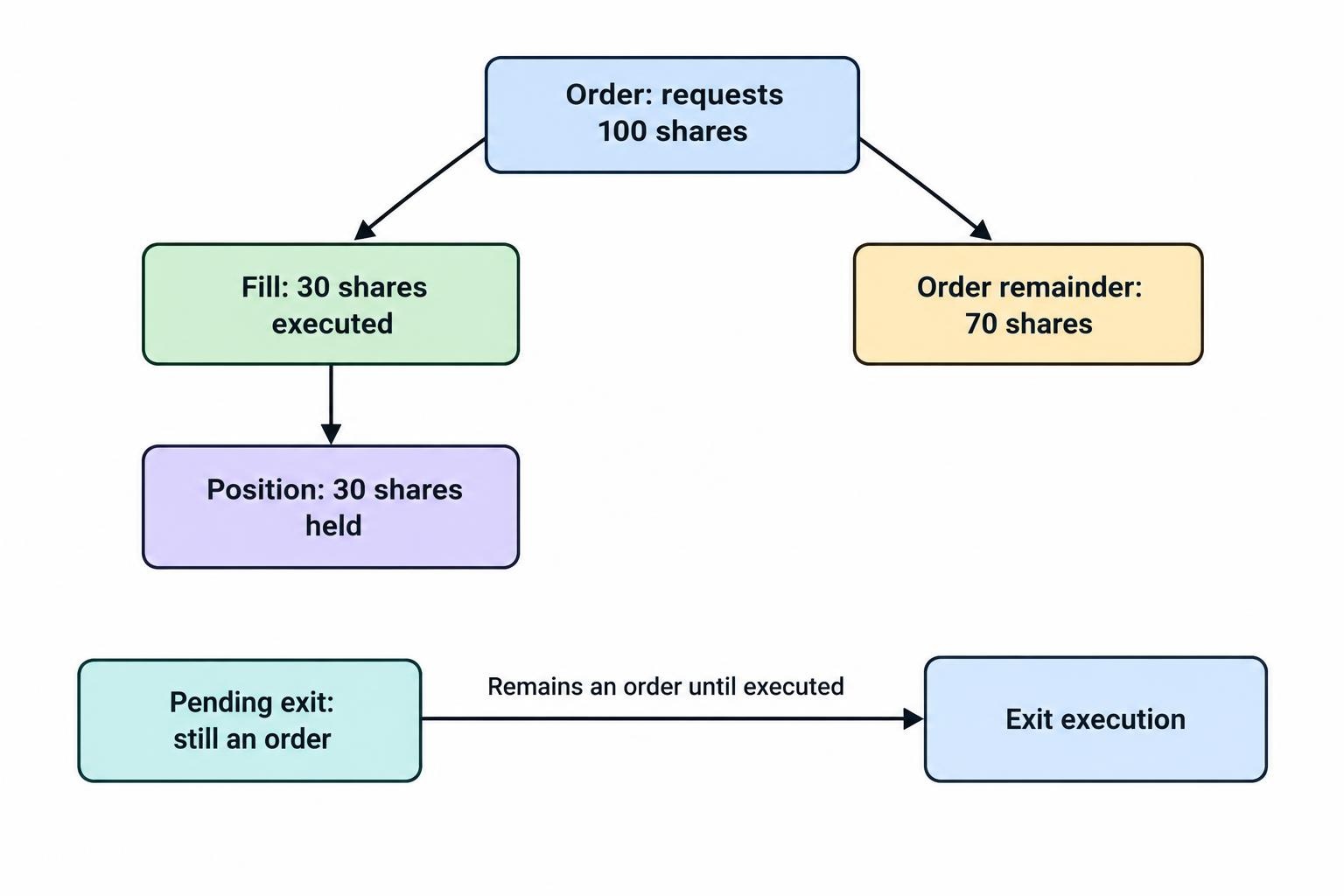
An order expresses an instruction. A fill records an execution. A position records what remains held. The dashboard should not treat these as interchangeable.
If an order to buy 100 shares receives a fill for 30, show a 30 share position and an order with 70 shares remaining. Do not calculate position P&L on the requested quantity. Pending exits also belong in the orders view until execution is confirmed.
Partial closes need equally clear treatment. In a hypothetical example, buy 100 shares at $50, sell 40 at $52, then value the remaining 60 at $51.50. Before fees, the realized gain is $80 and the unrealized gain is $90. The combined result is $170.
That example assumes one entry price. With several purchase lots, the method used to match sales against purchases affects the split between realized and unrealized gains. Show the method and preserve access to the underlying fills. A trading dashboard calculation should not present itself as a tax calculation.
Across accounts, retain the separate positions even when displaying a combined total. A long holding in one account and a short holding in another should not disappear behind a zero net quantity.
Separate Open P&L From Today’s P&L
Open P&L measures the result on a position against its entry reference. Daily P&L measures a change over a defined trading day. One can be positive while the other is negative.
For a separate example, suppose 100 shares were bought at $50, closed yesterday at $54 and are now valued at $53.50. The open gain is $350, but today’s price movement has reduced the position’s value by $50. A single number labelled “profit” cannot communicate both facts.
Show the daily reset time, time zone and reference price. Futures need settlement aware treatment: daily settlement variation is paid or collected in cash, and the calculation distinguishes trades cleared that day from positions carried into it. CME Group’s clearing calculation specification documents those mechanics.
When an account total combines realized and unrealized results, align their periods. Adding realized gains from the current session to all open gains since entry produces a mixed period figure, not a clean daily result.
Make Currency Conversion and Costs Visible
A consolidated dashboard needs both the instrument currency and a reporting currency. Show native currency P&L beside its converted value, with the conversion rate and timestamp available in the row details.
For illustration, a €100 open gain converts to $108 at an assumed rate of $1.08 per euro. That is a translation of the gain. It is not necessarily the full dollar return on owning the asset, because exchange rate changes can also affect the dollar value of the original investment.
Keep those calculations distinct. Do not label a translated local currency gain as total account currency performance unless the calculation includes the relevant currency effects.
Costs deserve the same care. Separate gross trading P&L, posted commissions, accrued financing or borrow charges, and estimated exit costs. If an estimate has been deducted, say so. “Net P&L” is not useful when nobody can tell what was netted.
Avoid subtracting the spread twice. When a position is valued using the closing side quote, the bid and ask difference already affects that valuation. Likewise, do not deduct a commission again if the supplied P&L already includes it.
Show Account Equity Beside Profit, Not Instead of It
P&L, account equity, cash and buying power answer different questions. Display them as separate measures with definitions available nearby.
For reconciliation, a useful starting relationship is ending equity minus starting equity, minus net external contributions. This describes the account’s change after adjusting for deposits and withdrawals, provided the valuations are consistent and other movements are accounted for. It does not automatically isolate trading gains from interest, distributions, currency changes or fees.
A profitable account can still have concentrated exposure or little capacity to absorb further losses. Place margin usage and exposure summaries near the P&L totals, but leave enforcement to the trading risk control panel. A green number is not permission to increase a position.
Make filtered totals unmistakable. If the table shows one account or strategy, label whether the headline total follows that filter or still represents every connected account.
Define What “Live” Actually Means
A changing screen does not prove that every input is current. Treat price freshness, position freshness and connection health as separate checks.
The dashboard should show the time of the last market event and the last account update. A newly received message can contain an older event, so arrival time alone should not be the freshness test. Also distinguish a quiet market, a closed session and a failed connection.
Preserve the last known value during an interruption, but mark it stale. Replacing missing data with zero creates false precision: a zero position means something very different from a position that has not loaded.
Snapshot and stream sequencing matter when restoring a live view. Nasdaq’s market data protocol, for example, identifies the sequence point at which updates should follow a snapshot. The Nasdaq GLIMPSE snapshot specification provides a concrete example of that handover.
Apply the same design discipline to account monitoring: establish a known state, identify any missing updates and reconcile before presenting the data as current. A connection badge should not turn green simply because a socket has reopened.
Handle Reconnection Without Inventing Positions
After a disconnect, require the dashboard to refresh positions, open orders, recent executions and account balances. Preserve execution identifiers so replayed messages do not become duplicate trades.
Pay attention to actions taken elsewhere. A position closed through another application must disappear from the monitoring view after reconciliation. The dashboard should not depend on being the place where every trade originated.
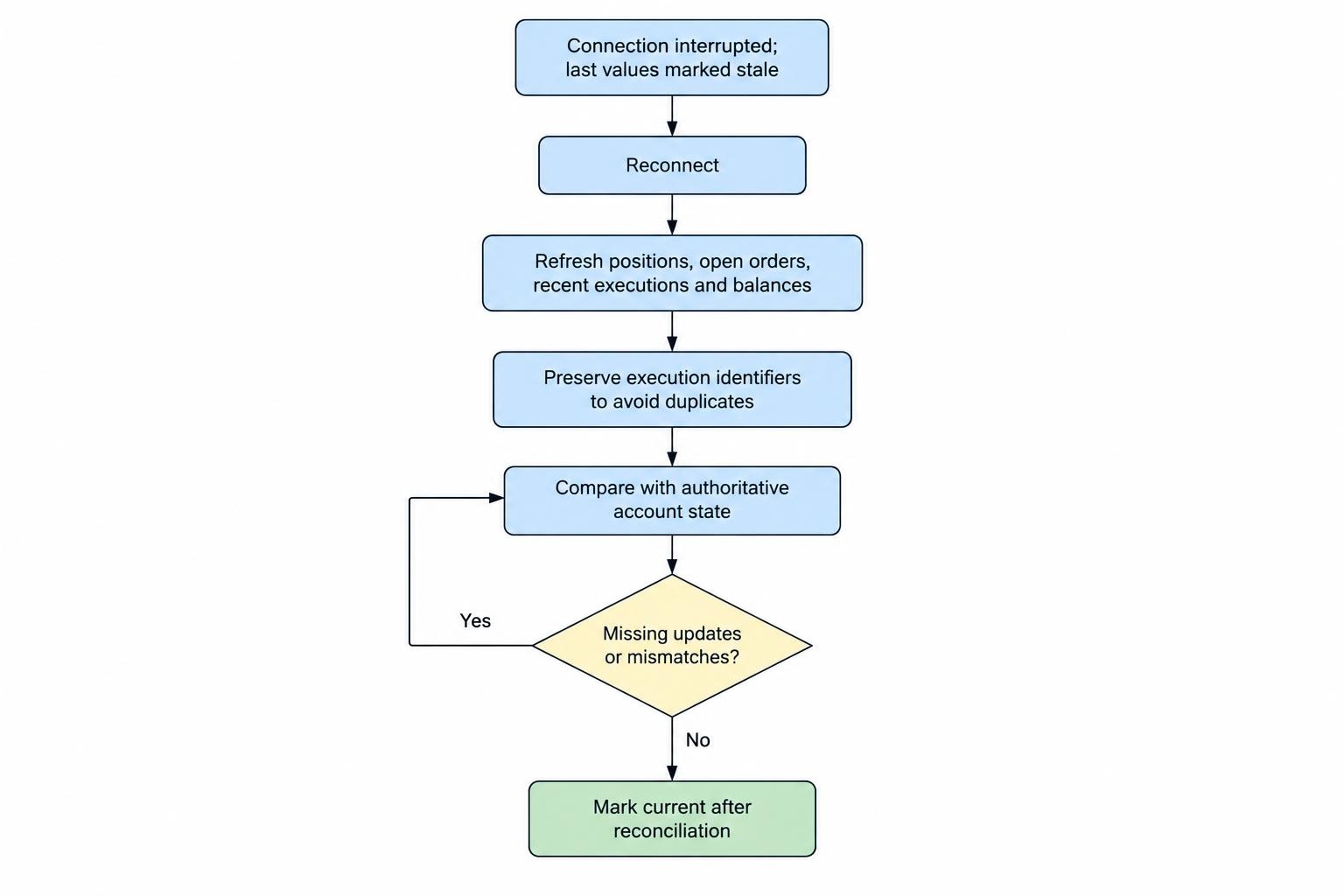
For a custom build, define which system supplies the authoritative quantity, cost basis and account balance. Keep locally calculated valuations separate from broker supplied totals, and flag disagreements rather than silently choosing the more attractive number. Connection architecture belongs in the guide to building a trading dashboard with broker APIs.
Keep monitoring access separate from trading permissions where possible. If the dashboard includes close buttons, display the account, instrument and quantity before confirmation. A displayed P&L should never be mistaken for an executable price promise.
Reconcile Totals Before Relying on Them
Compare like with like when investigating a mismatch. Start with the account and instrument, then check remaining quantity, fills, cost basis, valuation price, timestamp, currency conversion and charges. Check rounding only after those larger causes have been ruled out.
Use a saved snapshot for the comparison. Comparing a moving dashboard with a report generated several minutes earlier can create a discrepancy that is simply a price change.
Review executions and charges against trade confirmations and account statements, not just another dashboard screen. FINRA’s account statement and trade confirmation guidance identifies prices, quantities, cash movements and fees as items to check.
Keep an exportable record containing account identifiers, instrument details, quantities, reference prices, currency rates and calculation timestamps. Screenshots are useful for showing what appeared on screen; structured exports are better for reproducing the arithmetic.
How to Evaluate a Position and P&L Dashboard
Before paying for software or enabling trading access, test it with controlled examples. A paper account can help check calculations and display behaviour, although it does not establish live execution quality.
- Open and partly close a position, then verify the realized and unrealized split.
- Check a short position and an instrument with a contract multiplier.
- Interrupt the connection and confirm that stale values remain clearly labelled.
- Change a position elsewhere, reconnect and check that quantities and totals reconcile.
Compare the full cost of the setup, including required data subscriptions and account connections. Check whether exports, historical snapshots and multiple account views are included rather than assuming they accompany the headline subscription.
Choose a dashboard for explainable calculations, visible data status and dependable reconciliation. Use portfolio performance analysis tools for longer period return comparisons. The live dashboard has a narrower job: show the positions held now, value them consistently and make uncertainty impossible to miss.