Forex charting software turns currency prices into a workspace for analysing trends, marking price levels and reviewing trading decisions. The right choice depends less on how many indicators appear in the menu and more on whether the software provides suitable data, repeatable layouts and tools that fit your trading process.
Start with the chart feed, then assess analysis tools, alerts, device support and cost. A polished interface cannot compensate for analysing one price stream while placing orders against another. Charting is also only one part of a forex trading software setup: displaying a potential entry does not mean the software can execute it, or that the displayed price will be available.
What Should Forex Charting Software Provide?
A useful charting package should make your routine easier to repeat. You should be able to open the correct currency pair, apply saved settings, inspect price history and record your analysis without rebuilding the workspace each session.
Separate features you need from features you might occasionally use. Someone reviewing daily charts after work has different requirements from someone watching short intraday price movements. Buying the largest feature bundle before defining that routine gets the decision backwards.
| Feature | Why it matters | What to check |
|---|---|---|
| Identifiable data feed | Makes price comparisons meaningful | Provider name, quote basis and update status |
| Chart layouts and templates | Keeps analysis consistent between sessions | Which settings, drawings and chart arrangements are saved |
| Indicators and drawing tools | Supports a defined analytical method | Required calculations, editable inputs and precise price placement |
| Alerts | Reduces the need for continuous screen watching | Trigger conditions, expiry and delivery method |
| Historical review | Allows earlier decisions to be examined | Available history, replay behaviour and export options |
Check the Price Data Before Comparing Features
Identify the provider behind the currency pair
A currency pair’s name does not fully identify its data. Before comparing two EUR/USD charts, record the provider attached to each symbol. Also check that both represent the same instrument rather than assuming every chart with a familiar currency label is interchangeable.
TradingView, for example, offers composite ICE forex symbols alongside feeds from individual brokers. Volume availability and trading hours can differ between providers, as detailed in its forex data provider comparison. That makes the feed part of the software selection, not an afterthought.
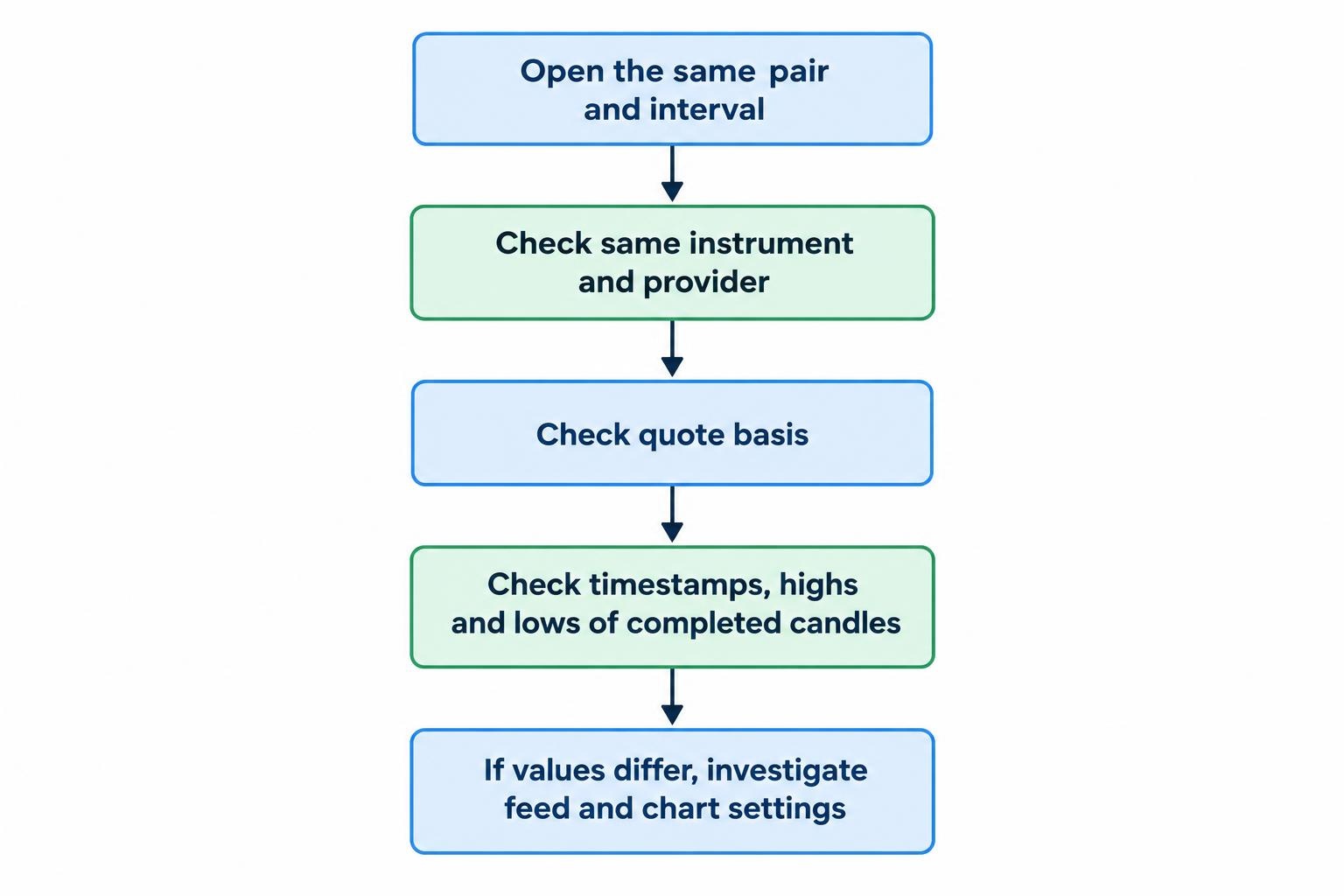
For a practical comparison, open the same pair and interval in your charting software and execution platform. Inspect several completed candles, including their timestamps, highs and lows. If they differ, investigate the feed and chart settings before deciding that either display is wrong.
Know whether the chart shows bid, ask or another price
The price used to construct a candle matters when comparing chart levels with executable quotes. In MetaTrader 5, OTC symbol bars use bid prices. Its tick volume measures ticks received during bar formation, while actual traded volume may be unavailable for OTC instruments. These distinctions appear in the MetaTrader 5 price data documentation.
Suppose a hypothetical EUR/USD quote is 1.08500 bid and 1.08512 ask. A bid chart displays the first side of that quote; it does not display both executable prices through one candle. When investigating an apparent mismatch between a chart and an order, compare the relevant quote side and timestamp rather than relying on a screenshot alone.
Treat volume labels with the same care. Check what the field measures before using it in an indicator. Tick activity from one feed should not be interpreted as a complete count of currency traded across the market.
Inspect history and bar boundaries
Check the oldest available date at the interval you actually use. A long daily history does not answer whether the software supplies enough one minute data for your review process.
Also verify daily bar boundaries, session settings and daylight saving treatment. Do not assume that changing the clock displayed beneath a chart rebuilds its candles. If your method depends on a daily close or session opening range, confirm how those periods are defined before comparing results across applications.
Choose Indicators That Answer Different Questions
Indicator quantity is a poor buying criterion. A more useful test is whether the software supports the calculations your method requires and makes their settings easy to inspect.
A moving average can describe trend direction, while average true range measures the size of recent price movement. Those serve different purposes. Adding several momentum indicators may instead give you several versions of much the same observation. More panels do not automatically mean more evidence.
When comparing platforms, match the indicator period, input price and calculation method. Two indicators with the same name need not produce matching values if their settings differ. Check completed bars as well as the current candle, whose values are still changing.
If your method requires a calculation that is not included, assess custom indicator support before paying. The separate guide to creating and installing custom forex indicators covers that process. At the selection stage, establish compatibility and maintenance requirements rather than filling the chart with downloads you have not evaluated.
Comparing TradingView, MetaTrader 5 and cTrader
These three options illustrate different considerations: reusable analytical layouts, a configurable terminal workspace, and indicator compatibility across applications. The comparisons below concern documented features, not measured execution speed or hands-on performance rankings.
TradingView: Assess the Layout Workflow
TradingView layouts save the symbol, interval, chart type, indicators, drawings and other settings. Its layout tools also support synchronising items such as the symbol, interval and crosshair between charts. Drawing synchronisation can operate within a layout or across layouts for the same symbol. The TradingView layout documentation sets out how these settings interact.
This makes layout management worth testing if you compare several intervals or maintain separate workspaces for analysis and trading. Try a daily chart beside an hourly chart, then change symbols and reopen the layout.
Check which drawings follow the symbol, which remain local and whether your preferred arrangement is available under the subscription you are considering. The useful question is not whether a layout looks good once, but whether it restores correctly every morning.
MetaTrader 5: Assess Templates and Workspace Profiles
MetaTrader 5 distinguishes between templates for individual charts and profiles for the arrangement of open charts. Templates can retain indicators, analytical objects and appearance settings; profiles preserve the wider chart workspace. The desktop terminal also supports detached chart windows for multiple monitors, documented in its chart configuration guide.
This structure is worth considering if you want a repeatable workspace within a trading terminal. Build a template, apply it to another pair and confirm that the resulting settings match your intention.
Be careful about what the template contains. Keep an analysis template focused on analysis, and inspect any attached automated components before reusing it. Saving a workspace should reduce routine work, not preserve settings you no longer remember adding. Test the restored profile after restarting the application, too.
cTrader: Check Indicator Support on Each Device
cTrader’s built-in indicators are available across its Mobile, Web, Windows and Mac applications. Custom indicators, however, work in Windows and Mac rather than Web or Mobile. The distinction is explicit in the cTrader indicator compatibility documentation.
That matters if your method depends on a custom calculation. Having access to the same account on a phone does not establish that the phone can reproduce your desktop analysis.
During evaluation, list every indicator you rely on and identify where it can run. Then decide whether mobile access is for full analysis or only for checking prices and positions. Either arrangement can be workable, provided the division is deliberate. Do not buy around an assumed feature match and investigate compatibility after the subscription renews.
Test Alerts, Replay and the Step From Analysis to Orders
For alerts, define exactly what should trigger a notification. A price touching a level is different from a candle closing beyond it. Check whether the alert repeats, expires or requires the application to remain open. Test delivery on the device you expect to use, rather than stopping once the alert appears in a settings menu.
For historical review, establish what replay actually simulates. Does it reveal completed candles one at a time? Does it reconstruct movement within each candle? Which prices do order controls use while replay is running? Do not assume that displaying an earlier chart also turns every connected trading function into a historical simulation.
Chart review and execution analysis are separate jobs. A replay can help you examine whether you followed your rules, but it does not establish what spread or fill a live order would have received. Use forex spread and slippage monitoring tools when the question concerns trading costs or execution differences rather than the chart display.
Compare Cost Against Your Actual Routine
Calculate the cost of the setup you need, not just the advertised entry price. Check the required subscription tier, any data charges, paid indicators and restrictions on simultaneous charts or alerts. Avoid paying annually until you have confirmed that the essential features work together.
Device support deserves the same scrutiny. Use the comparison of desktop, web and mobile forex platforms to assess where each part of your routine belongs. A phone screen may be sufficient for checking a marked level without being suitable for rebuilding a multi-chart workspace.
For an occasional chart review, prioritise readable prices, saved settings and manageable cost. For frequent intraday analysis, put more weight on fast symbol changes, clear quote information and reliable alerts. Neither routine needs every feature in the catalogue.
Run a Repeatable Trial Before Committing
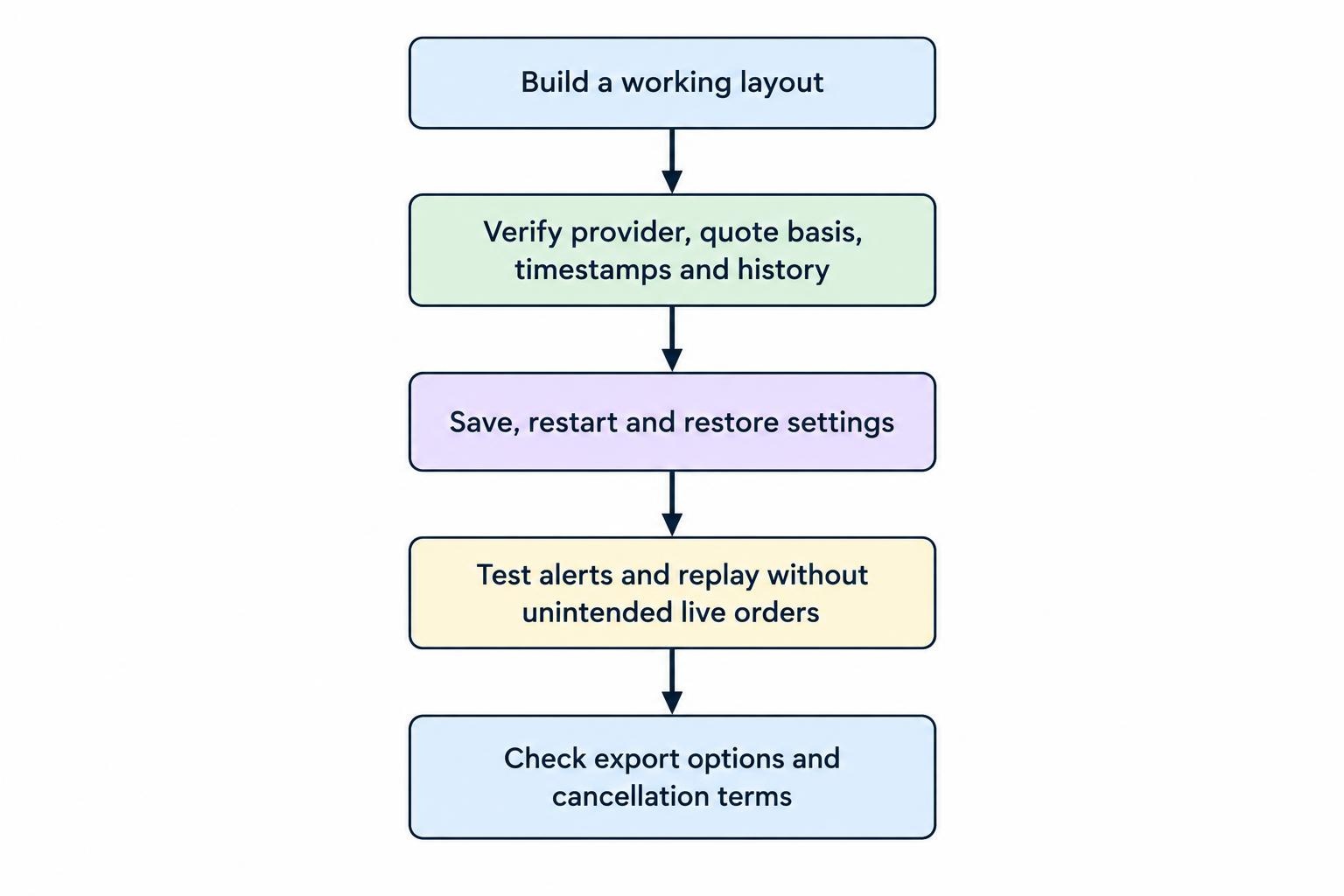
Compare candidates using the same task. Otherwise, the application you explored most thoroughly may appear better simply because you learned more of its controls.
- Build one working layout. Use a currency pair, intervals and indicators that represent your normal analysis.
- Verify the data. Record the provider, quote basis, timestamps and available history, then compare them with your execution platform.
- Save and restore everything. Restart the application and inspect drawings, indicator inputs and chart arrangements.
- Test notifications and review tools. Confirm alert delivery and investigate replay behaviour without sending unintended live orders.
- Check the exit route. Establish whether you can export the data, screenshots or settings you need, and review cancellation terms before paying.
Record problems as plainly as features: unclear feed labels, missing history, awkward drawing controls or settings that fail to restore. A fault affecting your daily routine deserves more weight than an impressive tool you will rarely open.
The best forex charting software for your process is the option that passes those checks with the least unnecessary work. Choose it for clear data and repeatable analysis, not for the promise that another indicator will make uncertain prices certain.