Forex trade copier software replicates trading activity from a source account to one or more receiving accounts. It can reduce repetitive order entry when you trade several accounts, or connect your account to another trader’s strategy. The important distinction is what gets copied: trade instructions, not guaranteed prices, profits or risk.
A useful copier needs more than fast transmission. It must size positions correctly, recognise the receiving account’s instruments, handle closures reliably and make failures visible. Within a broader forex trading software setup, its job is execution coordination. It does not improve the strategy being copied.
How Forex Trade Copiers Work
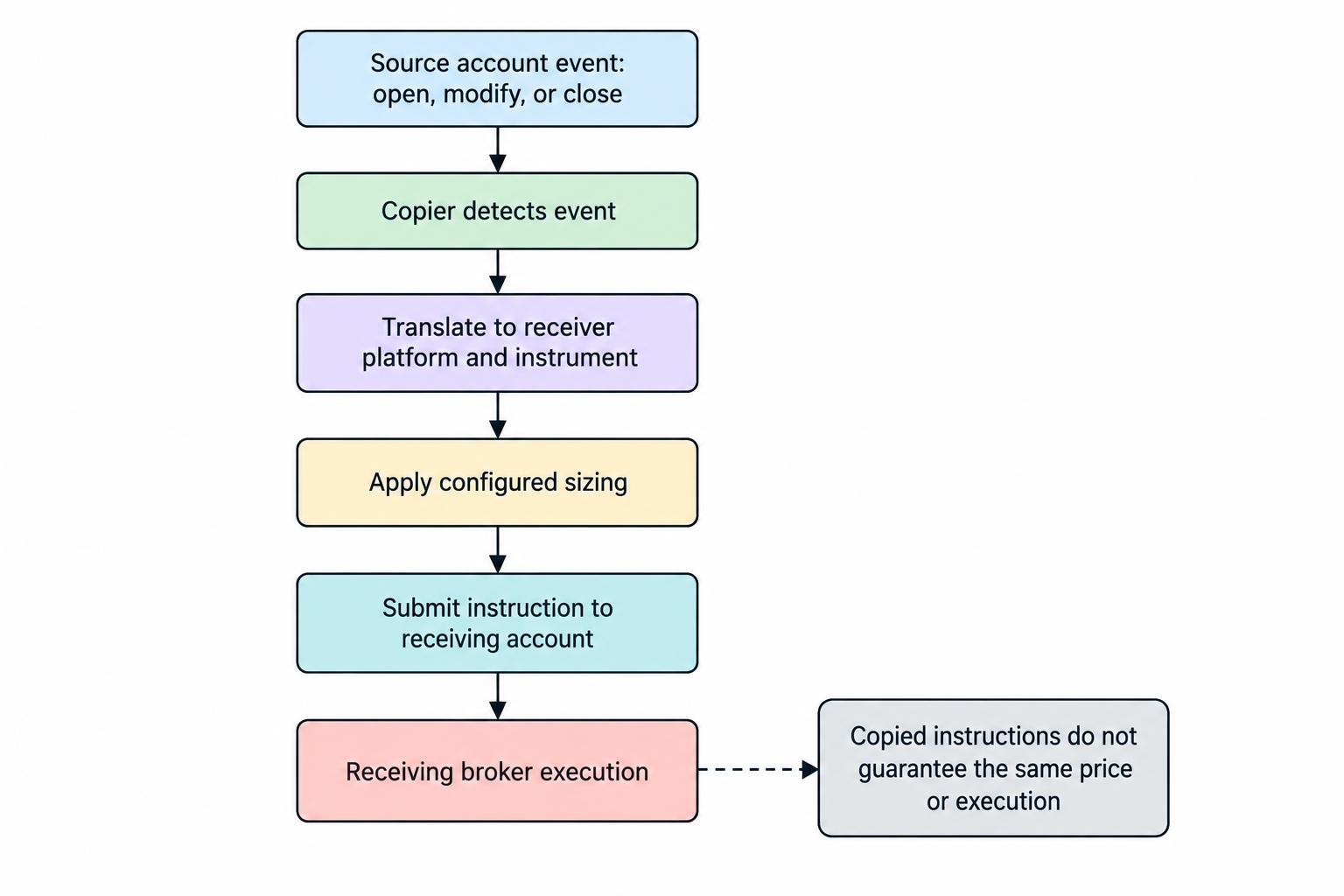
A typical copier has a sender and a receiver, sometimes labelled master and follower. The sender detects trading activity, such as opening a position or changing a stop loss. The receiver translates that event into an instruction for its own account, applies the configured sizing rules and submits the request.
That process is not necessarily a literal duplication of every order. MetaTrader 5 Signals, for example, does not copy a provider’s pending orders when they are placed. It copies the resulting trading operation after the pending order triggers. The MetaTrader 5 signal subscription documentation sets out this distinction.
Before selecting software, establish whether you need to copy market entries, pending orders, stop changes, partial closures and full exits. Also decide whether copying should include positions already open at startup or only new trades. Those choices affect the receiving account from the moment you connect it.
Local, Remote and Hosted Trade Copying
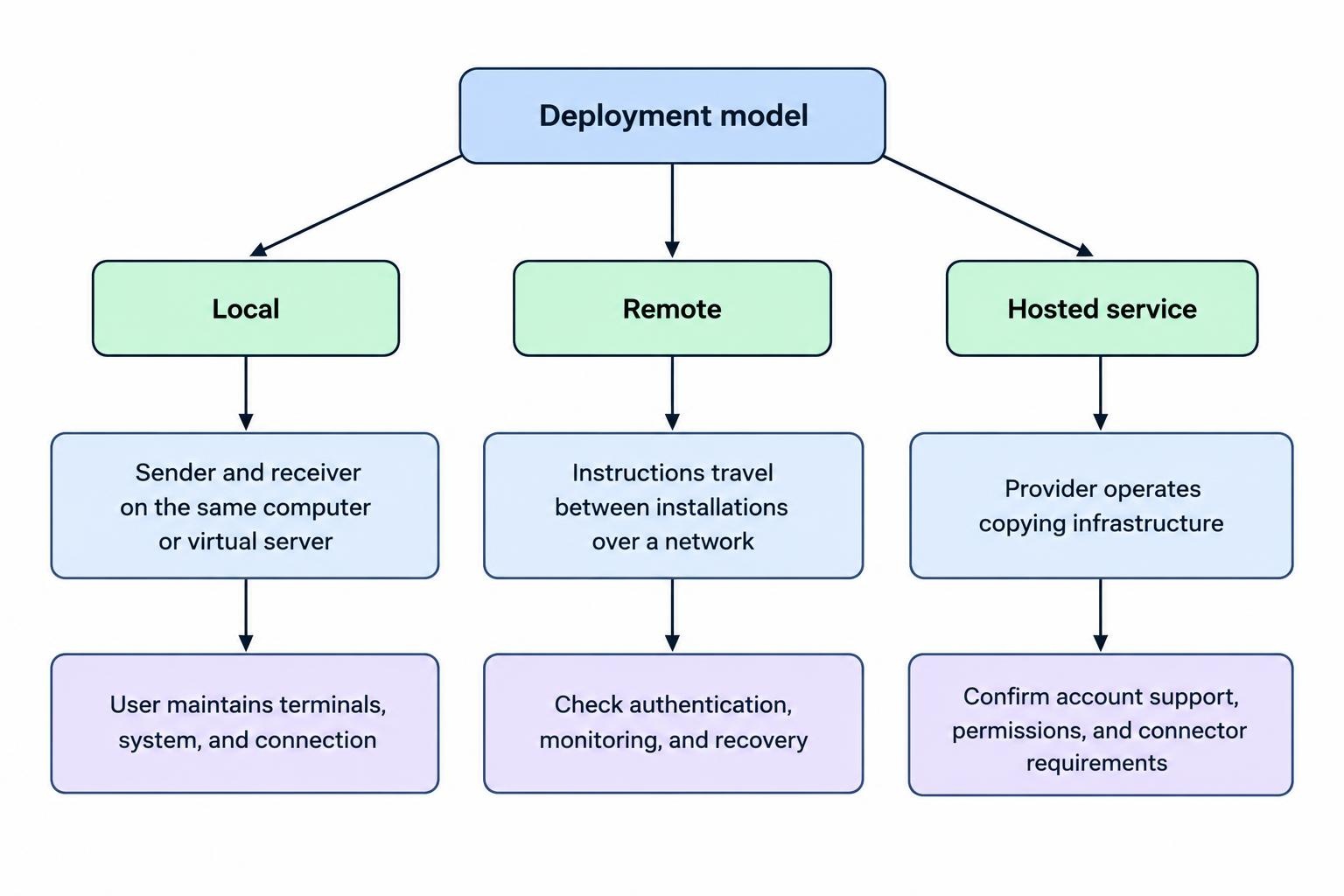
The deployment model determines which computers, terminals and connections must remain available. “Cloud” is not enough of a description; ask where the copying engine runs and whether it still depends on a desktop connector.
| Model | How it operates | Main consideration |
|---|---|---|
| Local copier | Sender and receiver components run on the same computer or virtual server. | You maintain the terminals, operating system and connection. |
| Remote copier | Trading instructions travel between sender and receiver installations over a network. | Check authentication, connection monitoring and recovery behaviour. |
| Hosted copying service | A provider operates the copying infrastructure. | Confirm supported accounts, permissions and any connector requirements. |
Local copying can support different platforms when the software provides the necessary bridge. The FX Blue Personal Trade Copier user guide documents copying between MT4 and MT5 installations on the same computer. It also requires those terminals to remain running; placing the original trade from a phone does not remove that dependency.
If your chosen copier depends on desktop terminals, plan for sleep settings, restarts and software updates. A forex VPS hosting setup can move that workload off your everyday computer, but it still needs monitoring and maintenance.
Check Account Compatibility Before Features
Start with the exact combination of sending platform, receiving platform and account type. Support for MT5 does not automatically prove that every MT5 account configuration will work as intended. Obtain confirmation for your proposed arrangement rather than relying on a platform logo.
Instrument mapping deserves particular attention. One account may label a currency pair EURUSD, while another adds a suffix. The copier must identify the intended instrument without confusing similarly named contracts. Matching names alone is insufficient: check contract size, minimum volume and permitted volume increments.
Position accounting also matters. A hedging account can hold separate buy and sell positions in the same pair. A netting account combines activity into one net position per instrument. Test how the copier translates entries, reductions and reversals between those structures.
Keep copied activity separate from unrelated manual trading where practical. Otherwise, position totals and margin usage become harder to reconcile. If several strategies feed one account, require a reliable method of identifying each strategy’s trades and preventing instructions from circulating back through another copier.
Choose Position Sizing That Matches the Account
Copying the same lot size is simple, but it can produce very different exposure relative to account equity. A 0.50 lot position represents a much larger commitment for a $2,000 account than for a $20,000 account.
Common sizing choices include a fixed lot size, a multiplier applied to the source trade, proportional sizing based on balance or equity, and sizing based on the cash amount at risk. These methods answer different questions. A multiplier controls volume; it does not establish the maximum loss.
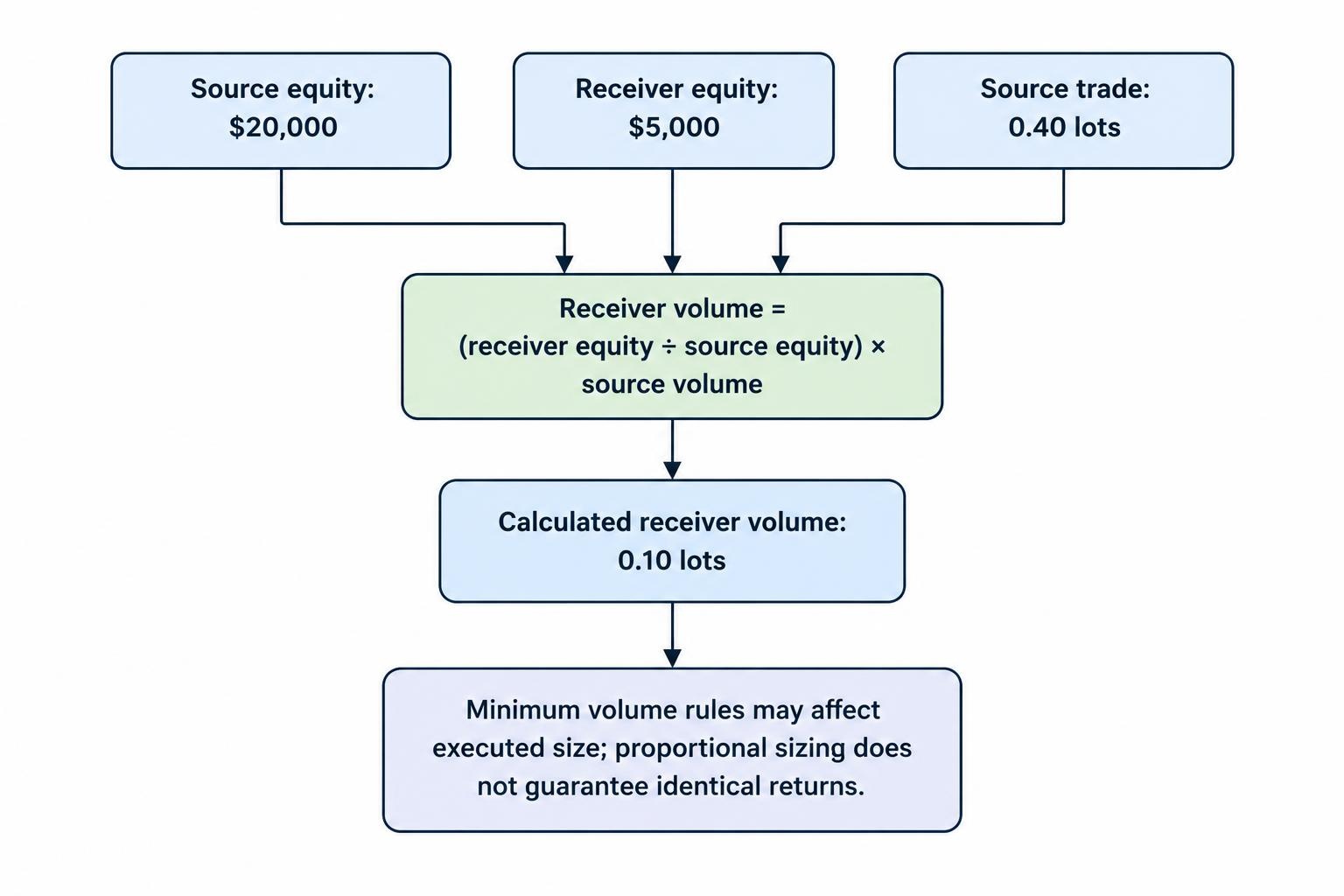
For an illustrative equity calculation, assume the source account has $20,000 equity and the receiver has $5,000, both in the same currency. A source trade of 0.40 lots becomes 0.10 lots using:
Receiver volume = receiver equity ÷ source equity × source volume
This is the basic relationship used by the cTrader Copy equity proportional model. It scales volume with equity, but does not guarantee identical percentage returns. Execution prices, costs and account trading conditions can differ.
Check what happens when the calculated size falls below the receiving account’s minimum. If 0.005 lots becomes 0.01 lots, the executed volume is twice the calculated amount. Decide whether the copier should skip, round down or round up, where those options exist.
For sizing based on cash risk, require a valid stop distance and the correct monetary value of a price movement. Set a separate rule for trades without stops. A “risk percentage” field is not meaningful unless the calculation behind it is clear.
Separate Copying Controls From Loss Protection
Confirm how stops reach the receiving account
A copier may transmit stop loss and take profit prices, follow the source position’s eventual closure, or offer both behaviours. These are different forms of protection, especially during a disconnection.
MetaTrader 5 Signals offers an option to copy stop loss and take profit levels to the subscriber account. Accepted levels are then handled by the receiving broker rather than depending on the terminal remaining open. The MetaTrader 5 Signals settings also include an equity threshold for stopping copying and closing positions.
Check the receiving account after execution: was the stop actually accepted, and is it attached to the intended position? A local software rule that watches prices is not the same as an order held at the broker.
Do not assume another copying service behaves the same way. cTrader Copy does not copy the provider’s individual stop loss or take profit protections; it copies the closing event. Its account equity stop is also not a guaranteed exit value, as detailed in the cTrader Copy protection and closure rules.
Define what happens when a limit is reached
Look for controls over maximum copied volume, permitted instruments, open positions and total exposure. Treat an equity threshold as an instruction to act, not a promise that losses stop at that exact figure.
Distinguish “pause new entries” from “disconnect copying” and “close all copied positions.” Pausing entries while continuing to receive exit instructions may suit one situation; closing everything may suit another. Test each action before relying on it. An emergency button should not require an emergency reading session.
Measure Execution, Not Just Transmission Speed
A fast message between copier components does not establish the time or price at which the receiving account fills. Separate signal detection, transmission, order submission and broker confirmation when reviewing performance.
For each test trade, compare source and receiver timestamps, entry prices, exit prices and rejected requests. Evaluate the resulting differences against the strategy’s expected trade size and holding period. A small price difference can matter far more to a short target strategy than to one holding positions for several days.
Set an acceptable entry deviation, then test the trade off. A tight tolerance may avoid worse entries but leave trades uncopied; a wider tolerance accepts more price variation. Use spread and slippage monitoring tools to assess the receiving account’s results rather than relying on an advertised copying speed.
Pay equal attention to exits. A delayed entry is visible as a missed opportunity. A delayed closure leaves an existing position exposed.
Test the Full Trade Lifecycle Before Going Live
Begin with a demo arrangement where the copier and service permit it. The objective is to verify behaviour, not to treat simulated profitability as evidence of future returns. Use a written test record so that changes to settings remain traceable.
- Entries: Test buys, sells and any pending order workflow you intend to use.
- Position changes: Check stop amendments, take profit changes and partial closures.
- Volume: Verify proportional sizing, minimum sizes and volume caps.
- Recovery: Disconnect and restart the required components, then inspect reconciliation.
- Shutdown: Test pausing entries, stopping copying and closing copied positions.
Include a startup test with positions already open on the source account. Establish whether the receiver opens them at current prices, ignores them or requests confirmation. Repeat after changing the account balance if sizing depends on balance or equity.
Also test a manual intervention on the receiver. Ask whether the copier respects a manually closed position or attempts to reopen it during reconciliation. Document the correct procedure for taking control without fighting the copier.
If positions diverge, preserve logs before changing settings. The separate guide to troubleshooting trade copier synchronisation errors covers fault diagnosis. Here, the buying criterion is simpler: the software should expose what happened and provide enough records to investigate it.
Compare Costs, Permissions and Support
Compare the total operating cost rather than the advertised licence alone. Check whether charges apply per account, connection, strategy or installation. Include hosting and any strategy subscription fees, then establish what happens when a subscription expires while positions remain open.
Read the licence terms too. Personal account copying and providing a paid copying service are not interchangeable permissions. Ask whether commercial use, account sharing or distributing the software requires a different agreement.
For account access, request the least authority the connection needs. A sender may only need to read trading activity, while a receiver needs permission to place and manage trades. Prefer restricted authorisation where supported, and establish how to revoke access. Do not provide withdrawal authority simply to enable copying.
Support quality matters most during an incident. Ask whether logs can be exported, whether configuration changes are recorded and how an account can be disconnected without losing control of existing positions. Save a working configuration before updating the copier.
Check Permissions Before Copying Other People’s Trades
Confirm that your broker and any funded account programme permit the proposed arrangement. Check rules for third party signals, automated execution, shared infrastructure and copying between accounts. Technical compatibility does not establish contractual permission.
Copying your own trading also raises different questions from charging others to follow it. In the United States, paid advice concerning retail off exchange forex can fall within the commodity trading advisor framework, with registration exemptions depending on the circumstances. Review the NFA commodity trading advisor registration requirements before offering a service; installing software does not settle its regulatory status.
What Makes a Trade Copier Worth Using?
The right forex trade copier supports your actual account combination, translates volume predictably and handles the entire trade lifecycle. It should make missed instructions visible, retain useful logs and give you a tested way to stop new exposure.
Choose it in that order: compatibility, sizing, protection, recovery and cost. Start with the smallest practical setup and expand only after the records match your expectations. The useful automation is not the part that opens ten trades at once. It is the part that leaves you knowing exactly what those ten trades are doing.