User permissions determine who can view accounts, submit orders, change controls and connect external services. Security determines whether those permissions remain effective when credentials leak, a device goes missing or someone leaves the team. A trading control panel needs both. A strong login does not compensate for unrestricted administrator access.
For trading dashboards and control panels, start with three questions: who can act, which accounts can they act on, and how quickly can that access be removed? Document the answers before connecting live trading credentials.
Build Permissions Around Actions, Not Job Titles
“Trader” and “administrator” are convenient labels, but neither defines a safe permission boundary. A trader may need authority over one account without seeing another. An administrator may need to manage users without being allowed to place orders.
Create a permission matrix that separates viewing data, exporting records, submitting orders, changing risk settings, managing integrations and administering users. Then assign those permissions to roles. The following is a starting design, not a set of capabilities every platform provides.
| Role | Permitted activity | Restrictions to retain |
|---|---|---|
| Viewer | View approved accounts, positions and reports | No orders, settings changes or exports unless separately approved |
| Analyst | Build reports and save personal dashboard layouts | No live execution or changes to shared trading controls |
| Trader | Submit, amend and cancel orders for assigned accounts | No user administration, credential access or self-approved limit increases |
| Risk operator | Review exposure and use approved restriction or shutdown controls | No automatic right to expand trading authority |
| Access administrator | Manage identities and approved role assignments | No routine trading access or unrestricted deletion of audit records |
| Service account | Run a defined reporting or execution process | No interactive use or permissions unrelated to that process |
Scope each role by account, environment and permitted action. Someone authorized to trade a demonstration account should not inherit access to its live counterpart. Permission to view positions should not automatically include downloading the entire account history.
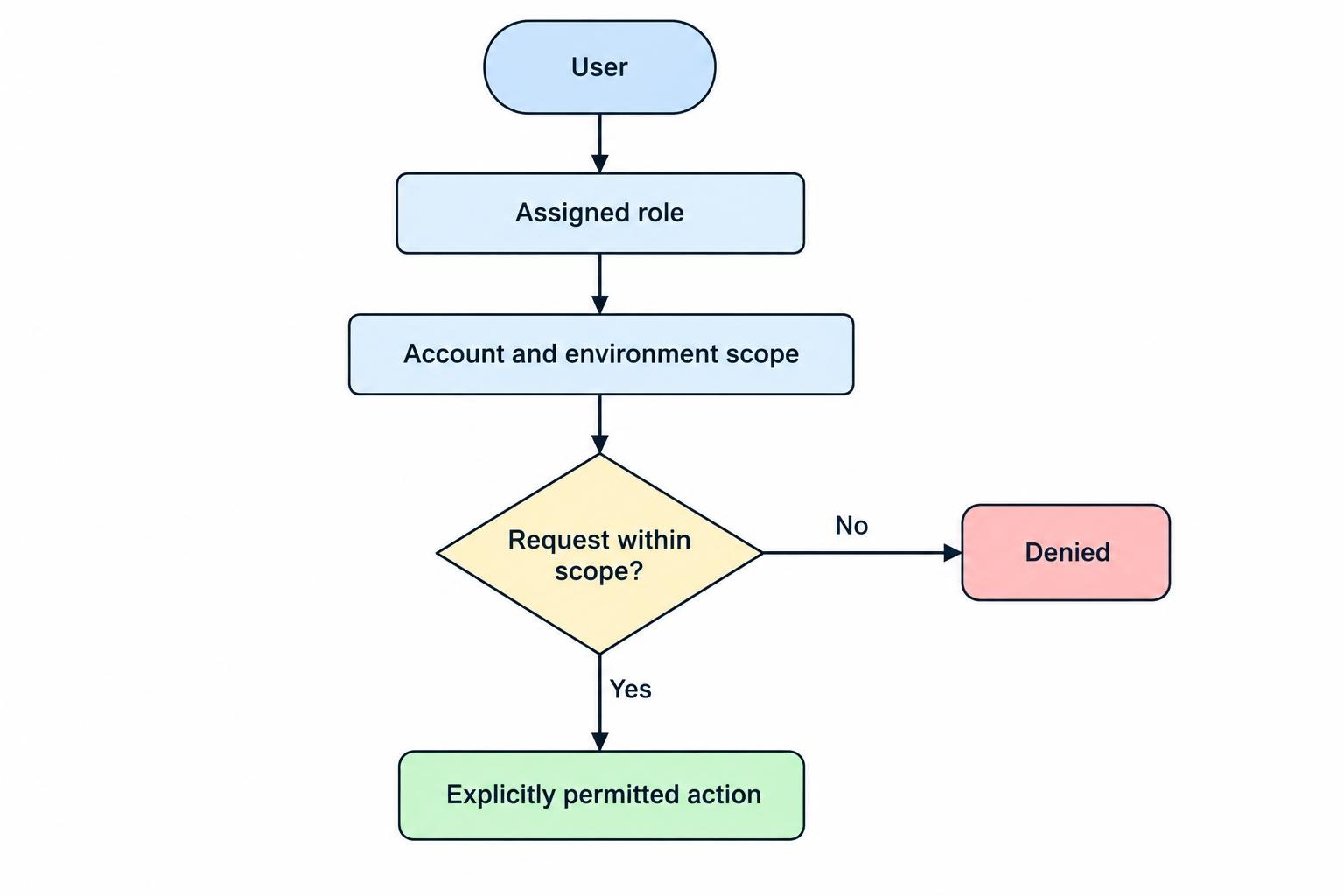
For a solo trader, separation still has value. Use an ordinary account for daily work and a separate privileged identity for administration. Keep the latter out of routine browsing and reporting tasks.
Enforce Access Beyond the Visible Interface
Hiding an order button is a presentation choice, not an authorization control. The service handling the request must verify the user, requested action and target account. Apply default denial and check permission on every request, including requests for exports and account records. These are core controls in the OWASP authorization guidance.
Consider a user assigned to Account A. In an authorized test environment, changing a request to reference Account B should produce a denial, not another account’s positions. Repeat the test for order submission, cancellation, reports and stored documents.
Also test what happens after permissions change. An already open browser tab should not retain trading authority simply because its screen has not refreshed. Require the execution service to apply current permissions rather than trusting an old interface state.
Protect Logins, Recovery and Active Sessions
Require multifactor authentication for users with trading or administrative access. Prefer phishing resistant authentication using FIDO2/WebAuthn, with user verification enabled through a PIN or biometric. Manually entered one-time codes do not provide the same phishing resistance; the distinction is covered in the NIST Digital Identity Guidelines for authentication.
Recovery deserves the same attention as enrollment. Register a protected backup authenticator where supported, store recovery material securely and define how a lost device will be handled. Do not let a hurried support request become an informal route around the normal login controls.
Set session timeouts appropriate to the role and require fresh authentication before sensitive changes, such as replacing a broker connection or granting administrator access. Give users a way to identify and terminate active sessions.
If the panel uses single sign-on, test logout and revocation in both the identity provider and the dashboard. Their sessions may be managed separately. During acceptance testing, remove access while a test user remains logged in and confirm which actions stop working.
A useful practical test is the lost-laptop scenario: can the account owner revoke access from another device without first recovering the missing computer?
Keep Broker Credentials Separate from Dashboard Users
Treat access to the dashboard and access to brokerage credentials as different permissions. A trader may need to submit orders through an approved connection without ever seeing the underlying secret.
For a hosted web panel, keep reusable broker secrets in a protected backend rather than distributing them to every user’s browser. Centralize credential storage, restrict which services can retrieve secrets and document rotation and revocation. The OWASP secrets management guidance covers this lifecycle and the need to assign each secret only the privileges it requires.
Where the broker supports it, use read-only credentials for monitoring and separate credentials for execution. Disable withdrawal and transfer permissions when the panel does not need them. A dashboard switch labeled “read only” should not be treated as proof that the underlying broker credential lacks trading rights.
Separate production and test credentials. Give each integration a named owner and record its purpose, permitted accounts, expiry arrangements and revocation procedure. Avoid a single shared credential serving reporting, execution and unrelated background tasks.
For a custom trading dashboard connected through broker APIs, map where each restriction is enforced: the dashboard, its execution service or the broker. Do not assume an account restriction configured in one layer exists in the others.
Plan credential replacement as an operational change. Test the replacement, switch the intended service, revoke the old credential and confirm that the old one fails. Never include complete secrets in logs, screenshots or support tickets.
Separate Approval from Execution
Some actions deserve a second person’s approval: granting administrator rights, connecting another live account, increasing trading limits or changing the destination of sensitive exports. This applies the NIST separation of duty principle, including the two-person rule, to changes that could expand someone’s authority.
Approval must refer to the exact proposed change. If a request to increase an account limit is edited after approval, require another review. Record the requester, approver, previous value, replacement value and time of activation. Do not allow the requester to approve their own request through a second role assigned to the same identity.
Use proportionate controls. Requiring two people to approve every routine order may obstruct the intended workflow. Requiring review before a trader can remove their own restrictions addresses a different, more direct conflict.
Keep permissions separate from the rules described in trading risk control panels. Permissions decide who may act; risk controls decide whether an otherwise authorized action is acceptable. Passing one check should not bypass the other.
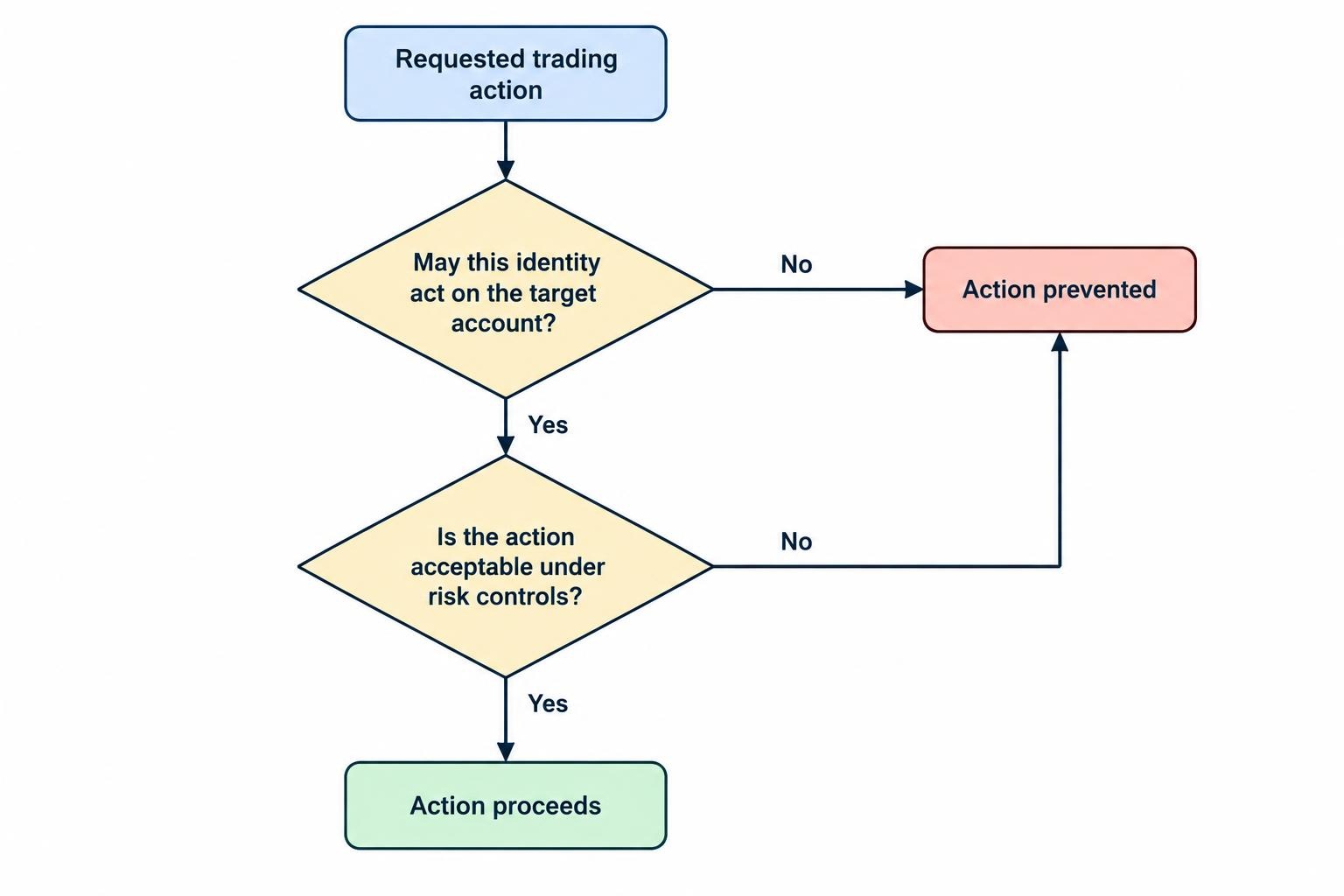
For emergency authority, distinguish restricting activity from restoring it. You might allow a risk operator to block new orders immediately but require separate approval to resume trading. Define cancellation and position-closing permissions individually rather than hiding them behind one broad “emergency” role.
Create Audit Records That Answer Trading Questions
An activity feed is useful only if it can reconstruct what happened. Capture authentication events, failed authorization attempts, role changes, connection changes and sensitive configuration updates. Centralize records and protect them against unauthorized alteration or deletion, following the joint agency guidance on event logging and threat detection.
For trading actions, design records around a practical question: who requested what, for which account, and what happened next? Include the user or service identity, timestamp, target account, action, outcome and identifiers that connect the request to subsequent execution events.
Keep “request received,” “order accepted” and “order filled” distinct. A successful dashboard request should not be presented as evidence of a completed trade. For configuration changes, retain the before and after values where appropriate, without recording secrets.
Restrict access to logs themselves. An administrator who can grant trading rights should not automatically be allowed to erase the evidence of that change. Set retention and access rules based on operational needs and applicable obligations rather than choosing an arbitrary period.
Assign someone to review alerts. A record of an unexpected administrator grant is more useful when it reaches a responsible person promptly, not during next month’s housekeeping.
Make Access Removal a Tested Procedure
Give every human and service account an owner. Record why access exists, who approved it and when it should be reviewed. Use expiry dates for temporary contractors, support sessions and project work rather than relying on someone to remember them.
When someone leaves or changes responsibilities, review more than their dashboard login. Remove obsolete role assignments, terminate active sessions, revoke personal tokens and inspect scheduled jobs or integrations they created. Rotate shared secrets they could access where exposure warrants it.
Prepare an incident procedure before live use. It should identify who can restrict execution, revoke credentials, contact the broker and inspect account activity through an independent route. The dashboard should not be the only recovery path for a problem involving the dashboard.
Define shutdown behavior precisely. Blocking new requests, cancelling working orders and closing positions are separate operations. The distinctions covered in trading bot monitoring and emergency stop controls also matter when a control panel manages automated execution.
After suspected compromise, reconcile open orders, positions and recent fills with broker records. Revoking a credential does not itself cancel an order already accepted by the broker. Decide how existing orders and positions will be handled rather than assuming “access removed” means “account safe.”
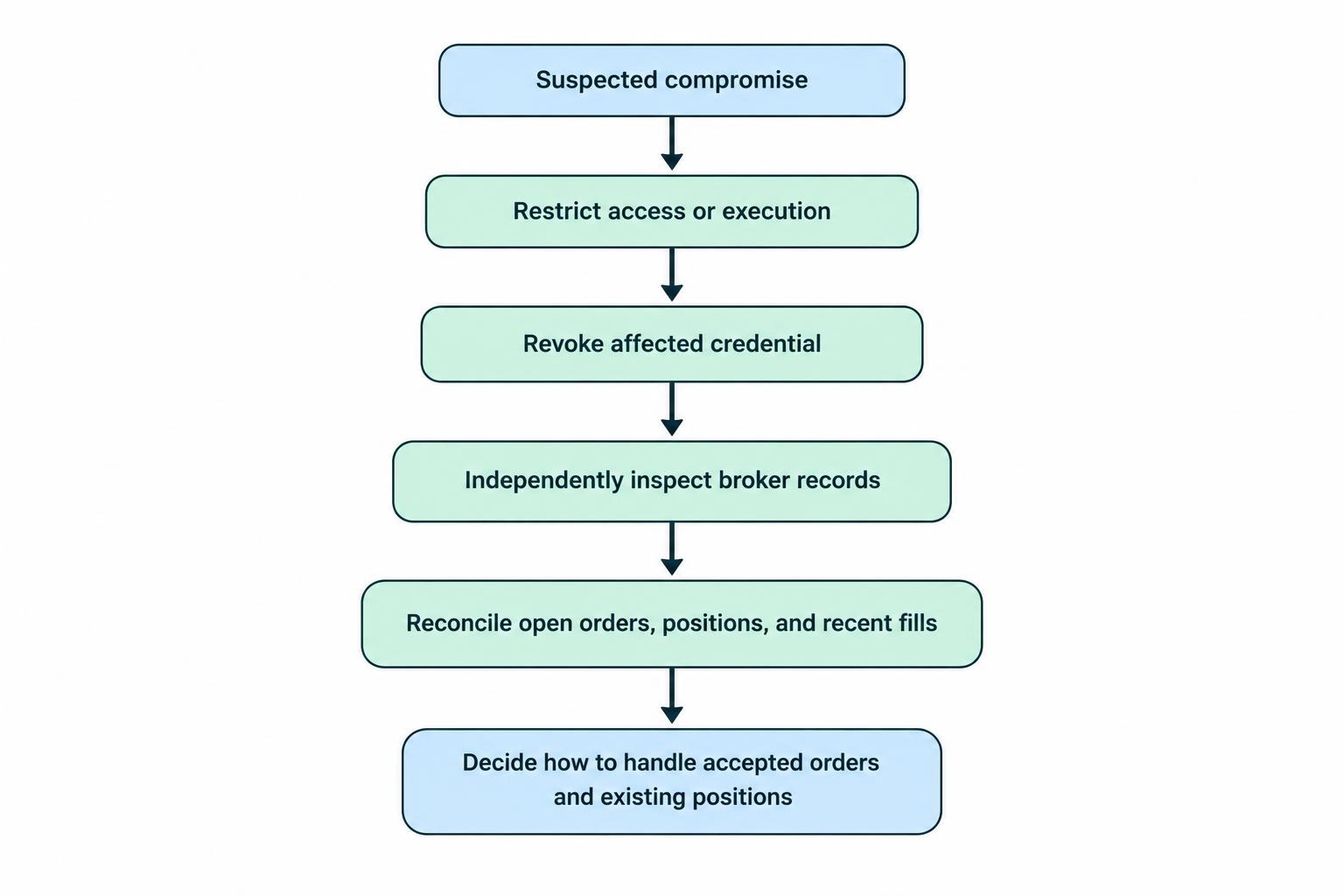
Keep recovery access protected and test it periodically. A backup administrator identity that nobody can use during an outage is little more than a reassuring label.
Verify Security Before Connecting Live Accounts
Evaluate a panel through demonstrations and controlled tests, not a collection of security badges. Ask the supplier to show account-level restrictions, credential revocation, audit exports and permission changes taking effect during an active session.
For a hosted service, establish whether support staff can access your accounts, whether access requires approval and how their activity is recorded. Ask who maintains the application and infrastructure, how security incidents are communicated and what happens to stored credentials when you disconnect.
For a self-hosted panel, assign responsibility for updates, backups, access reviews and recovery testing. Deployment ownership is not maintenance ownership unless someone has accepted the job.
Before activation, complete a short acceptance test:
- A viewer cannot submit orders or retrieve another account’s records.
- A trader cannot grant themselves broader permissions.
- A revoked session and an old credential fail when reused.
- A sensitive change leaves an attributable audit record.
- An authorized operator can restrict trading without relying on the affected interface.
Repeat the relevant tests after major releases, new integrations and permission-model changes. The standard to aim for is straightforward: each identity can do its assigned work, cannot expand its own authority unnoticed, and can be removed without guesswork.