Automated trading software turns trading rules into actions: reading market data, generating signals, checking risk and submitting orders. The software may handle one part of that process or run the entire workflow. A signal alert that requires approval is not the same product as a bot with permission to trade your account.
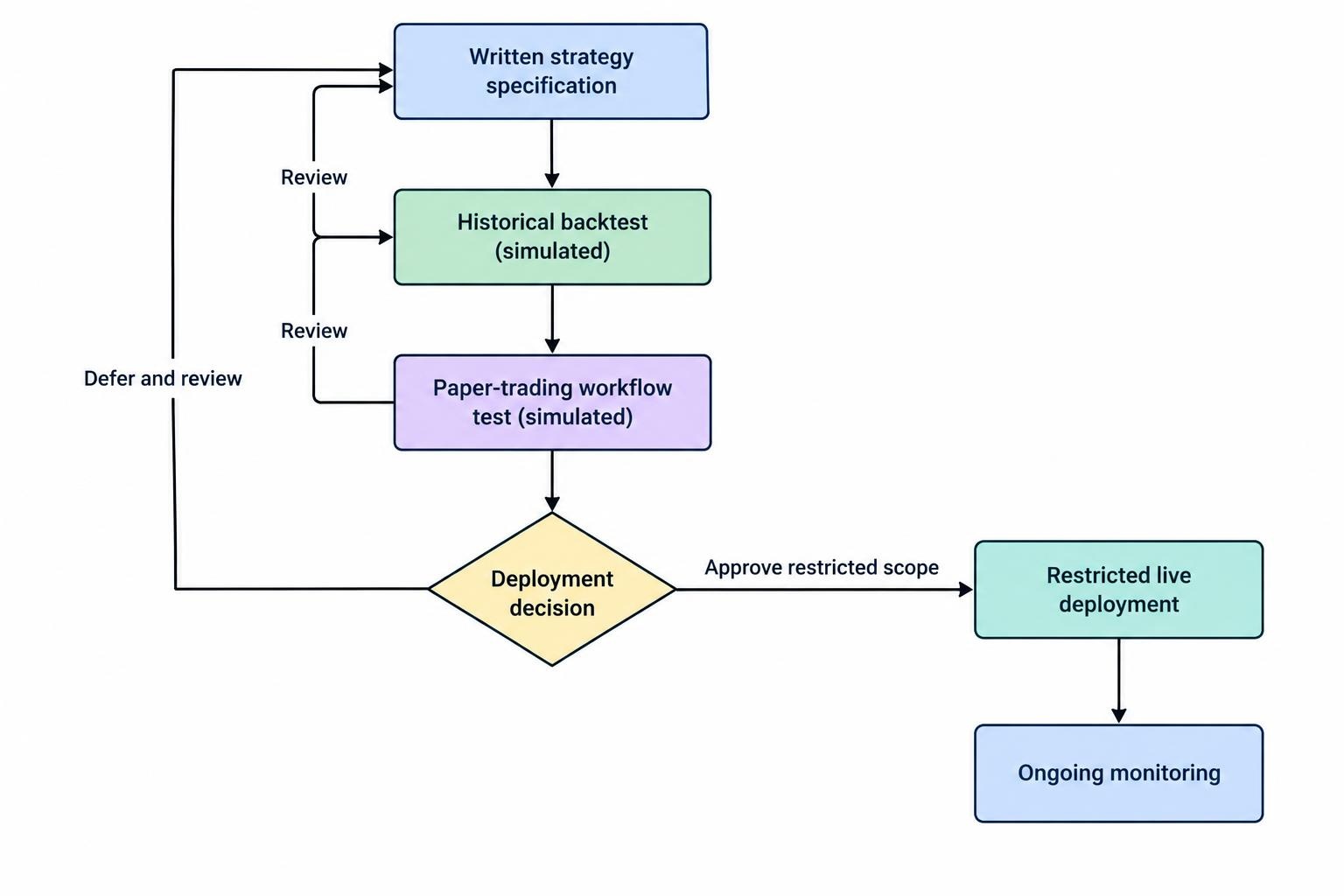
The practical task is to build a controlled process from strategy development through testing, deployment and monitoring. Start with rules you can explain, test them under realistic assumptions, then decide whether the system deserves access to real capital.
Automation does not make a strategy profitable or remove the risk of loss. Guaranteed returns and effortless “AI income” deserve particular suspicion; these claims feature in the CFTC advisory on AI trading bot fraud. Software can follow bad instructions with impressive consistency.
Choose the Right Level of Automation
Before comparing products, decide what you want the software to control. Some traders need help converting research into signals. Others need order execution, position sizing and account supervision. Buying an execution system before defining the strategy puts the shopping cart several steps ahead of the horse.
| Approach | What you control | What to check |
|---|---|---|
| Visual strategy builder | Rules assembled from menus or blocks | Whether the available rules express your strategy without awkward workarounds |
| Platform scripting | Custom logic within a trading application | Language restrictions, testing tools and behavior when the application closes |
| Custom trading application | Strategy logic, data handling and execution connections | Development workload, order tracking, security and recovery procedures |
Use the comparison of algorithmic trading platforms to assess these routes in more detail. Compare them against a written requirement rather than a feature count.
For a daily strategy, prioritize reliable scheduling and recovery over speed claims. For an intraday strategy, ask how the platform handles data updates and order acknowledgments. If you cannot maintain custom code, include ongoing development support in the budget.
Develop a Strategy Specification Before Writing Code
Treat development, testing and release as separate stages. Document the intended behavior and preserve previous versions before changing a live system. These controls also feature in FINRA’s algorithmic trading supervision guidance, which addresses member firms rather than serving as a retail trader’s compliance checklist.
“Buy when momentum improves” is an idea, not an executable specification. Define the instruments, calculation period, entry trigger, exit conditions, position size and trading hours. State whether the strategy evaluates completed price bars or acts during a bar.
Consider a hypothetical daily strategy that enters after the closing price exceeds the previous 20 sessions’ highs. The specification should identify when that closing price becomes available and when an order may be sent. Do not let the test assume a fill at a price that was already gone when the signal became known.
Write down what should happen outside normal trading conditions too:
- Skip new entries when required data is missing or stale.
- Reject orders that breach position or account exposure limits.
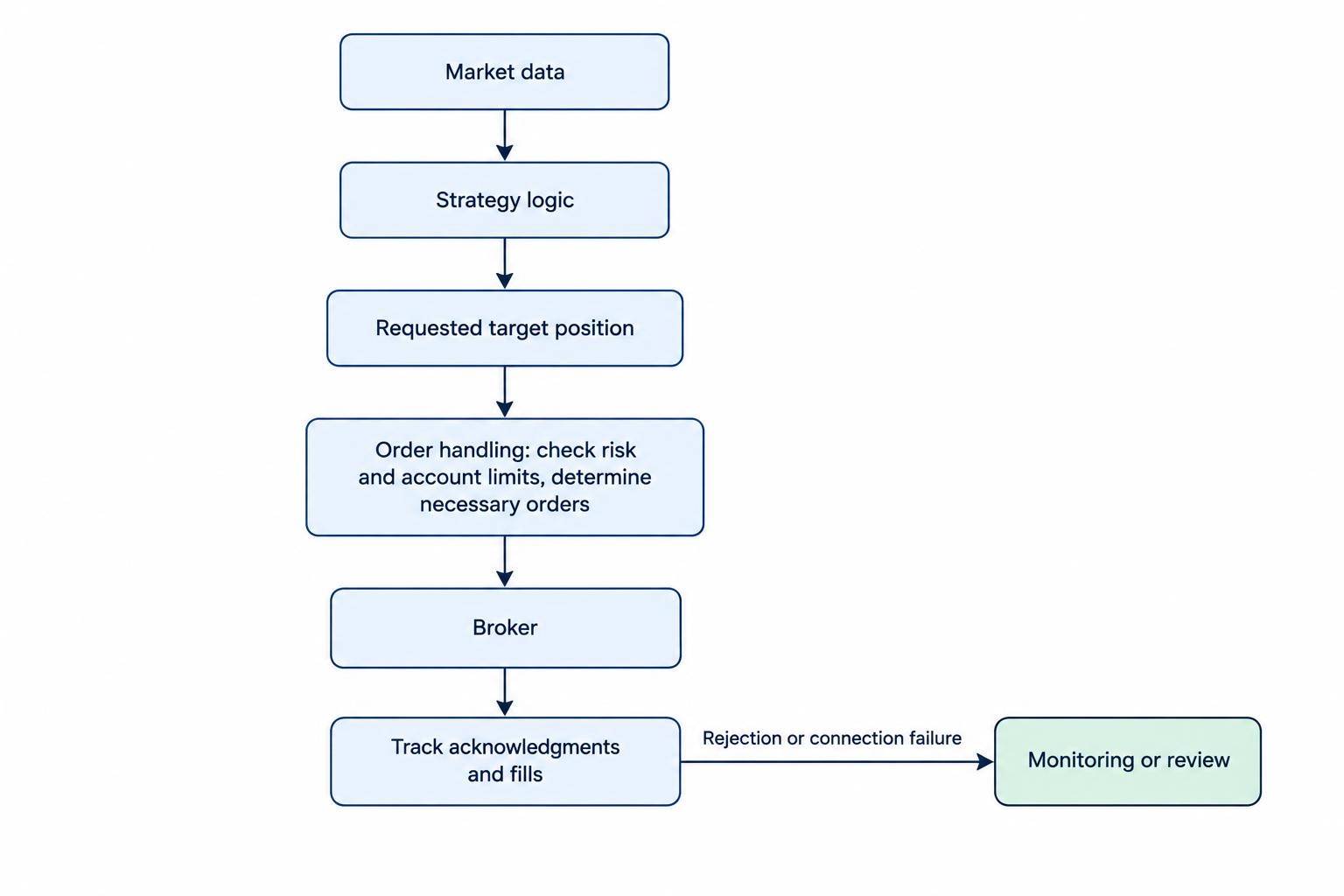
- Define what to do after a partial fill, rejection or connection failure.
- Specify how existing positions and pending orders are handled after a restart.
Keep signal generation separate from order handling. The strategy can request a target position; another component should determine which orders, if any, are needed to reach it. That separation gives you a clearer place to test account checks and execution failures without changing the trading idea.
Backtest the Rules, Data and Trading Costs
A backtest should test the specification, not repair it behind the scenes. Before interpreting returns, inspect individual trades and confirm that signals, timestamps, quantities and exits match the written rules. Our guide to trading strategy backtesting software covers the testing environment in greater detail.
Check whether the data is appropriate for the decisions being simulated. A daily closing price cannot tell you the precise sequence of movements within that session. For stock strategies, review adjustments for splits and dividends, and check whether historical investment lists exclude companies that later disappeared.
Use only information that would have been available at the decision time. An earnings figure belongs in the test when it was published, not automatically at the end of the accounting period it describes. Ask the same timing question of revised economic data and changing index membership.
Build costs into the test before judging the result. Include applicable commissions, spreads, slippage, financing and borrowing expenses. Keep fixed software and hosting charges visible in a separate operating budget rather than losing them between the trading report and the subscription invoice.
Suppose a hypothetical strategy earns $12 per completed trade before costs. If modeled trading costs are $9, the remaining average is $3. Another $4 of execution cost turns that average into a $1 loss. This is a sensitivity check, not a forecast, but it shows why small assumptions deserve close inspection.
Test Stability, Not Just the Winning Settings
Keep a record of every strategy variation you evaluate. Selecting the best result from hundreds of attempts is different from testing one rule chosen in advance. Repeated searches can select historical noise rather than a repeatable effect, a problem examined in the research paper The Probability of Backtest Overfitting.
Reserve later periods for evaluation rather than repeatedly adjusting the strategy to improve them. Walk forward testing can structure this process by fitting rules on one period and evaluating them on the next. Treat it as another test, not proof of future profitability.
Inspect nearby parameter values and different market conditions. Ask whether the result depends on a handful of trades, one instrument or an unusually favorable period. Set acceptance criteria before opening the results, including acceptable drawdown, turnover and cost sensitivity.
Use Paper Trading to Test the Operating Workflow
After historical testing, run the intended deployment setup with simulated capital. Keep the same strategy version, schedules, configuration and monitoring arrangements you plan to use live. The aim is to test the workflow, not just produce another return chart.
Inspect simulation defaults. QuantConnect’s default paper trading model fills market orders immediately and completely and applies no slippage, as documented in its paper trading execution model. That illustrates why a working simulation should not be treated as evidence of equivalent live execution.
During the trial, compare expected signals with generated orders. Check time zones, market holidays, instrument identifiers and position quantities. Restart the application deliberately. Interrupt its connection in a controlled environment and verify how it recovers.
Set operational pass criteria: no unexplained duplicate orders, no unresolved position mismatches, reliable notifications and correct recovery after a restart. Choose a trial period that gives the strategy opportunities to exercise its normal behavior; a low frequency system needs more than a quiet afternoon.
The guide to paper trading automated strategies covers this stage separately. Passing it supports a deployment decision, but it does not establish how live orders will fill or whether the strategy will remain profitable.
Deploy With Restricted Access and Defined Limits
Before deployment, confirm that the broker permits your intended automation and supports the required instruments, order types and account permissions. Check these against your account and jurisdiction rather than assuming that an integration logo covers every use case.
Choose hosting around the strategy’s operating hours and support needs. If using your own computer, plan for sleep settings, updates and power interruptions. With hosted infrastructure, establish who handles outages, where logs are stored and how you regain control.
Use separate credentials for testing and production. Grant only the permissions required, disable withdrawal access where available, and keep secrets out of strategy files and logs. Preserve a tested release so that a failed update has a defined rollback path.
Start, if you proceed, with exposure you can afford to lose. Configure order size, position size, account exposure and message rate limits before launch. A daily loss threshold should trigger a defined response; do not treat it as a guaranteed ceiling on losses.
Check order status before retrying an uncertain submission. A timeout does not tell you whether the original order reached the broker. The guide to broker APIs for automated trade execution examines the connection and order lifecycle.
Finally, define “stop.” Pausing new entries, canceling pending orders and closing positions are different actions. Test each supported action, verify its outcome and retain a way to access the account independently of the bot.
Monitor System Health Separately From Strategy Performance
Build two monitoring views. One should answer whether the system is operating correctly. The other should answer whether trading behavior remains within the expectations established during testing. A green connection indicator cannot answer both questions.
For operational monitoring, track data freshness, process activity, connection status, outstanding orders and rejected submissions. Reconcile the software’s recorded positions with the broker’s records. If the records disagree, investigate before permitting further entries.
For performance monitoring, review realized and unrealized profit and loss, drawdown, turnover, exposure and execution costs. Compare actual trades with the strategy’s intended decisions. Investigate whether a disappointing result came from the trading rule, an implementation error or a different fill than expected.
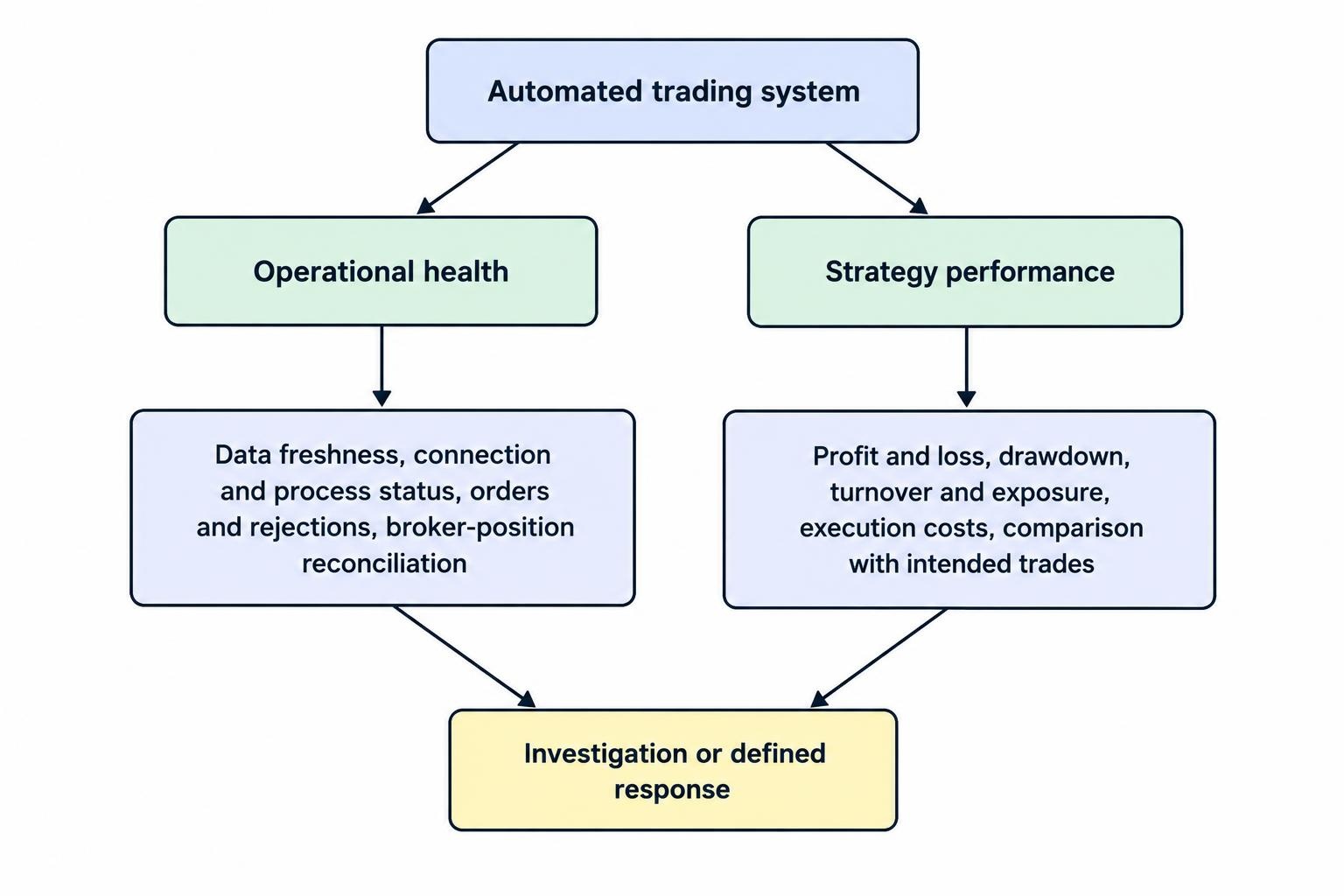
Give alerts an action and an owner. “Connection lost” should lead to a documented response, not simply another notification. Send urgent alerts through a route that remains available if the trading application fails, and test that delivery regularly.
Keep the detailed setup in the guide to trading bot monitoring and emergency stop controls. Include release reviews in that process: record what changed, why it changed, which tests passed and which version is running.
Avoid rewriting the strategy after every losing sequence. Investigate breaches of predefined limits, but do not confuse normal variation with a software defect. Any proposed adjustment should return through testing rather than slipping straight into production.
Evaluate Software by Evidence and Total Cost
Before paying, request a demonstration of the complete workflow: define a rule, run a test, inspect an order, export the records and recover from a restart. Ask what stops working when a subscription expires and whether your strategy files remain accessible.
Separate backtested, simulated and actual trading results in any sales presentation. Check the periods shown, omitted costs and benchmark choice. Backtested returns are hypothetical, and fees reduce returns; the SEC investor bulletin on performance claims sets out these distinctions.
Budget for software, data, hosting, development and maintenance, not just the advertised monthly charge. Require useful records and clear controls before adding more features. A sensible purchase is software that lets you explain what should happen, verify what happened and intervene when the two disagree.