Forex spread and slippage monitoring tools track the difference between quoted trading costs and the prices your orders actually receive. A useful monitor records bid and ask quotes, captures order events, and connects each fill to a clearly defined reference price. A spread display alone cannot tell you whether execution is getting worse.
The practical aim is to separate expensive market conditions from delays, recording errors and recurring execution problems. Within a forex trading software setup, monitoring should provide evidence for decisions about trading hours, order size and execution settings—not another dashboard that turns red after the damage is done.
Measure Spread and Slippage Separately
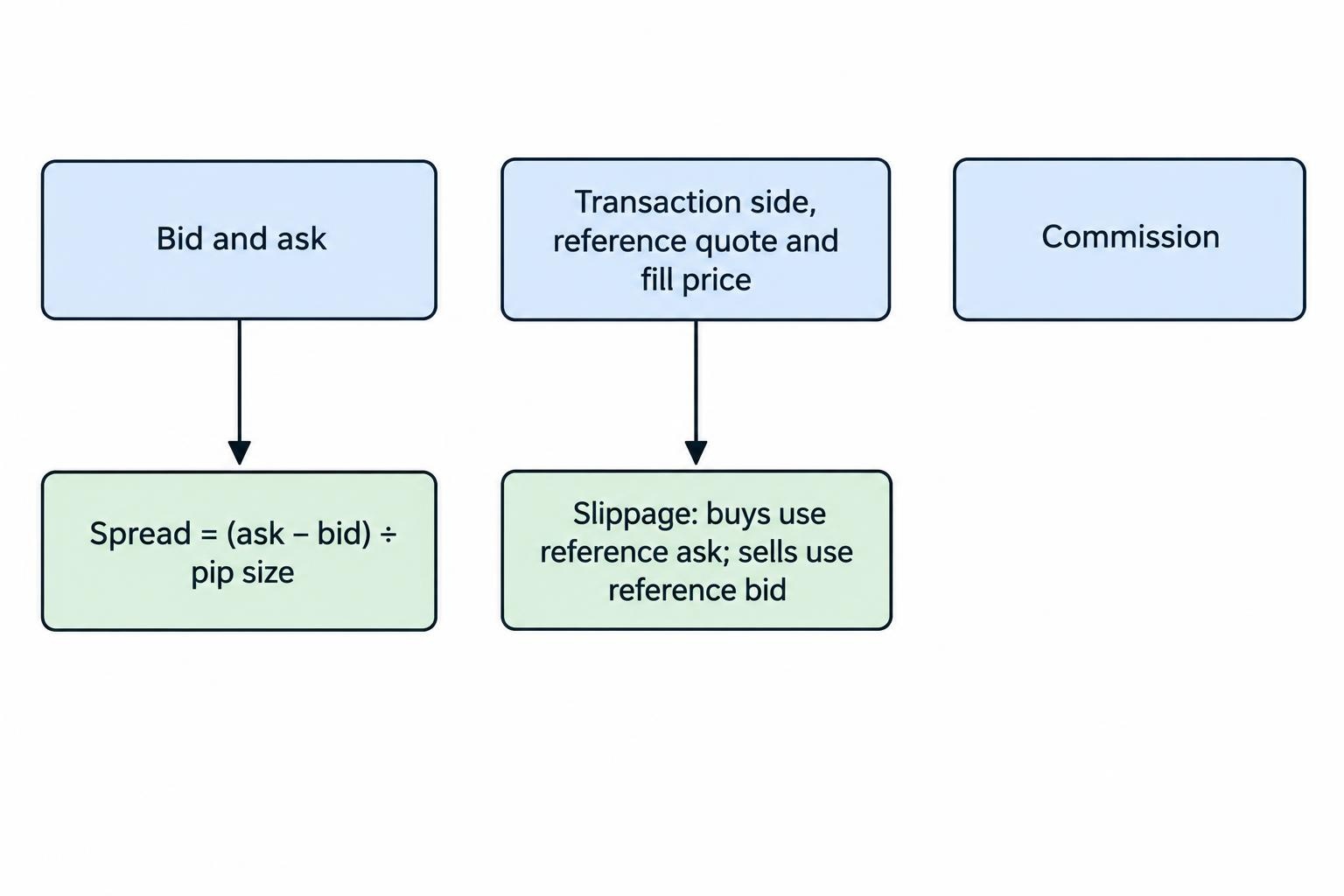
The spread is the difference between the bid and ask at a particular moment. Slippage is the difference between an execution price and a chosen reference price. They describe different costs, so a monitoring tool should not combine them under an unexplained “execution quality” score.
Spread in pips = (ask − bid) ÷ pip size.
For slippage, use a consistent sign convention. One practical choice makes adverse execution positive and favourable execution negative:
Buy slippage = (fill price − reference ask) ÷ pip size.
Sell slippage = (reference bid − fill price) ÷ pip size.
The transaction side matters, including when closing positions. Closing a long position is a sell; closing a short position is a buy. Comparing every fill with the bid will make buy execution look worse than it was.
Consider a hypothetical EUR/USD quote of 1.08450 bid and 1.08462 ask. With a pip size of 0.0001, the spread is 1.2 pips. If a buy order receives 1.08467 against that recorded ask, adverse slippage is 0.5 pips.
The reference midpoint was 1.08456, making the fill 1.1 pips above midpoint. That already includes half the quoted spread plus the measured slippage. Adding the full spread again would double count part of the cost. Keep commissions separate, and do not deduct spread again from profit figures that already reflect executed entry and exit prices.
Label the benchmark explicitly: quote at order submission, stop trigger price, or midpoint at a recorded decision time. These are not interchangeable. Detailed transaction cost analysis depends on accurate timestamps, granular prices and an appropriate benchmark, as set out in the BIS report on FX execution algorithms and transaction cost analysis.
Which Monitoring Tools Fit Different Workflows?
Choose the recording method before choosing the dashboard. A polished report cannot reconstruct a quote that was never saved.
| Tool type | Useful for | What to check |
|---|---|---|
| Platform history and event panels | Reviewing individual orders and fills | Whether the original reference quote and timing details are available |
| Spread indicators and quote recorders | Watching current conditions and building spread history | Whether they store both bid and ask rather than displaying only the latest spread |
| Spreadsheet analysis | Checking formulas and reviewing modest datasets | Whether imports preserve price precision, timestamps and identifiers |
| Custom recorders and analytics databases | Continuous monitoring across strategies or accounts | Whether requests, quotes and fills can be matched reliably |
MetaTrader 5 Tick Collection
MetaTrader 5 provides a documented route for retrieving tick data through its Python integration. The MetaQuotes copy_ticks_range documentation covers date range requests, bid and ask data, and filtering for quote changes. It also requires attention to UTC when constructing time requests.
This supports a workflow that retrieves ticks, calculates historical spreads and joins prices to separately recorded order events. Tick history alone does not establish the quote your application saw when it submitted an order. For that benchmark, save a live quote snapshot at submission as well.
cTrader Order and Deal Records
In cTrader, one order can generate several deals at different prices. The cTrader documentation on positions and deals distinguishes the instruction from its actual executions. That distinction matters when an order fills in parts.
Use a volume weighted fill price: multiply each deal price by its filled quantity, add the results, then divide by total filled quantity. Keep the individual deals too. An average price can conceal a delayed final fill or an unusually expensive portion of the order.
Spreadsheets and Custom Dashboards
A spreadsheet is a sensible starting point when the dataset remains manageable. It makes incorrect pip conversions and reversed buy or sell signs easier to inspect before automating the report.
Move to a database or dashboard when imports become repetitive, multiple recorders need reconciling, or alerts require continuous processing. Keep the calculation rules visible. A proprietary score without its benchmark, exclusions and weighting is difficult to audit.
Build an Order Record You Can Audit
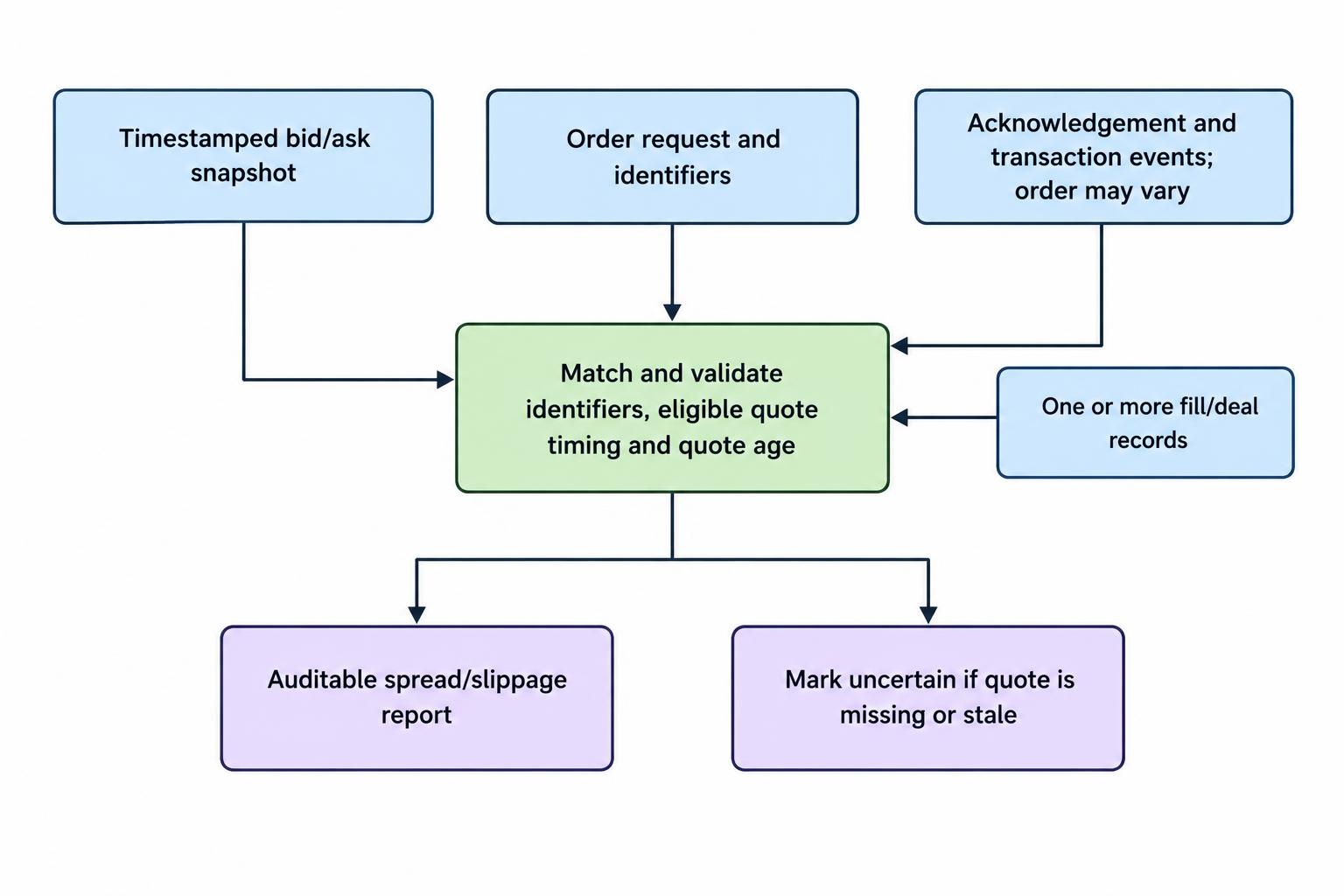
Create one parent record for each submitted order and retain a separate record for every fill. Include rejected, cancelled and unfilled requests rather than logging only completed trades. Otherwise, a restrictive execution setting can appear excellent simply because the awkward orders disappeared from the sample.
A useful minimum record contains:
- Identity: account alias, symbol, strategy tag, request ID, order ID and deal IDs.
- Instructions: buy or sell, order type, requested quantity, requested price and any price tolerance.
- Timing and quotes: submission time, bid and ask snapshot, quote timestamp, acknowledgement time and fill times.
- Outcome: filled quantity, deal prices, commissions, rejection reason and final order status.
For an MT5 recorder, MetaQuotes’ OnTradeTransaction event documentation describes trade transaction notifications and warns that their arrival order is not guaranteed. Match events through identifiers and reconcile them with account history; do not assume the next notification belongs to the last request.
Record the raw values too, rounded dashboard numbers are not enough for an execution review. Store the symbol’s pip convention explicitly rather than assuming that every decimal place represents a pip.
Keep Clock Differences Out of Slippage
Distinguish local receipt time from a platform or server timestamp. Converting both to UTC fixes timezone representation, but it does not prove that the underlying clocks agree.
For local elapsed durations, use a monotonic clock that is not affected by wall clock adjustments. Label submission to acknowledgement time honestly: it includes more than network travel and is not a direct measurement of server processing time.
When matching fills to historical quotes, use the latest eligible quote at or before the benchmark time, not a later quote that happened to be closer. Set a maximum acceptable quote age. If the available quote is stale or missing, mark the measurement as uncertain rather than reporting false precision.
Report Typical Costs and Expensive Exceptions
A single average is a weak execution report. Design the output to show the middle of the distribution, its expensive end and the amount of evidence behind each result.
Spread Statistics
Show the median spread, a higher percentile such as the 95th, and the percentage of valid monitored time above your chosen threshold. Calculate these by currency pair and trading session.
Distinguish tick weighted from time weighted summaries. A tick weighted average gives more influence to periods with frequent quote updates. A time weighted average reflects how long each valid quote persisted. Neither should silently carry an old quote through a disconnection.
Attach scheduled event labels through an economic calendar integration. This lets you compare event windows with ordinary sessions without treating every expensive observation as the same problem. Keep event timestamps and timezone rules consistent with the execution records.
Slippage and Completion Statistics
Report signed average slippage, adverse slippage percentiles, and the proportions of favourable, unchanged and adverse fills. Show both order weighted and volume weighted results when trade sizes vary.
Include sample counts beside every segment. A handful of fills can justify reviewing an incident, but not a confident ranking of accounts or execution methods.
Separate market orders, triggered stops and limit orders. Also split entries from exits, small orders from larger ones, and manual trading from automated requests. A changing mix of order types can move the headline average without any deterioration within the underlying groups.
Track fill rate and time to completion alongside price. Better prices on a shrinking fraction of submitted orders may not represent a better trading process.
Set Alerts That Support Useful Decisions
Use separate alerts for spread, slippage and data health. A wide spread warning concerns the current quote. A slippage warning concerns a completed execution. A stale feed warning means the monitor may not know enough to judge either.
Calibrate thresholds to the pair, session and strategy’s cost allowance. As a hypothetical starting rule, an entry alert could require the spread to remain above a chosen multiple of that session’s historical median for several seconds. Test the rule against stored data before allowing it to affect orders.
Price tolerances involve a trade off. cTrader’s market range setting constrains permitted price deviation, but an excessively tight range can leave an order unfilled. Its order documentation covering market ranges and limit orders also distinguishes immediate execution from orders that require an acceptable price.
Do not judge a tighter tolerance only by the fills that survived it. Review rejected requests, missed entries, completion delays and what happened before any replacement order.
Keep entry filters separate from protective exits. A rule that blocks new exposure during expensive conditions should not accidentally block a risk reducing action. Monitoring software should also avoid automatically loosening price tolerances simply to improve its completion statistics.
Compare Setups Without Changing the Question
When comparing accounts, devices or hosting arrangements, match currency pairs, order types, size ranges and trading windows. Comparing quiet session entries on one setup with event driven exits on another says little about execution quality.
Use the same benchmark definition on both sides. An independent price feed can provide context, but do not assume its displayed quote was executable for your account and order size. Treat differences as evidence to investigate rather than automatic proof of an execution fault.
If you are assessing forex VPS hosting, compare measured request timing and slippage before and after the change while keeping the trading process as consistent as practical. A shorter connection path is not, by itself, proof of better fills.
Validate collection and calculations in a test environment first. Then assess live execution separately with appropriate risk controls; a successful recording test does not establish future trading performance.
Choose Auditability Over Extra Features
Before paying for a monitoring tool, request a sample export and check whether you can reproduce one order’s spread, slippage and weighted fill price. Confirm how it handles partial fills, stale quotes, restarts and missing data. Check retention periods and whether exporting your own records carries another charge.
Prefer read only access where the integration supports it. A reporting tool should not receive order placement or withdrawal permissions without a clear operational reason.
The right tool leaves a traceable record from quote to request to fill. Start with reliable collection, verify the arithmetic, then add reports and alerts. Monitoring can identify costs and faults; it cannot guarantee execution prices or make an unprofitable strategy profitable.