Portfolio rebalancing software compares your investments with a target allocation, measures how far the portfolio has drifted, and calculates the changes needed to bring it back into line. Depending on the service, it may flag a mismatch, prepare a trade list, or place orders after you grant trading authority.
The buying decision is not simply whether a tool supports “automatic rebalancing.” You need to know which accounts it covers, how it handles taxes and cash, and what happens when a trade fails. Unlike basic portfolio tracking software, a rebalancing tool should turn an allocation gap into an actionable, reviewable plan.
What Portfolio Rebalancing Software Should Do
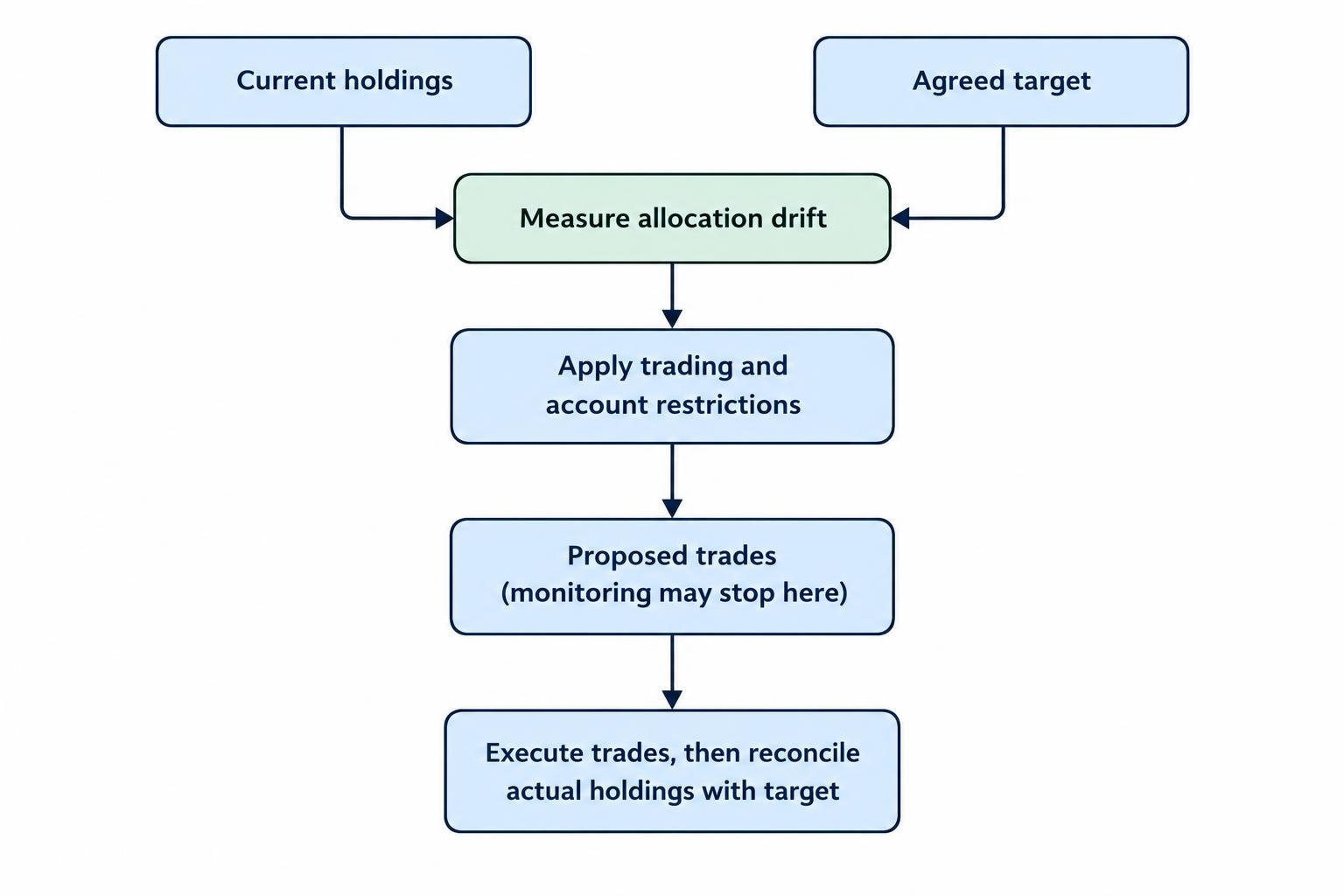
A useful rebalancing workflow starts with current holdings and an agreed target. The software calculates each holding’s weight, compares it with that target, applies your trading restrictions, and produces proposed changes. After execution, it should compare actual holdings with the intended result.
Separate three levels of functionality before comparing subscriptions:
- Monitoring: Measures allocation drift and sends alerts. You calculate or place the trades yourself.
- Trade planning: Produces proposed purchases and sales, ideally with cash requirements, estimated gains or losses, and projected allocations.
- Automated execution: Sends orders through a supported account connection or manages the portfolio within an advisory service.
These levels are not interchangeable. A dashboard that displays an overweight position has not necessarily worked out which shares to sell. A trade calculator has not necessarily checked whether the connected account can accept its orders.
Automation also does not establish whether the target suits your circumstances. An investment tool may overlook outside holdings, future spending needs, or parts of your tax situation. FINRA’s guidance on automated investment tools identifies these gaps and warns against promises of better portfolio performance.
For a simple portfolio reviewed occasionally, a spreadsheet may be enough. Paid software becomes easier to justify when it removes recurring work: coordinating accounts, processing contributions, applying restrictions, or keeping a reliable record of decisions.
Set the Allocation and Drift Rules Before Automating
Rebalancing restores an existing target. Changing that target is a separate investment decision. Moving from 60% stocks to 40% stocks because your spending needs have changed is not the same task as restoring a 60% stock allocation after market movements.
Choose the investment policy before configuring the software. If you still need to compare possible mixes, use asset allocation tools for that stage rather than treating the rebalancer’s default model as a recommendation.
Then decide what should trigger a review. A calendar rule checks the portfolio on scheduled dates. A threshold rule reacts when an allocation moves outside an agreed band. A combined approach checks periodically but proposes trades only when the drift exceeds your tolerance. Calendar and threshold approaches are both covered in the SEC’s guide to allocation and rebalancing.
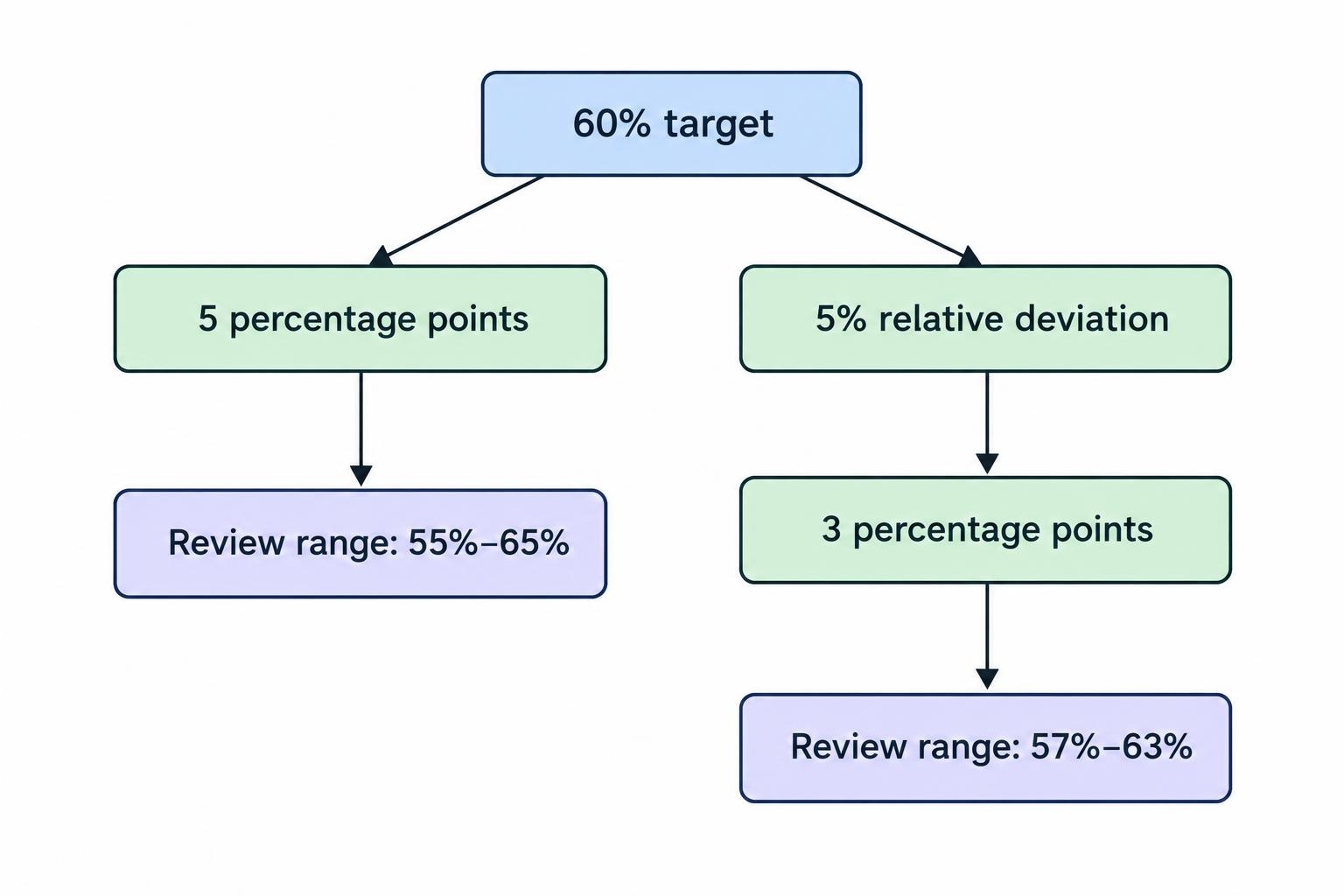
Check how the software defines its threshold. A five percentage point band around a 60% target permits a range from 55% to 65%. A relative deviation of 5% from that target equals three percentage points, producing a range from 57% to 63%. Similar wording, different trade triggers.
Also distinguish the trigger from the destination. Once a band is breached, does the tool trade back to the exact target, or only far enough to return inside the band? Ask whether you can set minimum trade amounts and prevent repeated alerts while an approved rebalance is still in progress.
A Worked Rebalancing Example
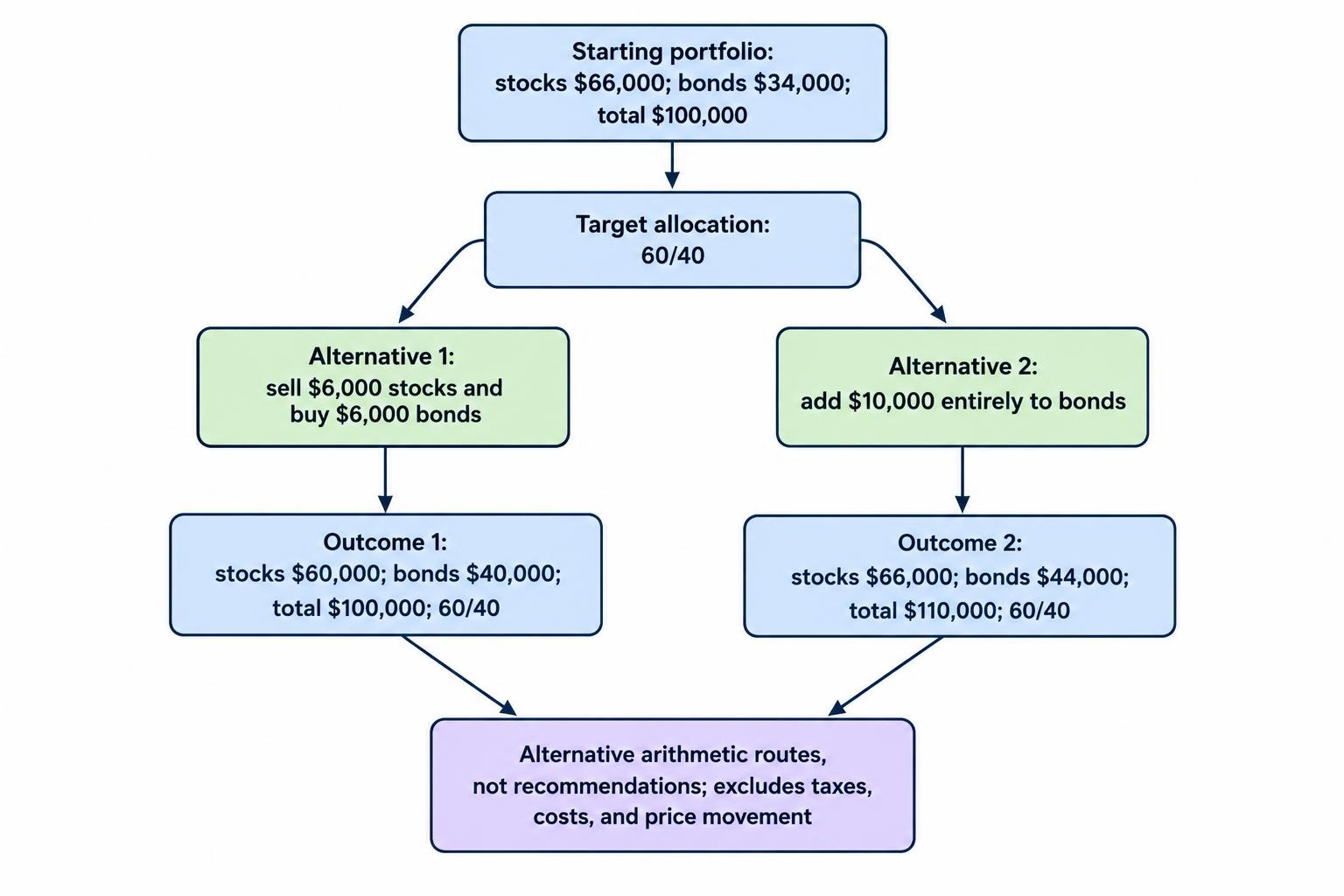
Suppose a portfolio worth $100,000 has a target of 60% stocks and 40% bonds, but its current allocation is 66% stocks and 34% bonds. This is an arithmetic example, not a suggested investment mix.
| Asset class | Current value | Target value | Proposed change |
|---|---|---|---|
| Stocks | $66,000 | $60,000 | Sell $6,000 |
| Bonds | $34,000 | $40,000 | Buy $6,000 |
That plan assumes no contribution, withdrawal, trading cost, or price movement between calculation and execution. Actual share quantities may also require rounding.
There is another route. Adding $10,000 entirely to bonds would produce $66,000 in stocks and $44,000 in bonds. The new $110,000 total would also match the 60/40 target, without selling stocks.
A useful evaluation question follows: does the software consider incoming cash before recommending sales? The two plans reach the same allocation, but their funding requirements and potential tax consequences differ.
Handle Cash Flows and Multiple Accounts Deliberately
Look for separate settings for new contributions, accumulated distributions, withdrawals, and cash reserves. Money earmarked for near term spending should not disappear into a purchase order because the software labels every available dollar “uninvested.”
For withdrawals, ask whether the tool can propose sales from overweight assets while respecting your cash reserve and sale restrictions. For contributions, check whether it directs purchases toward underweight assets rather than distributing every deposit in the original target proportions.
With several accounts, establish whether the target applies to each account or to the combined portfolio. A household allocation can meet its target even when individual accounts have very different mixes. However, viewing accounts together does not make their cash interchangeable.
Require the proposed plan to show purchases, sales, and available cash within each account. Include workplace plans or other outside holdings in the analysis where relevant, but distinguish holdings the software can observe from holdings it can trade.
These details belong in your connection checks. The guide to connecting investing software to brokerage accounts covers the difference between importing account information and authorizing transactions.
Review Tax Handling Before Approving Sales
In a taxable account, an allocation correction can involve realizing gains or losses. Ask for a preview that shows the estimated result for each proposed sale, not just a total dollar amount to dispose of.
Where tax lot selection is offered, check that the intended shares can actually be identified through the account’s execution process. A calculator’s preferred lot and the shares recorded as sold need to agree. Retain the resulting confirmations rather than relying solely on the software’s original proposal.
US investors should also check wash sale controls when rebalancing overlaps with loss harvesting or automatic purchases. A loss deduction can be disallowed when substantially identical securities are acquired within 30 days before or after a loss sale. Relevant purchases can include those in an IRA or Roth IRA, and purchases by a spouse can also matter. IRS Publication 550 covers wash sales and share identification rules.
Ask which accounts and transactions the tool’s checks actually cover. A control that sees only one connected account cannot evaluate purchases it has not received. Include scheduled purchases and dividend reinvestments in that review.
Treat a “tax aware” label as the start of the questions, not the answer. Ask what tax information the system uses, whether gain estimates are available before approval, and which situations require review by a qualified tax professional.
Check Execution Controls and Account Security
Before allowing automatic orders, inspect the approval screen. It should identify the account, security, quantity or dollar amount, proposed order type, estimated cash effect, and expected allocation after execution.
Ask how the service handles changed prices, insufficient cash, rejected orders, and partial fills. If a sale completes but the related purchase fails, the original trade list is no longer a reliable description of the account. Require a fresh reconciliation before another attempt.
Look for a clear way to pause future orders and inspect outstanding ones. A pause button should explain what it stops; it should not leave you guessing whether previously submitted orders remain active. Order records should distinguish proposals, submissions, fills, cancellations, and failures.
Security deserves the same scrutiny as the allocation engine. Account aggregation can involve sharing credentials or granting access through an application programming interface. The permissions and data handling arrangements differ. FINRA’s account aggregation risk guidance addresses access scope, credential sharing, privacy, and data retention.
Prefer the narrowest permissions needed for your workflow. If you only need calculations, question why a connection requests trading or transfer access. Check multifactor authentication, how to revoke access, and what happens to stored data after cancellation.
Finally, require visible timestamps for holdings and prices. A disconnected feed should create an obvious warning and block unattended trading until the account information has been checked.
Compare the Full Cost, Not Just the Subscription
Compare software charges separately from advisory fees, underlying investment expenses, and transaction costs. Where selling is involved, assess the potential tax effect separately rather than burying it inside an advertised savings figure.
The SEC’s investor bulletin on robo advisers highlights total costs, compensation arrangements, product restrictions, and exit charges as questions to investigate. Those questions matter when comparing a standalone calculator with a managed service.
Convert fixed charges into a percentage of the assets you expect to manage. A hypothetical $120 annual subscription equals 1.2% of a $10,000 portfolio, but 0.12% of a $100,000 portfolio. The same tool can represent a very different expense depending on account size.
Check whether the quoted plan includes every account, trade previews, exports, and tax lot features you need. Also establish whether cancelling the subscription leaves you with usable records. Paying for convenience is reasonable; paying to recover your own history is less appealing.
Test the Workflow Before Enabling Automatic Trading
A trial should test your intended process, not just whether the dashboard looks tidy. Start with imported data or a read only connection where available, and verify the proposed results independently.
- Reconcile holdings. Compare quantities, cash, and account totals with current account records. Resolve missing or duplicated positions.
- Verify classification. Check that funds and other holdings are assigned to the intended asset classes, without counting the same exposure twice.
- Reproduce a calculation. Use a small example like the 60/40 portfolio above and check the proposed dollar changes.
- Test restrictions. Add a cash reserve, a holding that must not be sold, and a minimum trade amount. Confirm that the proposal respects them.
- Inspect the audit trail. Establish how the system records approvals, executions, errors, and the final allocation.
Where the provider offers a simulation, use it to inspect an interrupted workflow. Ask what happens after a connection failure or incomplete trade batch. Do not create live trading errors just to see whether the warning light works.
After a completed rebalance, compare actual holdings with the plan and explain any remaining drift. Use portfolio performance analysis tools to assess returns separately. Staying close to a target and earning a higher return are different measurements; more trades are not a performance metric.
Choose the Simplest Tool That Meets the Job
For a small portfolio with occasional contributions, clear drift alerts and an accurate trade worksheet may be sufficient. Several accounts, regular withdrawals, sale restrictions, or tax lot decisions can justify more capable software.
Choose by the hardest part of your workflow, not the longest feature list. Before paying or granting trading authority, require a proposal that you can explain: why each trade appears, which account funds it, what restrictions apply, and how completion will be verified.
Good portfolio rebalancing software makes those decisions easier to inspect. It should not make them harder to question.