A trading risk control panel brings account exposure, loss limits, order checks and emergency actions into one place. Its purpose is not to predict the next market move. It is to show how much risk a trading operation has taken, identify breaches and enforce the rules that govern further trading.
The distinction matters: a dashboard that turns red after a breach is monitoring software, not necessarily a control system. Within a broader trading dashboard and control panel, the risk layer should connect each warning to a defined response, with clear evidence that the response actually happened.
Monitoring Risk Is Different From Enforcing Limits
A useful panel separates three functions. Monitoring measures positions, orders and account conditions. Alerts draw attention to a developing problem. Enforcement rejects an order, restricts trading or starts an approved emergency procedure. A warning asks for attention, a hard limit should stop the order.
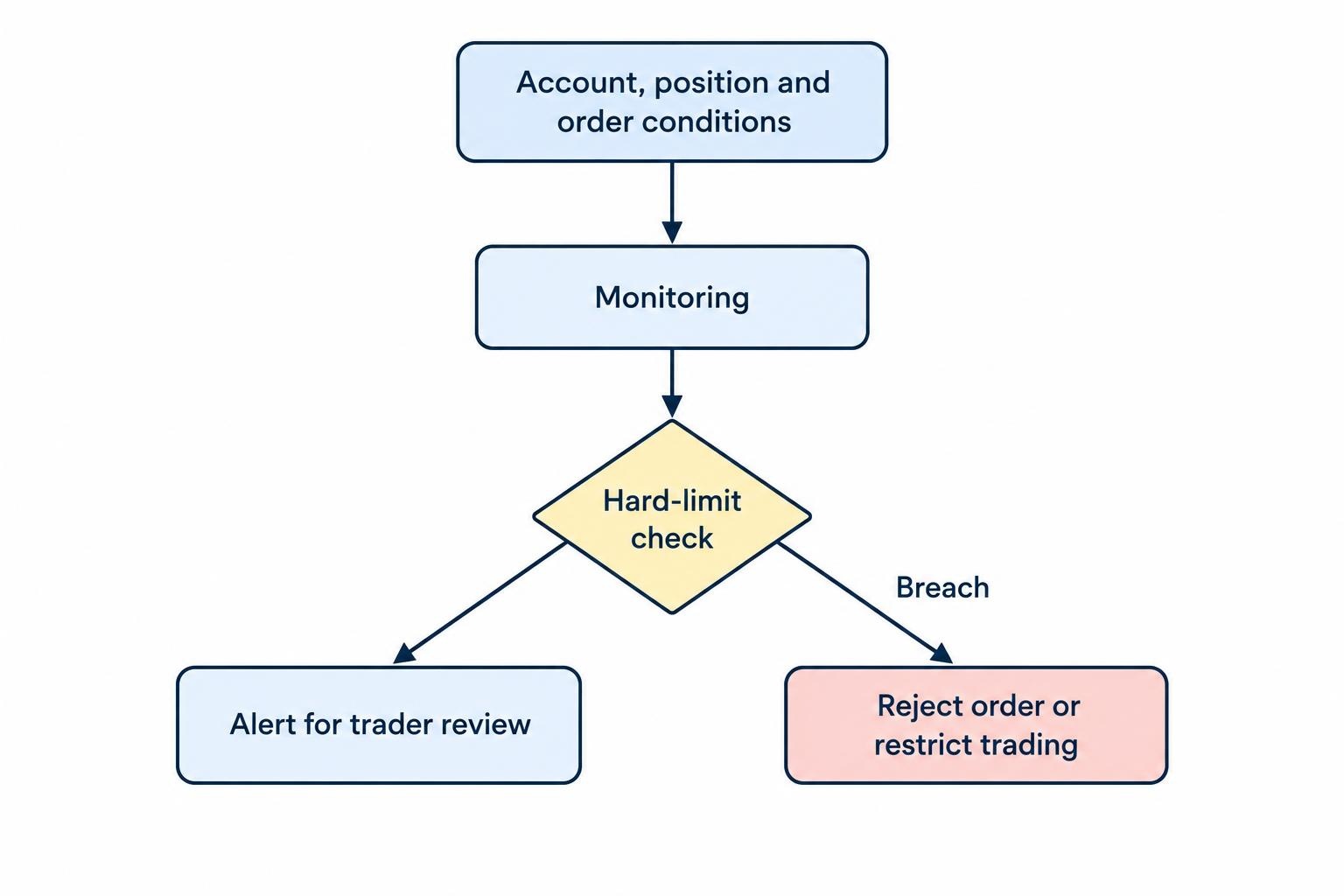
Before choosing software, establish where enforcement runs. A check inside a desktop application may cover orders entered through that application but miss trades placed through a mobile app, another terminal or an automated strategy. Ask whether every relevant order route passes through the same controls, and what remains active when the dashboard closes.
For covered U.S. broker dealers with market access, preventing orders that exceed preset credit or capital thresholds, and rejecting certain erroneous orders, forms part of the regulatory framework. These are duties on the covered firms, not a universal requirement for every retail dashboard: see the SEC’s market access risk control guidance.
For your own panel, require a plain answer to each enforcement question: which accounts are covered, which orders are checked, which system makes the decision and how a rejection reaches the trader. “Risk management included” is a feature label, not an answer.
What a Trading Risk Control Panel Should Display
Start with measurements that lead to decisions. Give every metric a unit, calculation basis, timestamp and applicable limit. A percentage without a denominator is decoration.
| Measurement | What it tells you | What to verify |
|---|---|---|
| Account equity | The account value used by the panel’s rules. | Currency, valuation method and treatment of cash movements. |
| Session profit or loss | Performance against the current session’s loss threshold. | Realized results, open position changes, costs and reset time. |
| Gross and net exposure | Total position size and directional balance. | Contract multipliers, currency conversion and permitted offsets. |
| Margin usage | How much account capacity positions consume. | Data origin, update time and whether working orders are included. |
| Working order exposure | Additional exposure that outstanding orders could create. | Partial fills, pending cancellations and linked order treatment. |
| Control status | Whether trading is permitted, restricted or blocked. | Enforcement location, affected accounts and latest confirmation. |
Keep performance reporting separate from control calculations. An attractive return chart does not establish how much more an account may lose before a restriction activates. For valuation methods and reporting views, use the companion guide to live position and profit and loss dashboards.
Do not treat margin availability as a loss budget. Likewise, a small net exposure does not make a large gross position harmless. Require additional stress measurements where simple position totals fail to capture the risk, particularly for options and portfolios with assumed offsets.
Turn Each Risk Rule Into an Explicit Action
Write the rule before configuring its threshold. “Stop trading after a bad day” leaves too much room for interpretation. A usable rule identifies the measurement, covered accounts, trigger, action and restart conditions.
For a session loss rule, decide whether the calculation includes both realized and unrealized results. Define how costs enter the calculation and whether the baseline is opening equity or a session high. If positions carry overnight, distinguish their change since the session began from their profit or loss since entry.
Separate an early warning from an enforced restriction. A warning gives the trader time to review positions. A hard threshold should have a documented consequence, such as blocking new exposure. Neither should silently become permission to raise the limit after losses accumulate.
Apply rules at the level where risk is owned: an account, a strategy, an instrument or a group of accounts. Then check the combined result. Five strategies staying inside their individual allowances can still exceed the account’s shared budget.
Keep the implementation detail in the dedicated guide to configuring position limits and exposure alerts. At panel level, the priority is visibility: show the active rule, remaining allowance and action that follows a breach.
A Worked Session Loss Example
Consider a hypothetical account with opening equity of $100,000. Its owner chooses a $1,500 warning threshold and a $2,000 restriction threshold. These figures illustrate panel behavior; they are not suggested trading limits.
During the session, realized trading losses reach $1,200, open positions lose $650 relative to their session baseline, and separately recorded costs total $50. With no deposits or withdrawals, the panel calculates a $1,900 session loss and shows $100 remaining before the restriction.
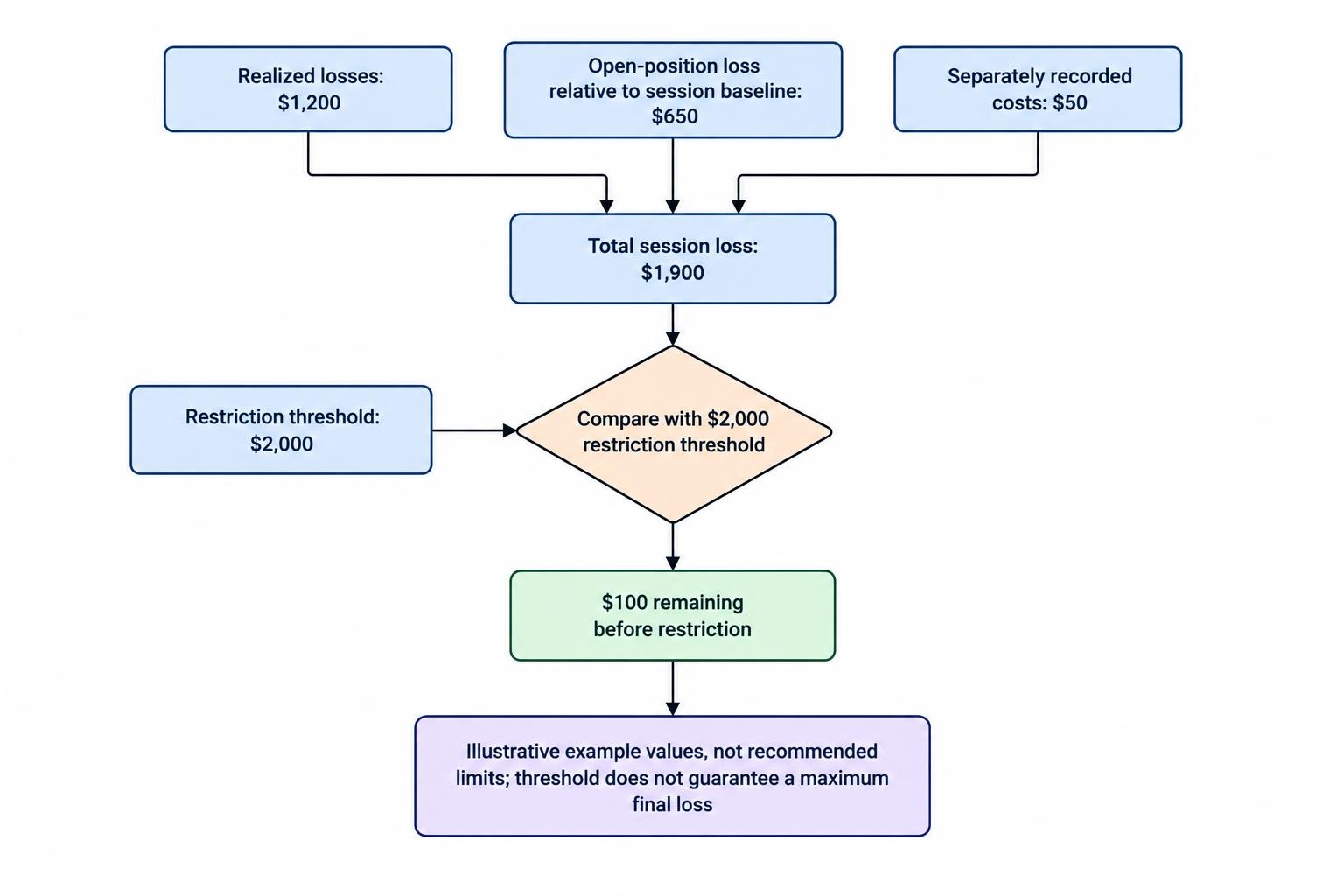
A realized loss only display would show $1,200 and miss the developing breach. Conversely, adding costs again when they are already included in reported profit or loss would overstate the loss. Require a calculation breakdown so the number can be checked.
At $2,000, the example rule blocks additional exposure while preserving approved risk reduction routes. That does not guarantee a final loss of $2,000. Existing positions can continue moving, and execution can occur at worse prices than expected. The threshold controls an action; it does not freeze the account’s value.
Separate Blocking, Cancellation and Liquidation
An emergency button needs an exact definition. Blocking new orders prevents further submissions within its scope. Cancelling working orders attempts to remove outstanding instructions. Liquidating positions submits transactions intended to close existing holdings. These actions are not interchangeable.
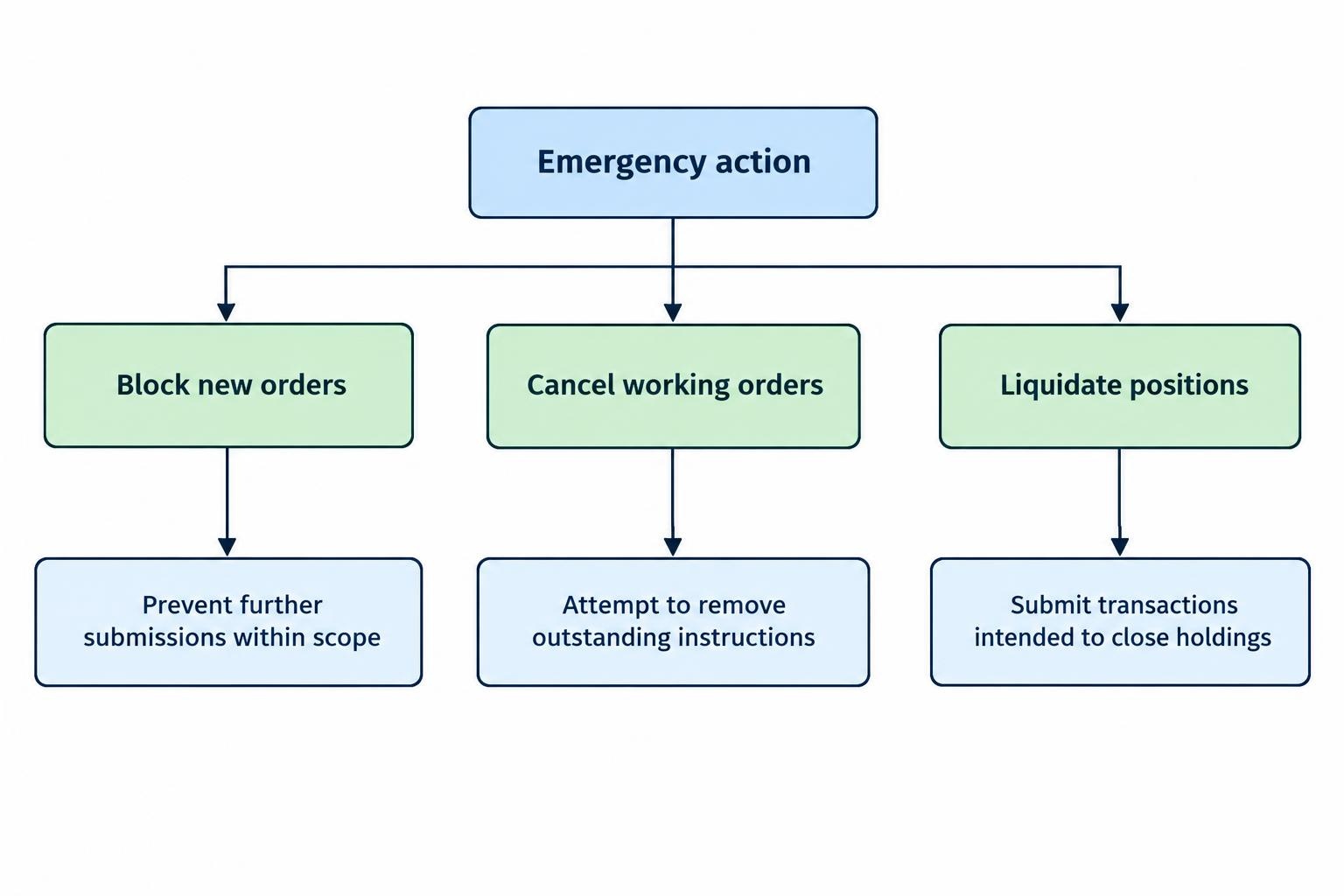
Exchange controls illustrate the difference. CME’s Globex Kill Switch blocks new order entry and cancels covered resting orders, but its documentation includes exceptions for market state and mass quotes. It is not a position liquidation instruction. The CME Kill Switch operating documentation sets out those boundaries.
Label each panel action with its scope. “Cancel entry orders in Account A” is more informative than “Stop everything.” A blanket cancellation may also remove protective exit orders, so require the software to distinguish order purposes where supported, or document how protection will be restored.
After activation, show requested, acknowledged, rejected and unresolved actions separately. Do not replace an uncertain state with a reassuring green tick. Require confirmation of remaining positions and working orders before declaring the account clear.
Also establish the restart procedure. A paused strategy should not resume simply because the browser refreshes or its process restarts. Require an explicit release after the underlying problem has been checked.
Make Data Quality Part of the Risk Display
A risk number needs a freshness indicator. Require timestamps for account balances, position updates, order events and prices rather than one general “connected” light. A live connection is not proof that every required feed is current.
Market data checks should assess update age and abnormal values; position checks should compare internal records with available execution or clearing records. These practices, including independent trade reconciliation, form part of the FIA’s automated trading risk control practices.
Choose the response to missing data in advance. A conservative design may block new exposure when it cannot establish the current position, while retaining a tested route for cancellations and risk reduction. Do not make “block everything” the default without checking whether it would obstruct exits.
For multiple accounts, require instrument mapping, contract multipliers and a documented currency conversion method. Show missing accounts explicitly rather than presenting an incomplete total as portfolio risk. Distinguish an expected absence of updates during a closed market from an unexpected feed failure.
Control Who Can Change the Controls
A loss limit offers little discipline if the same trader can remove it immediately after a breach. Decide who may view risk, change thresholds, acknowledge incidents and release a trading block. For a solo trader, a deliberate delay or separate approval step may still be preferable to an unrestricted override.
Require a change history containing the previous value, replacement value, user, timestamp and reason. Temporary exceptions should expire or require review. Keep the current configuration available after an application restart, rather than relying on settings held only in an open browser tab.
Account access and credential handling belong in the broader guide to control panel permissions and security. For risk controls, the immediate concern is narrower: nobody should be able to bypass a restriction through an unmonitored order route or an undocumented setting change.
Test Breaches, Failures and Recovery Before Live Use
A demonstration showing normal account updates is not enough. Test the moments when the panel must refuse an action, report uncertainty or recover from a fault. FINRA’s guidance for firms using algorithmic strategies covers testing, data integrity checks, documented results and continued monitoring in Regulatory Notice 15-09 on algorithmic trading controls.
Build an acceptance test around a few practical cases:
- Boundary conditions: submit orders just below, exactly at and above a configured limit. Include order amendments, not only new submissions.
- Overlapping activity: submit two orders that individually fit the remaining allowance but exceed it together. Confirm that the shared allowance cannot be spent twice.
- Uncertain order status: delay a cancellation response or simulate a partial fill. Check that unresolved quantity remains visible until its state is confirmed.
- Failure and recovery: interrupt a feed, disconnect the interface and restart the application. Verify restrictions, account reconciliation and restart permissions.
Record the starting conditions, expected outcome, actual result and supporting event log. Use a separate test environment where available. Do not create a dangerous live position simply to see whether the emergency button works.
Repeat the relevant tests after changes to account connections, order routing, calculation settings or software versions. A previously successful test establishes what worked under those conditions, not permanent protection.
Choose a Panel by Its Control Evidence
When comparing trading risk control panels, request a demonstration of one complete breach: measurement, decision, enforcement, confirmation and recovery. Ask the provider to show the rejected order, the event record and the behavior of any other connected trading interface.
Then examine daily operation. Can the user identify the most urgent breach without opening several screens? Does an alert name the affected account and required action? Keep escalation rules consistent with the wider trading alerts and notification system, so an unattended warning reaches someone who can act.
Prefer clear calculations and verified enforcement over a crowded screen. Before putting capital behind the panel, establish what it measures, what it can stop, what happens when its data disappears and who has authority to restart trading. Those answers matter more than the number of gauges on display.