Trading alerts and notification systems monitor market prices, account activity and software health, then send a message when a rule triggers. Their purpose is to bring an event to your attention without requiring you to watch every chart, position and connection.
A useful alert answers three questions: what happened, how urgent is it, and what should happen next? Within a trading dashboard or control panel, notifications should connect directly to the account, instrument or incident that needs review. An isolated message saying “threshold reached” leaves most of the work to the recipient.
The aim is not more notifications. It is fewer missed events, less noise and a clear distinction between an opportunity, a warning and a software failure.
Decide Which Events Deserve an Alert
Start with the decisions you need to make, rather than the notification options available. A price crossing a watchlist level might justify a chart review. An order rejection may require immediate investigation. These events should not produce identical messages or sounds.
| Alert category | Example trigger | Intended response |
|---|---|---|
| Price and market conditions | A price crosses a level or a spread exceeds a threshold | Review the current market and trading plan |
| Technical signals | An indicator condition becomes true on a chosen timeframe | Check whether the signal meets the strategy rules |
| Account and exposure | A loss warning or exposure threshold is reached | Inspect account risk and follow the agreed response |
| Orders and positions | An order is rejected, partially filled or cancelled | Reconcile the order with the intended position |
| Software health | A connection fails or market data becomes stale | Check whether monitoring and trading remain operational |
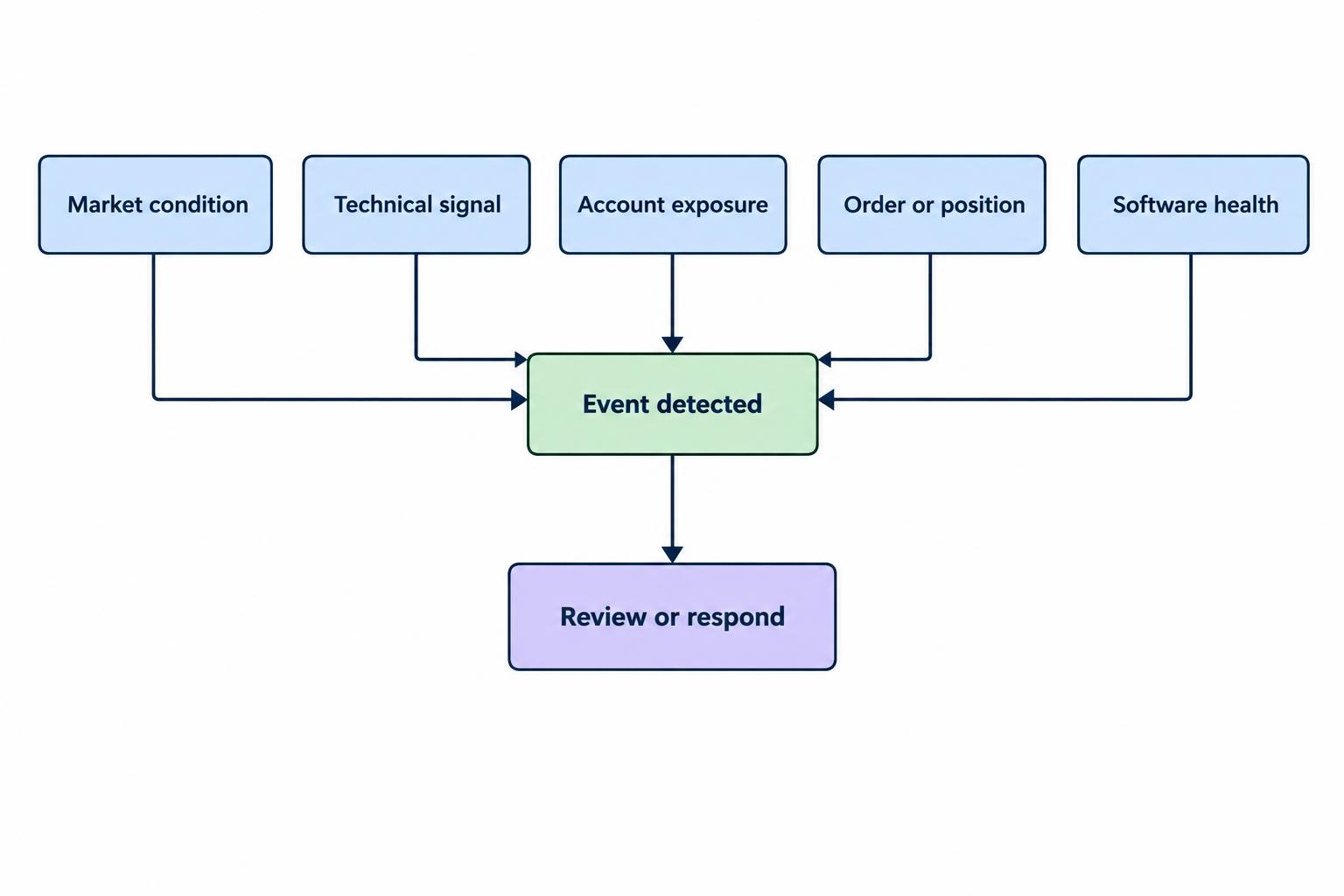
Keep notification rules separate from enforcement rules. An exposure warning informs someone; a control that blocks additional orders changes what the system permits. Define those boundaries in the trading risk control panel, rather than assuming a message provides protection.
Also distinguish a strategy signal from a confirmed account event. “Buy condition detected” does not mean an order was submitted, accepted or filled.
Write Precise Trigger Rules
Define the Price, Feed and Timing
A price alert needs more than a symbol and a number. Record the instrument, exchange or venue, data provider, price basis and trading session. A rule using the last traded price is not interchangeable with one using the bid, ask or midpoint. Check whether the feed requires a separate subscription or carries a delay.
Timing matters for indicator alerts. A condition can appear during a candle and disappear before it closes. TradingView supports alerts evaluated at bar close to avoid acting on that unfinished candle’s changing condition; its alert timing and repainting documentation also distinguishes this issue from other causes of repainting. Waiting for confirmation changes the timing, so choose it deliberately rather than treating it as a universal improvement.
Define Repetition and Reset Behavior
“Price is above $100” describes a continuing state. “Price crosses above $100” describes a transition. Decide whether the alert should fire once, on every qualifying update, once per candle or again only after a reset.
For a hypothetical watchlist rule, you might alert above $100 and rearm only after the price falls below $99.50. That gap between trigger and reset is called hysteresis. It helps prevent repeated notifications when the price flickers around the threshold. The figures illustrate the rule, not a trading recommendation.
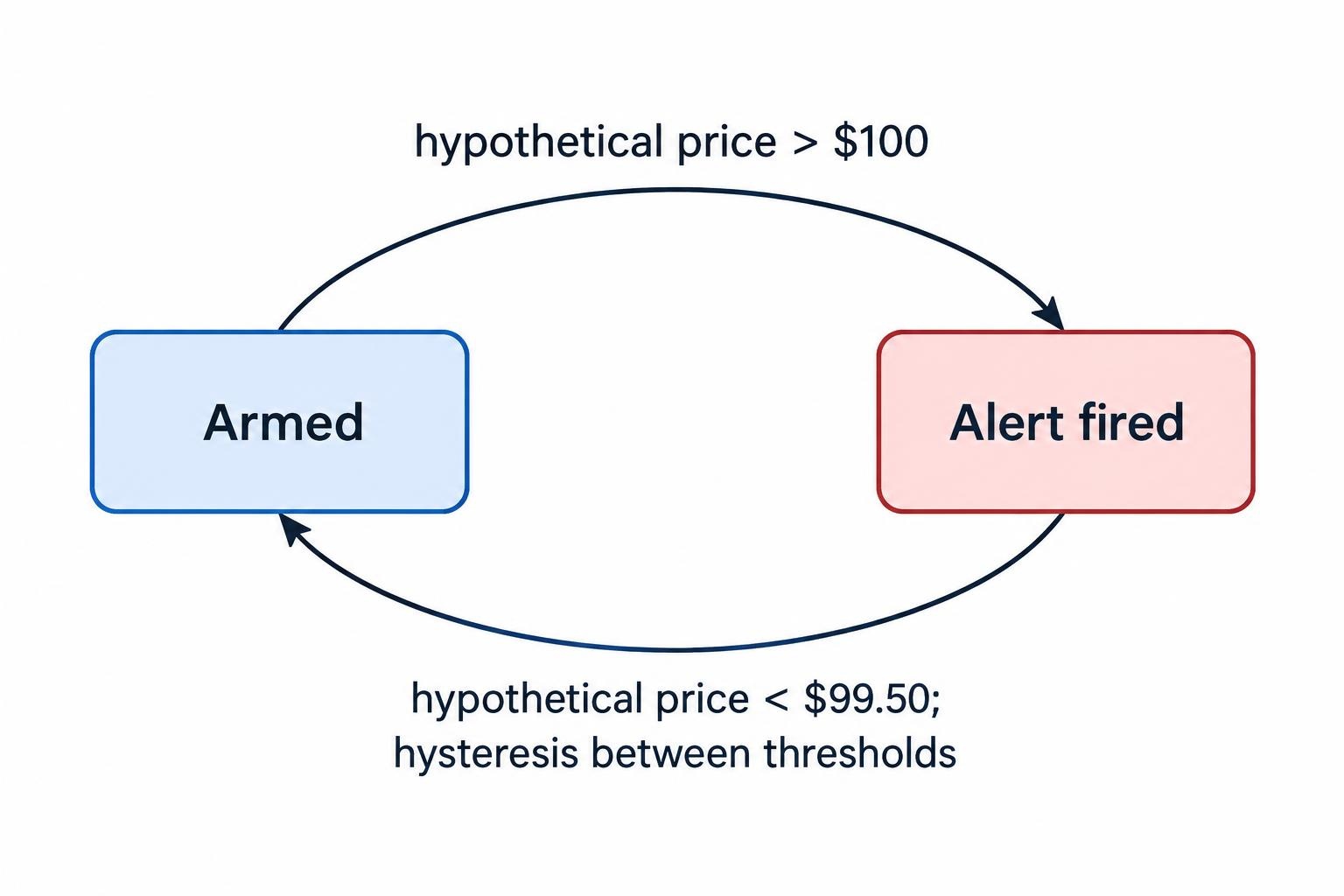
A cooldown serves a different purpose: it suppresses repeats for a period. Do not let a cooldown hide deterioration. A warning should still be allowed to escalate if a more severe condition appears.
For account alerts, define the calculation too. A daily loss rule should state whether it includes open positions, closed trades and costs, plus the account currency and the time at which the day resets.
Match the Delivery Channel to the Response
Use dashboard notices for events that can wait until the next review. Push notifications suit mobile monitoring. Email can carry fuller details and support later searches. SMS or voice calls may serve as escalation routes where the chosen service supports them. Check availability, costs and delivery reporting rather than assuming every channel behaves alike.
Mobile push is not proof of immediate receipt. Firebase Cloud Messaging can store messages when a device is unavailable, and acceptance by its server does not mean delivery to the device. Its message lifespan documentation provides expiration controls for time-sensitive notifications.
Set an expiry that matches the event. A short-lived market signal should not arrive much later looking actionable. An unresolved account warning needs different treatment: retain the incident and show its current status, even if an earlier notification expires.
Ask where the rule runs. If evaluation depends on your desktop application, establish what happens when the computer sleeps, loses connectivity or closes. For hosted evaluation, check what happens when the local dashboard disconnects.
A fallback channel should avoid the primary route’s main failure where practical. Two apps on the same offline phone are not much of a backup.
Use Severity, Acknowledgment and Escalation
A simple severity scheme is easier to operate than a long menu of nearly identical priorities. Separate informational events, warnings that need review and urgent incidents requiring a prompt response. Assign severity by the consequence of inaction, not by how dramatic the message sounds.
For urgent incidents, define an owner and an escalation path. A solo trader might use push followed by another channel. A team might notify the responsible operator, then a backup if nobody responds within the agreed window. Choose that window around the incident, not a convenient software default.
Acknowledgment and resolution must remain separate. PagerDuty’s escalation policy documentation makes this distinction explicit: acknowledgment stops escalation, but does not resolve the incident. Apply the same principle to trading notifications. Someone taking responsibility for a rejected order has not yet corrected the account state.
Keep unresolved incidents visible after acknowledgment. Where appropriate, require fresh confirmation or renewed escalation if the problem persists.
Make Webhook Alerts Readable and Safe
A webhook sends an alert to another application, such as a messaging service, incident manager or custom dashboard. Define the receiving system’s role before connecting it. Forwarding a notification and placing a trade are very different permissions.
TradingView sends webhook alerts as HTTP POST requests and cancels a request if the remote server takes longer than three seconds to process it. Its webhook configuration requirements also require two-factor authentication and warn against including login credentials in the message body.
For a custom receiver, validate the request, save the event durably and respond promptly. Perform slower processing afterward. Give each event an identifier so repeated delivery can be recognized without creating repeated actions.
Human-readable messages need context too. Put severity and the affected account or instrument near the beginning, where a phone preview can show them. Include the trigger value, threshold, event time with timezone, data freshness and intended response.
A hypothetical message could read: WARNING — Demo account A: daily net P&L is −$420 against a −$400 warning threshold. Includes open positions and costs. Review account exposure. Notification only; no orders changed.
For automated execution, add independent validation of account, instrument, size, event age and duplicate status. Do not treat any incoming message as unconditional permission to trade.
Design for Missing, Delayed and Duplicate Messages
Track the notification path in stages: condition detected, event recorded, delivery attempted, provider accepted, device delivered where supported, and human acknowledged. Avoid one vague “sent” status that hides where the process stopped.
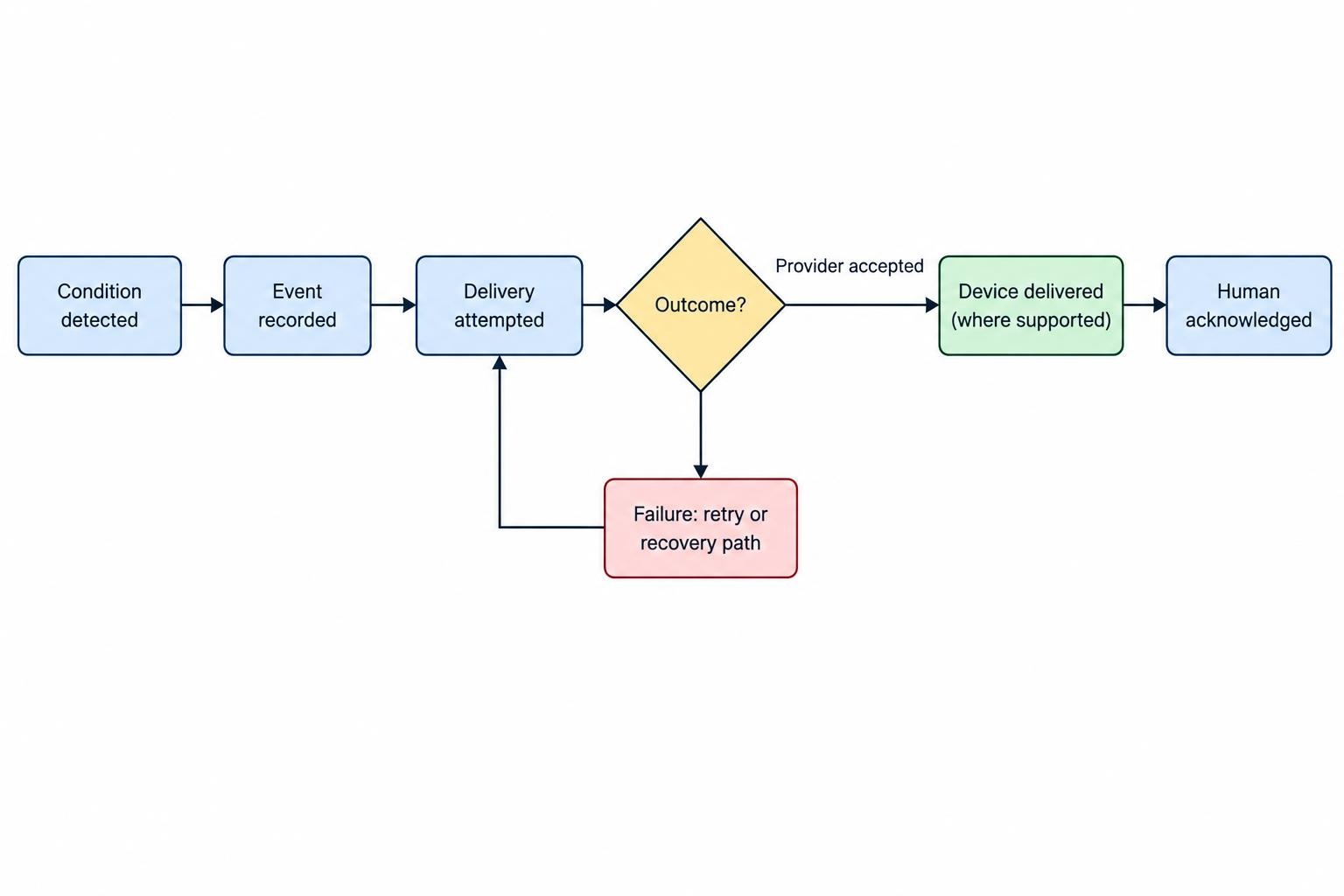
Retry behavior deserves inspection. Amazon SNS uses delivery policies that determine retry attempts; after those attempts are exhausted, it discards the message unless a dead-letter queue is attached. Its message delivery retry documentation shows why failed delivery needs its own monitoring and recovery path.
Keep an event identifier consistent across retries. The receiver should recognize an event it has already processed. Where messages update a continuing incident, preserve the sequence so an old warning cannot overwrite a newer recovery notice.
Monitor the monitoring system as well. Use a heartbeat or status check to detect a stalled alert engine, disconnected data feed or broken delivery integration. An independent check is preferable to asking the failed component to announce its own failure.
Treat stale data as a separate condition. If prices stop updating, show the last successful update and suspend rules that require fresh data. Silence should mean “no qualifying event,” not “the feed stopped half an hour ago.”
Protect Account Details and Notification Permissions
Assume lock-screen previews, email forwarding and shared chat rooms can expose message contents. Use account aliases and include only the detail needed for the response. Keep full balances, credentials and sensitive account identifiers out of routine notifications.
Separate permission to view alerts from permission to edit thresholds, change recipients, acknowledge incidents or connect an execution service. These controls belong within the broader permissions and security settings for trading control panels.
Record changes to alert rules and delivery destinations, including who changed them and when. Review recipients after staffing changes, account closures or device replacements. A perfectly functioning alert sent to the wrong person is still a failed alert.
For custom integrations, authenticate requests using a mechanism supported by the sender and receiver. Store integration secrets outside message content and restrict access to delivery logs that could expose them.
Test the Entire Notification Path
A test message confirms only part of the setup. Test the trigger, delivery route and response process together, using a demo environment or controlled events that cannot place live orders.
- Check boundary behavior. Test values below, at and above the threshold. Confirm crossing direction, candle timing, reset rules and cooldowns.
- Check actual devices. Test with the phone locked, the app closed and ordinary notification settings enabled. Confirm sound, preview content and the destination opened by the message.
- Introduce failures. Disconnect the primary route, delay the receiver and make a destination reject delivery. Check failure records and fallback behavior.
- Replay events. Send duplicates and older events after newer ones. Confirm they cannot create repeated actions or replace current status.
- Complete the response. Acknowledge an incident, leave it unresolved, then clear it. Verify escalation and recovery messages behave as intended.
Measure event-to-notification time separately from acknowledgment time. Record the slowest observed deliveries as well as typical ones, and repeat tests after changing devices, software versions, permissions or integrations. A successful test under ideal conditions is a starting point, not a permanent certificate.
Where alerts accompany automated strategies, test them alongside trading bot monitoring and emergency stop controls. Confirm whether a stop actually blocks new orders, cancels pending orders or does something else. The notification should describe the action performed, not imply that every position is closed.
Evaluate Software by Its Failure Behavior
Before paying for an alert service, check active-rule allowances, supported data feeds, evaluation frequency, expiration settings, delivery logs and rule export options. Review whether push, SMS, voice, webhooks and escalation require separate plans or usage charges. Compare the cost of the setup you need, not the headline subscription.
Ask the vendor to demonstrate a missed delivery, an expired alert and an unavailable data feed. Check whether you can identify the deployed rule version and trace an event through to acknowledgment. These questions reveal more than a successful popup demonstration.
Begin with a small set of actionable rules, then review their usefulness. Remove alerts that repeatedly prompt no decision, combine related incidents and reserve urgent channels for events that warrant interruption.
A trading alert should direct attention, not dictate an impulsive trade. Before acting on a market notification, check the current price and account state. Before dismissing an operational warning, confirm the underlying problem has cleared.