Building a custom trading dashboard with broker APIs means turning account balances, positions, orders and prices into a consistent view you can check and trust. The difficult part is not drawing charts. It is keeping that view accurate when connections drop, credentials expire or an order changes while your application is catching up.
For a first version, build a monitoring dashboard rather than an execution terminal. Start with one broker, one account and a small set of metrics. Within a broader trading dashboard and control panel, the integration layer should establish what happened, when it happened and whether the displayed state is current.
Define What the Dashboard Must Show
Write a short data contract before choosing charts or frameworks. Decide which balances you need, how positions should be grouped, which order states matter and how much delay each display can tolerate. A daily account review and an intraday exposure monitor should not share the same freshness requirements by accident.
For the first release, consider account equity, cash by currency, open positions, working orders and connection health. Add recent executions when you can retrieve and reconcile them reliably. Leave strategy analytics, tax calculations and automated trading outside the initial scope.
Check the broker’s documentation against that contract. Confirm account eligibility, authentication, available endpoints, streaming coverage, historical access, pagination and request limits. Verify market data permissions and whether the intended display, storage and sharing are permitted. Do not assume that access inside the broker’s own platform grants identical rights through its API.
Record missing capabilities explicitly. If an API supplies positions but not executions, design around that restriction rather than presenting an incomplete activity log as a complete trading history.
Separate the Interface from the Broker Connection
A practical architecture has four parts: the browser interface, an application service, a broker adapter and persistent storage. Keep broker credentials and connection management in the server application. Let the browser request only the account information that its authenticated user may view.
The adapter translates each broker’s responses into your own data model. The application service maintains current state, calculates approved metrics and sends updates to the interface. Storage preserves configuration, reconciliation checkpoints and the records needed to investigate discrepancies.
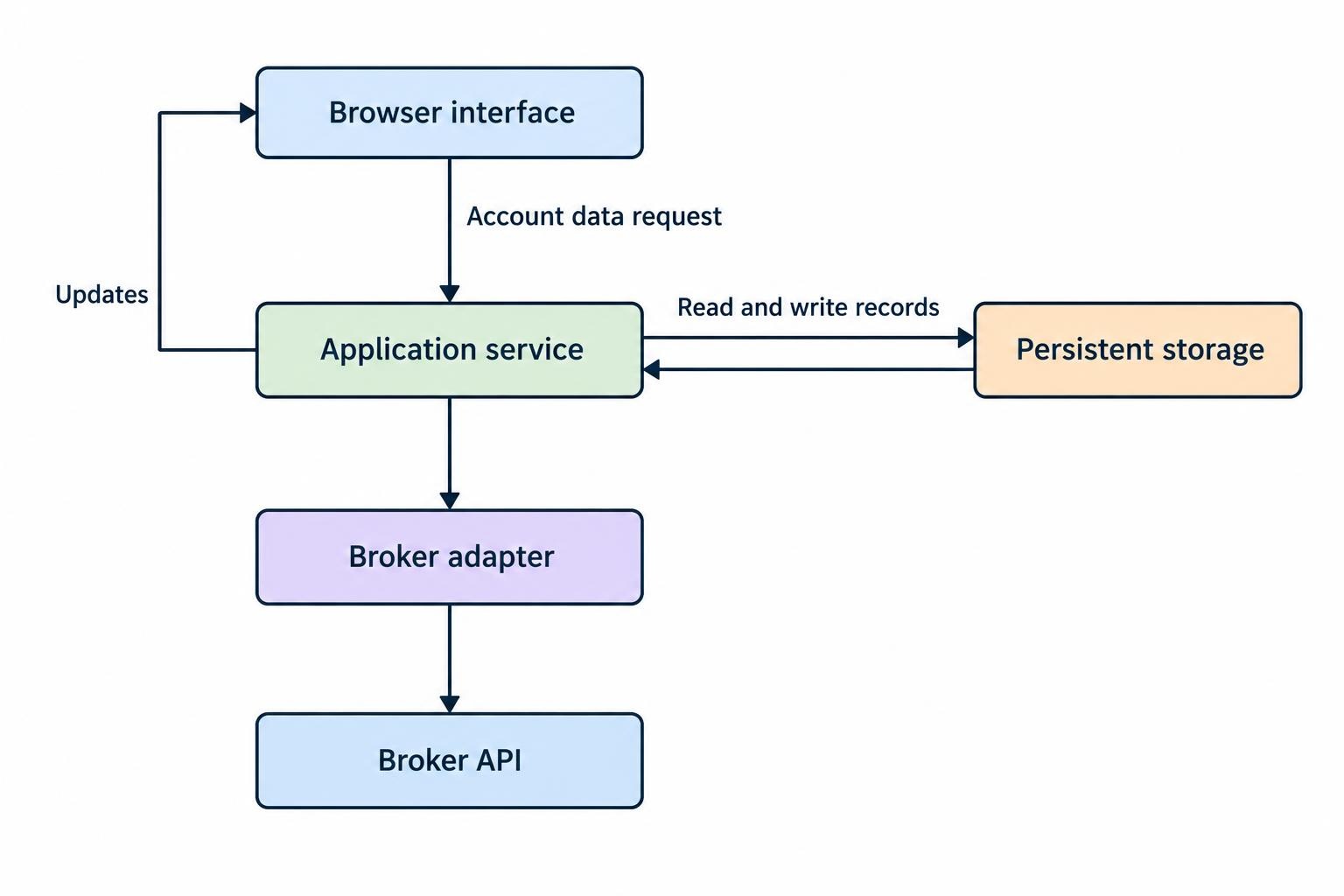
For a small deployment, these can be modules within one application rather than separate services. Choose a backend language your team can maintain, a relational database for account records and a frontend framework suited to the intended interface. Introducing several infrastructure products before connecting the first account is an expensive way to postpone the hard work.
Where the broker supports OAuth, use its documented authorization flow and request the smallest necessary permissions. Authorization code flows should use PKCE where supported; current OAuth security guidance requires it for public clients and recommends it for confidential clients. Apply the relevant protections in the IETF OAuth 2.0 security best practice, rather than inventing a login exchange.
Keep paper and live environments separate in configuration, stored records and screen labels. An environment name should remain visible even when the user changes accounts.
Normalize Data Without Removing Its Meaning
Define a common schema before adding a second broker. Preserve original identifiers and reported values alongside normalized fields, so you can trace a displayed number back to the response that produced it.
| Record | Fields to preserve | Design check |
|---|---|---|
| Account | Broker, environment, account identifier, reporting currency | Prevent records from different accounts merging |
| Instrument | Broker instrument identifier, symbol, venue, currency, contract details | Do not match instruments by ticker alone |
| Position | Quantity, units, cost basis, reported valuation, timestamp | Keep shares, contracts and currency units distinct |
| Order or execution | Account, order identifier, execution identifier, status, quantity, price | Separate order state from individual fills |
| Price | Instrument, bid, ask, last trade, provider timestamp, receipt timestamp | Retain the price type and data entitlement label |
Use decimal arithmetic for monetary calculations and preserve the precision supplied by the API. Store normalized timestamps consistently, while retaining the broker’s original timestamp and timezone context where relevant.
Treat missing values as missing. A failed balance request should not turn cash into zero. Give records explicit states such as unavailable, stale or awaiting reconciliation, and carry those states through to the screen.
Combine Snapshots with Streaming Updates
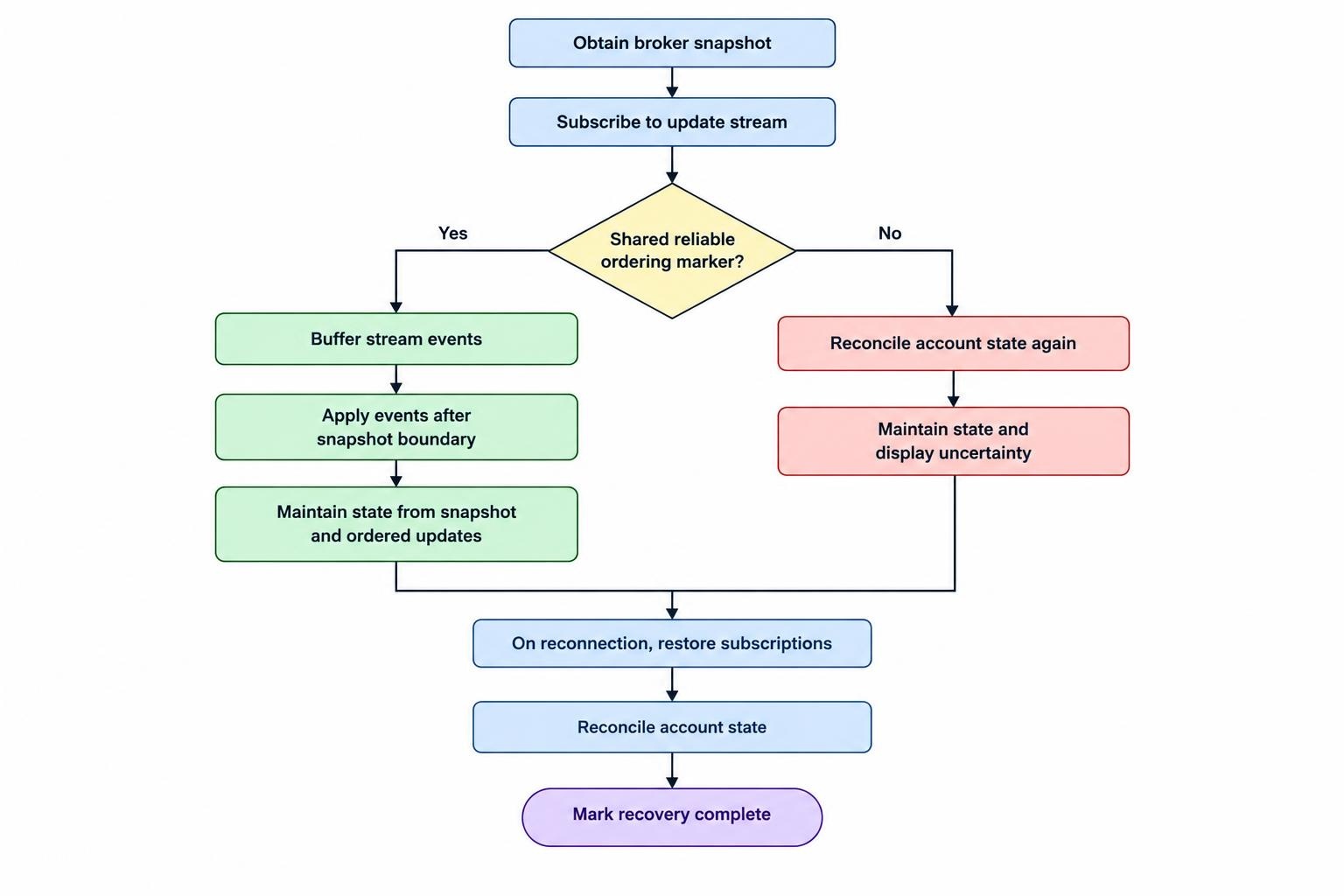
Design initial loading and reconnection together. A snapshot gives you a starting account state; subsequent updates change that state. The difficult boundary is the interval between obtaining the snapshot and subscribing to updates.
Follow the broker’s documented synchronization procedure. Where snapshots and streams share sequence numbers or another ordering marker, buffer incoming events and apply only those that follow the snapshot boundary. Do not compare unrelated sequence counters or assume timestamps establish a reliable total order.
If the API provides no reliable boundary, perform a second reconciliation and display the uncertainty. You cannot manufacture a guarantee of completeness from an interface that does not expose one.
After an unexpected WebSocket disconnection, reconnect with increasing delays and random variation rather than repeatedly opening connections immediately. This follows the recovery approach in RFC 6455 on abnormal WebSocket closures. Restore subscriptions and reconcile account state before declaring recovery complete.
Track connection health separately from data freshness. A connected socket does not prove that account updates are arriving. Display the last successful account refresh, the last stream activity and any known sequence gap. Interpret price age against market hours and instrument activity, rather than flagging every unchanged quote as a connection failure.
Reconcile Positions, Orders and Executions
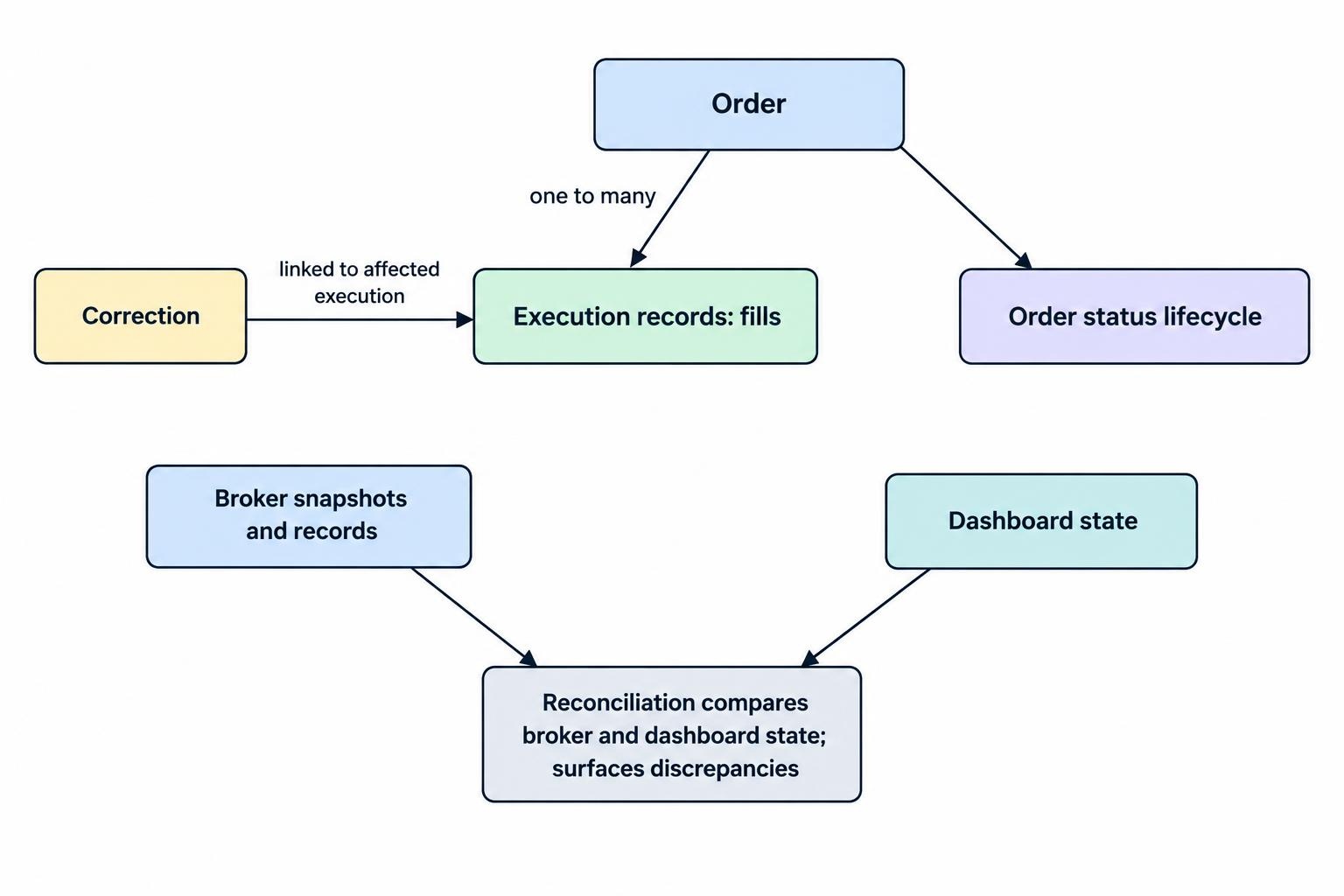
Choose a documented authority for each displayed field. For example, use the broker’s position snapshot for reported holdings, while maintaining executions as a separate activity ledger. Avoid adding a fill to a position snapshot that already includes it.
Deduplicate execution events using identifiers within their documented scope, usually including the broker and account. Do not deduplicate by order identifier alone: one order may have several fills. Preserve correction relationships rather than treating every later message as another trade.
Model order status explicitly. A cancellation request is not confirmation that an order has been canceled, and execution can occur while cancellation is pending. The FIX order state change specification documents these cases, including execution corrections. Use it as a design reference, then map the actual states and behavior exposed by your broker.
Reconcile periodically, after reconnecting and after detecting an inconsistency. Retrieve every page of the required records. Compare quantities and statuses, record discrepancies and expose unresolved differences. A green connection light is not a reconciliation strategy.
Make Profit and Loss Calculations Inspectable
Separate broker reported profit and loss from your own estimates. For each calculated figure, define the valuation price, currency, measurement period and treatment of fees. Label those choices in the interface rather than leaving users to reverse engineer them.
Consider a simple cash equity example: 100 shares bought at $50 and valued at $52 produce $200 of unrealized price profit before fees and other adjustments. That calculation does not automatically represent daily profit, realized profit or the amount available after selling.
For derivatives, apply the instrument’s documented contract multiplier and valuation method rather than reusing the share calculation. For accounts holding several currencies, retain native currency amounts and attach a timestamped conversion rate to reporting currency estimates.
Keep calculation rules in the application service, not scattered across interface widgets. That gives totals and position rows the same inputs. More detailed valuation and presentation choices belong in the guide to live position and profit-and-loss dashboards.
Protect Account Access Throughout the Connection
Authorize access on the server for every account request and subscription. Never trust an account identifier simply because it came from your own interface. Verify that the signed in user may access that account before returning its balances, positions or updates.
For browser WebSockets, use encrypted connections, validate origins against an explicit allowlist and enforce authorization for each requested subscription or action. Close connections when sessions expire or users log out. These controls form part of the OWASP WebSocket security guidance.
Keep broker secrets out of frontend bundles, browser storage and diagnostic exports. Store them in a controlled server secret store, restrict which processes can retrieve them and provide a revocation procedure. Test what happens when credentials expire or are withdrawn while the dashboard is open.
Distinguish dashboard login from broker authorization. A user may remain signed in to your application while the broker connection requires renewed consent. Show that condition clearly instead of silently displaying old balances. Define viewer, operator and administrator permissions before sharing access; the broader account model is covered in user permissions and security for trading control panels.
Keep Order Submission Outside the Monitoring Path
If you later add trading controls, treat them as a separate capability with separate permissions. A monitoring service should not acquire order submission rights simply because a trade button has been added to the page.
Validate the account, instrument, quantity, price constraints and permitted action on the server. Persist the user’s intent before sending the request, then track acknowledgement and subsequent order status separately. Present an unresolved submission as unresolved, not failed.
A request timeout does not establish that the broker rejected an order. Before retrying, query its status using the broker’s documented identifiers and recovery procedure. Use idempotency protections only where the API actually supports and defines them. The guide to broker APIs for automated trade execution covers that execution layer without mixing it into dashboard display logic.
Test Recovery Before Trusting the Display
Test more than successful requests. Build fixtures for empty accounts, short positions, fractional quantities, expired sessions, partial responses and missing fields. Replay duplicate events, out of order events and corrections. Verify that restarting the application does not double count activity.
Exercise rate limit responses and confirm that polling backs off without removing the last known values. For streaming, test network interruption, failed resubscription and a connection that stays open without useful updates. The interface should explain each condition without pretending that all failures are identical.
Log operational events with timestamps, correlation identifiers, affected components and outcomes. Exclude credentials, access tokens and unnecessary account details from routine logs; use the OWASP application logging guidance to define both useful event records and data exclusions.
Use the broker’s test environment where available, but also test against recorded, sanitized responses. Before relying on the live dashboard, compare its records with the broker’s own account view over representative sessions. Investigate discrepancies rather than adjusting calculations until the headline totals happen to match.
Budget for Operation, Not Just Development
Estimate hosting, storage, monitoring, market data access and maintenance separately. Size storage from the records you need to retain; a dashboard does not automatically need every market tick indefinitely.
Assign ownership for credential renewal, dependency updates, API changes and incident response. Set acceptance criteria before expanding: successful restart recovery, visible stale data, reconciled positions and traceable calculations.
A useful custom trading dashboard should answer three questions without hesitation: which account does this represent, how current is it, and what evidence produced the number? Add more brokers and controls only when those answers remain clear.