Economic calendar integrations connect scheduled data releases and policy events to forex charts, alerts, dashboards, or automated trading rules. The useful part is not another list of announcements. It is getting the right event into the right workflow, with a reliable timestamp and a clear action attached.
A discretionary trader might need a warning before a release. An automated strategy might need to block new entries, track publication status, and record what data was available when it made a decision. Those requirements call for different integrations.
When comparing forex trading platforms, check whether calendar information is only visible on screen or also accessible to indicators, alerts, and trading programs. A calendar tab and a programmable event feed are not interchangeable.
Choose the Integration Method Around the Task
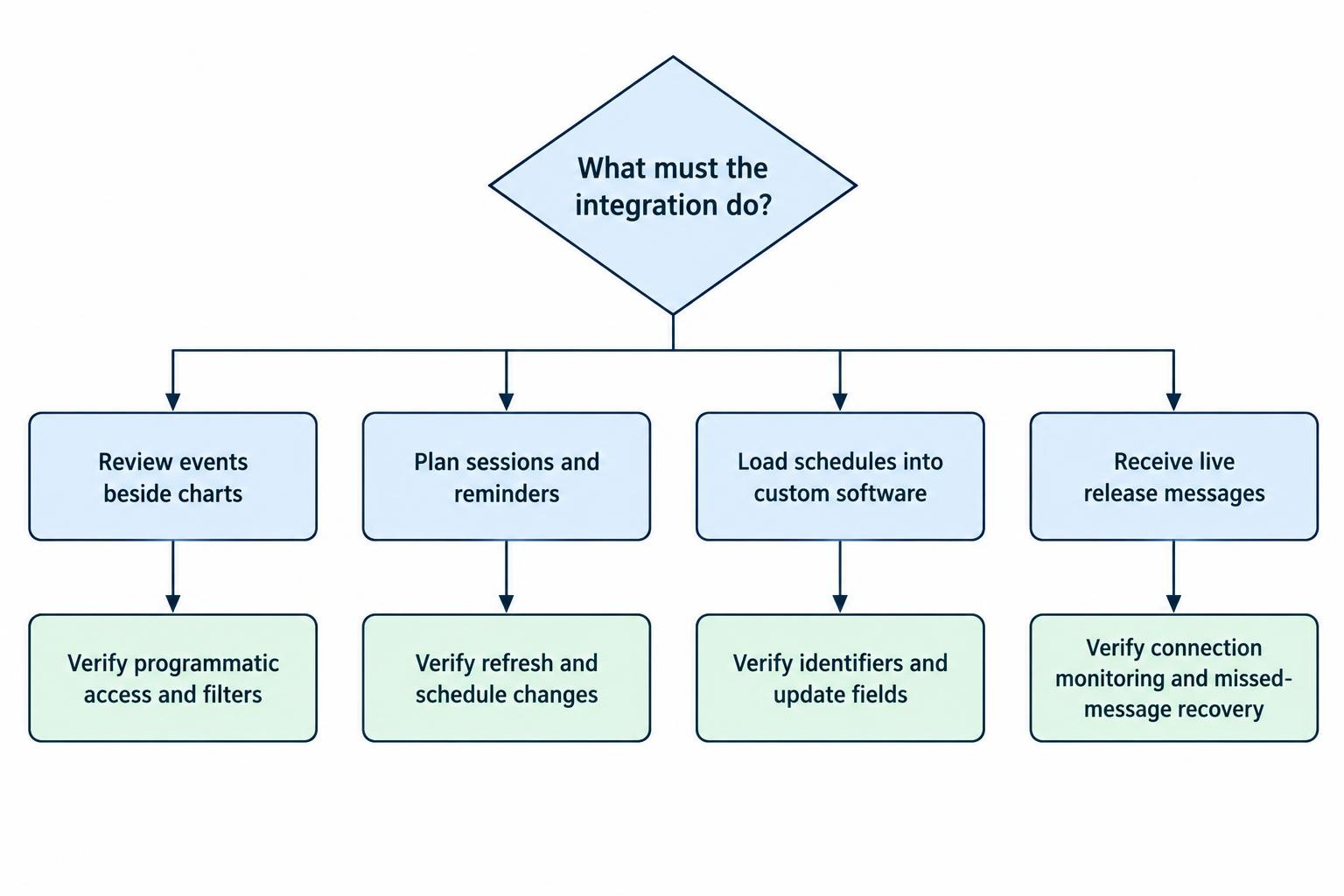
Start with the decision the calendar should support. If the task is session preparation, a subscription calendar may be enough. If software must react to a published figure, require structured data and a way to detect updates.
| Integration route | Suitable use | What to verify |
|---|---|---|
| Built-in platform calendar | Reviewing events beside charts and positions | Currency filters, time settings, alerts, and programmatic access |
| Calendar subscription | Planning sessions and setting reminders | Refresh behavior, schedule changes, and coverage |
| API requests | Loading event schedules into custom software | Request allowances, identifiers, update fields, and historical access |
| Streaming feed | Receiving release messages without repeated requests | Connection monitoring, reconnection, and missed-message recovery |
For official US release scheduling, the Bureau of Labor Statistics calendar subscription provides publication dates for most scheduled national office releases. Treat it as a planning resource rather than assuming it supplies actual results, consensus forecasts, or an execution-ready release signal.
Also distinguish importing a calendar file from subscribing to it. Before relying on either method, change a test event and confirm that the receiving application reflects the change. A successful import proves that an event arrived once; it does not prove future updates will arrive.
Select a Feed That Matches Your Workflow
Assess coverage against the currencies and event types you trade. Build a sample containing inflation, employment, policy decisions, speeches, and events with uncertain timing. Ask the provider to show how each appears in its data rather than accepting a country count as proof of suitability.
Keep schedule delivery separate from result delivery. A system that blocks entries before an announcement mainly needs accurate scheduling and prompt schedule corrections. A system that evaluates the released number also needs publication updates, suitable numeric fields, and measured delivery performance.
The Trading Economics calendar streaming documentation describes an authenticated WebSocket connection for receiving live releases. That establishes the delivery method, not a guaranteed end-to-end response time. Measure when your application receives and processes each message before allowing it to influence orders.
For a custom integration, consider loading an initial schedule snapshot and then applying updates. Define how the application will recover after a disconnection: reconnecting alone should not be treated as evidence that its local event list is complete.
Before paying for access, confirm the permissions for automated use, storage, historical retention, and any display shared with other users. Include maintenance in the cost comparison. Keep feed credentials separate from brokerage credentials, and avoid exposing private credentials in downloadable files or public dashboards.
Normalize Event Data Before Connecting Trading Rules
Create a consistent internal record rather than passing provider fields straight into a strategy. Separate the recurring indicator from each scheduled occurrence. A monthly inflation series needs a persistent identity, while each publication needs its own occurrence record.
The Trading Economics calendar field definitions distinguish release time, reference period, actual value, consensus forecast, provider forecast, importance, and update time. They also define separate previous and revision fields. Map those definitions explicitly; a familiar field name is not enough to establish its meaning.
For your own record, retain the provider identifier, original event name, mapped currencies, scheduled time, timing certainty, units, and raw message. Add a local receipt timestamp. Preserve successive versions so that a correction does not erase the record your software previously used.
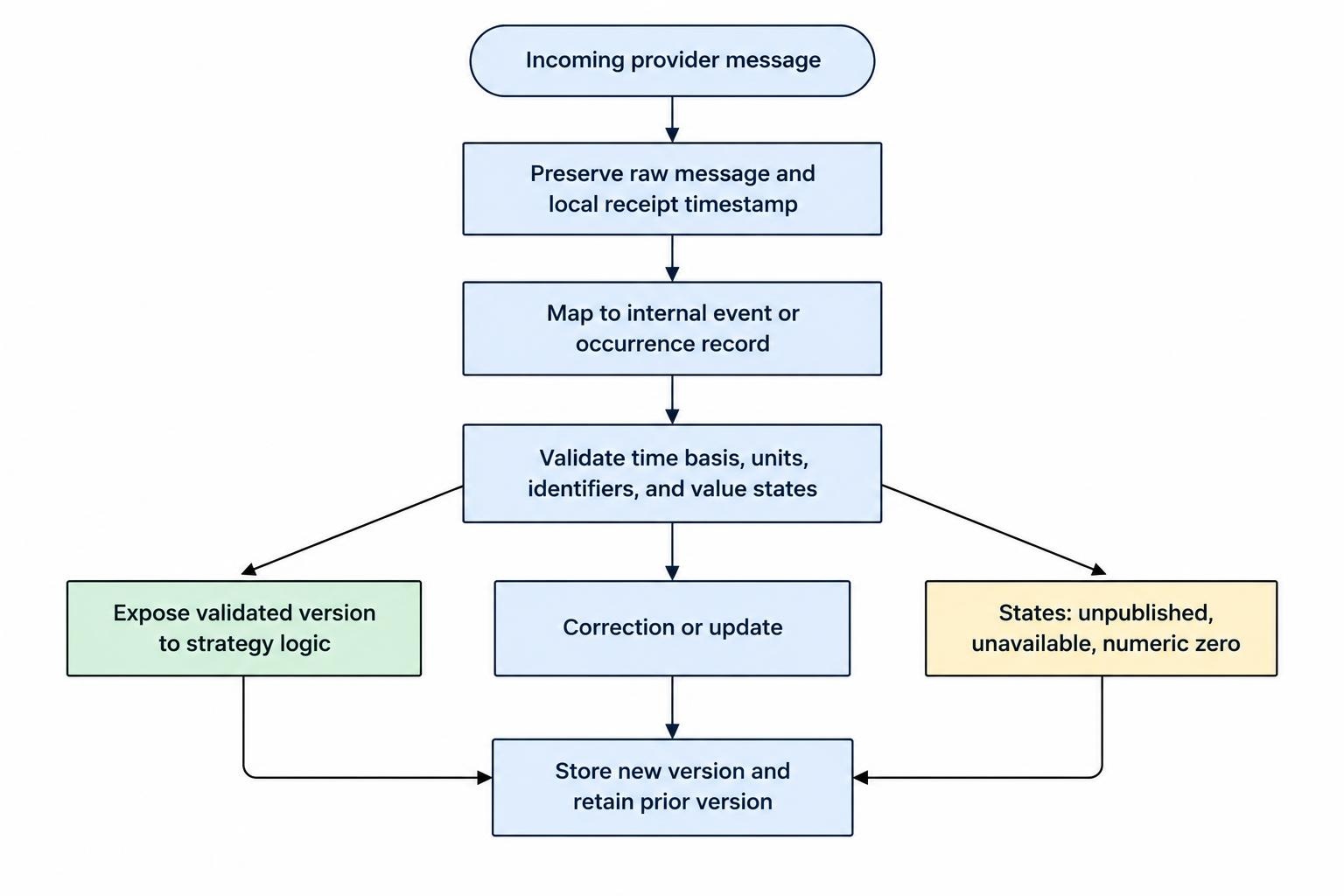
Missing is not zero. An unpublished result, an unavailable forecast, and a reported value of zero must remain different states. Treat text results and numeric results separately. Do not let an empty forecast become a zero forecast through an automatic conversion.
Validate units before calculating a surprise. In a hypothetical release, an actual inflation rate of 3.2% against a 3.0% forecast produces a difference of 0.2 percentage points. Comparing 3.2 with a forecast stored as 0.030 would produce nonsense with impressive decimal places.
Use a provider’s importance rating as a filter, not an instruction to trade. Configure which event families matter to each strategy, and keep that choice separate from the provider’s label.
Make Time Handling Explicit
Choose one internal time standard, preferably UTC, and convert for display at the interface boundary. Retain the original timestamp and its documented time basis so you can audit a conversion later. Avoid inferring a time zone from a timestamp’s appearance.
MetaTrader users need to check this carefully. The MQL5 economic calendar reference specifies that its calendar functions use trade server time rather than the user’s local time. Convert that time basis explicitly before comparing events with a UTC-based external feed or local alert schedule.
Test daylight saving transitions, date boundaries, and the historical offset used by the trading server. Do not apply the server’s present offset to every past event. Also check how the application handles an event whose date is known but whose publication time remains tentative.
Keep scheduled release time, provider update time, and local receipt time separate. Together, they help distinguish a changed schedule from a delayed message or slow application processing.
Make the displayed time basis obvious. “Release at 08:30” leaves too much room for interpretation. Show the zone beside the time and provide a countdown calculated from the normalized record.
Connect Calendar Events to Clear Actions
Map each currency pair to both currencies. A EUR/USD entry filter should evaluate relevant EUR and USD events; checking only the base currency leaves half the pair outside the rule. Add broader event mappings only where the strategy requires them.
Separate notification behavior from order behavior. A reminder can notify the trader without changing anything. An entry block can prevent new exposure while leaving existing position management active. Closing positions, cancelling pending orders, and suppressing strategy signals are separate decisions and should have separate controls.
For manual workflows, use trading alerts and notification systems to define delivery channels and escalation. Include the event name, affected currencies, release time, and current status. An alert saying only “important news soon” asks the trader to do the integration work themselves.
Consider a hypothetical rule that blocks new entries from 15 minutes before a selected announcement until 10 minutes afterward. These are example settings, not recommended trading intervals. Specify whether the end time follows the scheduled announcement, confirmed publication, or manual approval.
Keep protective position management active unless the strategy deliberately requires otherwise. A news filter should not accidentally disable a protective exit because the same permission flag controls every order type.
Log why an action occurred. Record the event occurrence, rule version, decision time, affected instrument, and result. Make overrides visible and give them an expiry. Otherwise, a temporary exception can become a permanent setting that nobody remembers changing.
Handle Changed Schedules and Unhealthy Feeds
Design for an event being postponed, corrected, duplicated, or missing from a response. These should be explicit test cases, not discoveries made during live trading.
Update an existing occurrence when its provider identifier matches rather than creating another countdown. Retain the earlier version for audit purposes. If identifiers change, use a cautious reconciliation process; matching on event name alone can merge separate publications.
Define what counts as stale data for each function. A cached schedule may remain useful for preparation, but an automated publication rule needs stronger evidence that updates are still arriving. Display the last successful synchronization and the current connection state.
Choose the failure policy in advance. One approach is to prevent new automated entries when calendar health is unknown while preserving position monitoring and protective management. Whatever policy you choose, show the reason clearly. “No events returned” and “calendar request failed” must not produce the same status.
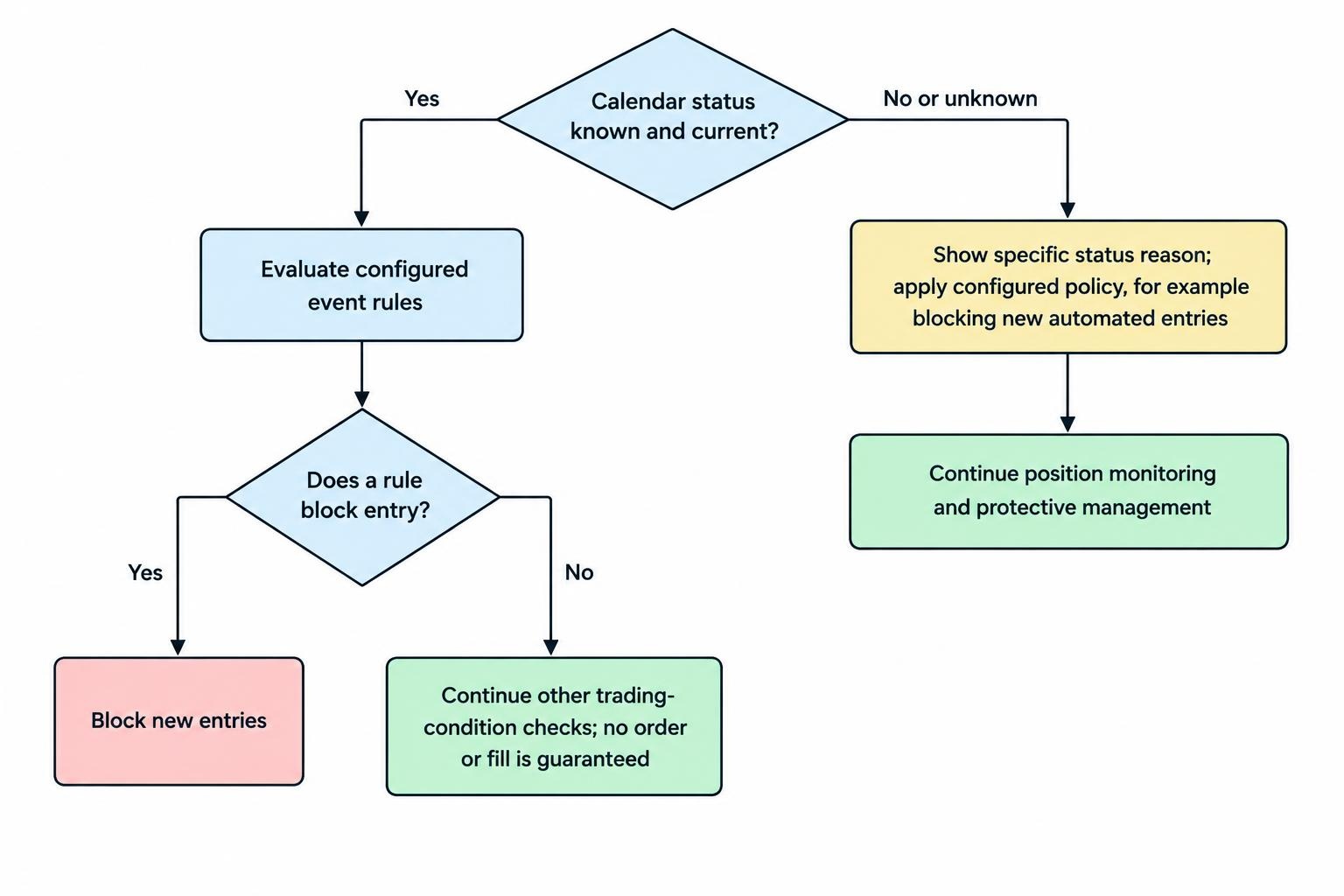
A calendar should not be the only permission check before an order. Combine event rules with spread and slippage monitoring so the application also evaluates trading conditions. Passing the calendar filter is permission to continue checking, not a promise of an acceptable fill.
Keep unscheduled news outside the calendar’s claimed coverage. A clean schedule cannot establish that no market-moving announcement will occur.
Test With the Information Available at the Time
Test schedule-based avoidance separately from result-based trading. The former needs the schedule your system knew before the event. The latter also needs the first received result, the forecast available beforehand, and the arrival order of later corrections.
Historical economic data requires care because later revisions can replace earlier estimates. The St. Louis Fed’s ALFRED vintage-data documentation describes access to data as reported on past dates. That supports revision-aware research, but do not assume a vintage dataset also contains your provider’s original forecast or your application’s exact receipt timestamp.
For an intraday replay, retain your own event-message history where your subscription permits it. Replay messages at their recorded receipt times rather than making every result available at its scheduled publication time. Include the delay between receipt, validation, rule evaluation, and order submission.
The same controls belong in a review of historical data quality and backtesting bias. A calendar strategy should not gain access to a corrected figure or revised forecast before that version reached the system.
Challenge the integration with missing forecasts, duplicate messages, malformed units, rescheduled events, and a connection failure immediately before publication. Confirm that each produces the intended state and an understandable log entry.
Record the test configuration as well as the results. Without the currency mappings, event filters, timing rules, and failure policy, repeating the test becomes guesswork.
Roll Out in Stages
Begin with a read-only integration. Verify event coverage, currency mappings, time conversions, and schedule updates before adding notifications. Then run the proposed trading rules in observation mode: log what they would block or allow without changing live orders.
Before granting the calendar permission to affect trading, confirm that:
- Each selected event maps to the intended instruments.
- Tentative timing and missing values remain visibly uncertain.
- Disconnections and stale data trigger the documented response.
- Existing protective management remains active during entry blocks.
- Every decision can be traced to an event version and rule setting.
Choose the simplest integration that meets those requirements. A reliable reminder is better than an automated filter whose timing cannot be verified. The standard is not how many events appear on screen, but whether the software uses the right record, at the right time, for the intended decision.