Trade copier synchronisation errors appear as missing entries, duplicate trades, incorrect lot sizes, delayed stop updates or positions that remain open after the source account has closed them. The visible mismatch is the symptom. The repair depends on where the instruction stopped: detection, transmission, filtering, order submission or execution.
Start with one affected trade and trace it through both accounts. Changing several settings at once makes the fault harder to isolate and can introduce fresh exposure. This guide covers fault diagnosis and recovery; the parent guide to forex trade copier software covers the broader setup and selection process.
Contain the Mismatch Before Changing Settings
Check the receiver account’s actual positions and pending orders before trusting the copier’s status display. Record the symbol, direction, volume, entry price and protective orders. Give priority to positions that should already be closed or have more exposure than intended.
If your copier supports blocking new entries while continuing to process exits, consider that control during diagnosis. Verify its behaviour first. Turning off automated trading altogether also prevents the copier from submitting automated closing instructions, so arrange direct supervision of existing positions if you disable it.
Save both terminals’ logs, the copier configuration and any documented tracking files before restarting or reinstalling. Note the terminal and copier versions, account server names and approximate incident time. Keep credentials out of the diagnostic record.
A useful incident description is “the source closed EURUSD at 10:14:22, but the receiver still held 0.10 lots at 10:16.” “The copier stopped working” leaves rather more detective work.
Find the First Missing Event
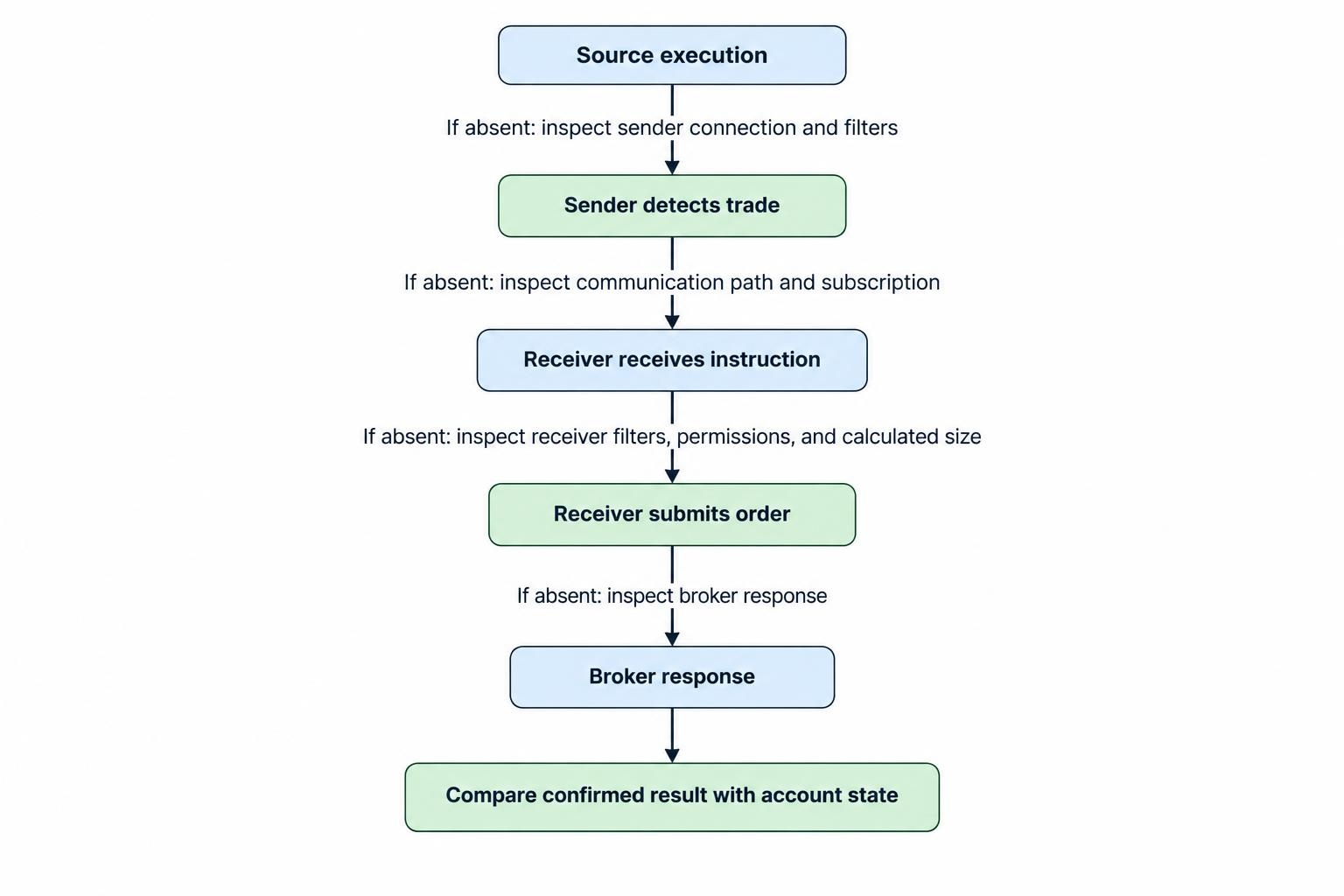
Build a short timeline for one affected trade. Look for the source execution, sender detection, receiver receipt, receiver order request and broker response. Use the copier’s own diagnostic logs alongside the terminal journal rather than relying on a screenshot of open positions.
Work through these questions in order:
- Was the source trade detected? If not, inspect the sender’s account connection, running status and inclusion filters.
- Did the receiver receive the message? If not, inspect channel names, account subscriptions and the communication path.
- Did the receiver submit an order? If not, inspect its filters, permissions and calculated trade size.
- What did the broker return? Record the full response, not just the copier’s summary.
- Does the account now match the confirmed result? Compare positions, pending orders and execution history.
Normalise timestamps before measuring delays. Broker server time, computer time and UTC should not be treated as interchangeable. Preserve the original timestamps and record their offsets rather than editing the logs.
Use the first missing event to narrow the investigation. There is little value adjusting order size when the receiver never received an instruction.
Check Permissions and Receiver Identity
A receiver needs permission to place trades, not just access to account information. Confirm that it is connected to the intended trading account, has trading access and is running the expected copier instance. Check these details after account changes, terminal updates and recovery from a server restart.
For an MT5 copier running as an Expert Advisor, automated trading must be permitted both at platform level and for that EA. Platform settings can also disable automated trading after account, profile or chart changes. Check the MetaTrader 5 controls for Expert Advisor trading permissions against the receiver’s current state.
Do not enable every permission as a troubleshooting shortcut. Allow DLL imports or external web requests only when the trusted vendor’s installation instructions require them.
Next, compare the sender and receiver configuration. Confirm the intended channel or subscription, trade direction, symbol permissions and trading hours. If the connection is healthy but only certain trades disappear, investigate selection rules before blaming the network. A correctly applied exclusion is not a transmission failure.
Correct Symbol, Volume and Stop Settings
Verify the destination instrument
Check the complete source and destination symbol names, including prefixes and suffixes. For a hypothetical mapping from EURUSD to EURUSD.a, verify that EURUSD.a is the intended tradable instrument on the receiver account.
Do not approve a mapping because the names look similar. Compare the underlying market, contract size, quote currency and trading session. Then check the receiver’s available quote and symbol trading status. A mapping should identify the right contract, not simply remove an error message.
Test one corrected symbol on a demo receiver before applying a broad mapping rule. Keep a record of the change so that another operator can distinguish an intentional override from an accidental one.
Recalculate the requested lot size
Compare the source volume, the copier’s calculated receiver volume and the volume actually requested. Check the destination instrument’s minimum, maximum and volume increment, along with its contract size. These are separate properties in the MQL5 symbol specifications for volume, contracts and stop restrictions.
Suppose a 0.03 lot source trade receives a 0.25 multiplier. The calculated destination size is 0.0075 lots. If the receiver’s minimum is 0.01 lots, the copier must follow its configured skip, reject or rounding policy. Rounding upward to 0.01 creates one third more volume than the calculation requested. It fixes the minimum size problem by changing exposure.
Decide that policy deliberately. Do not increase the multiplier simply to make an error disappear. For balance or equity based sizing, also verify the input values and any currency conversion used.
Inspect rejected stop updates separately
For a failed stop modification, capture the requested stop price and the receiver’s bid and ask at that moment. Compare them with the instrument’s stop distance, freeze distance and price increment requirements.
Keep points, pips and price units distinct. Do not remove protective orders merely to prove that an entry can execute. Diagnose the rejected request on a demo account or through saved request details instead.
Allow for Netting and Hedging Differences
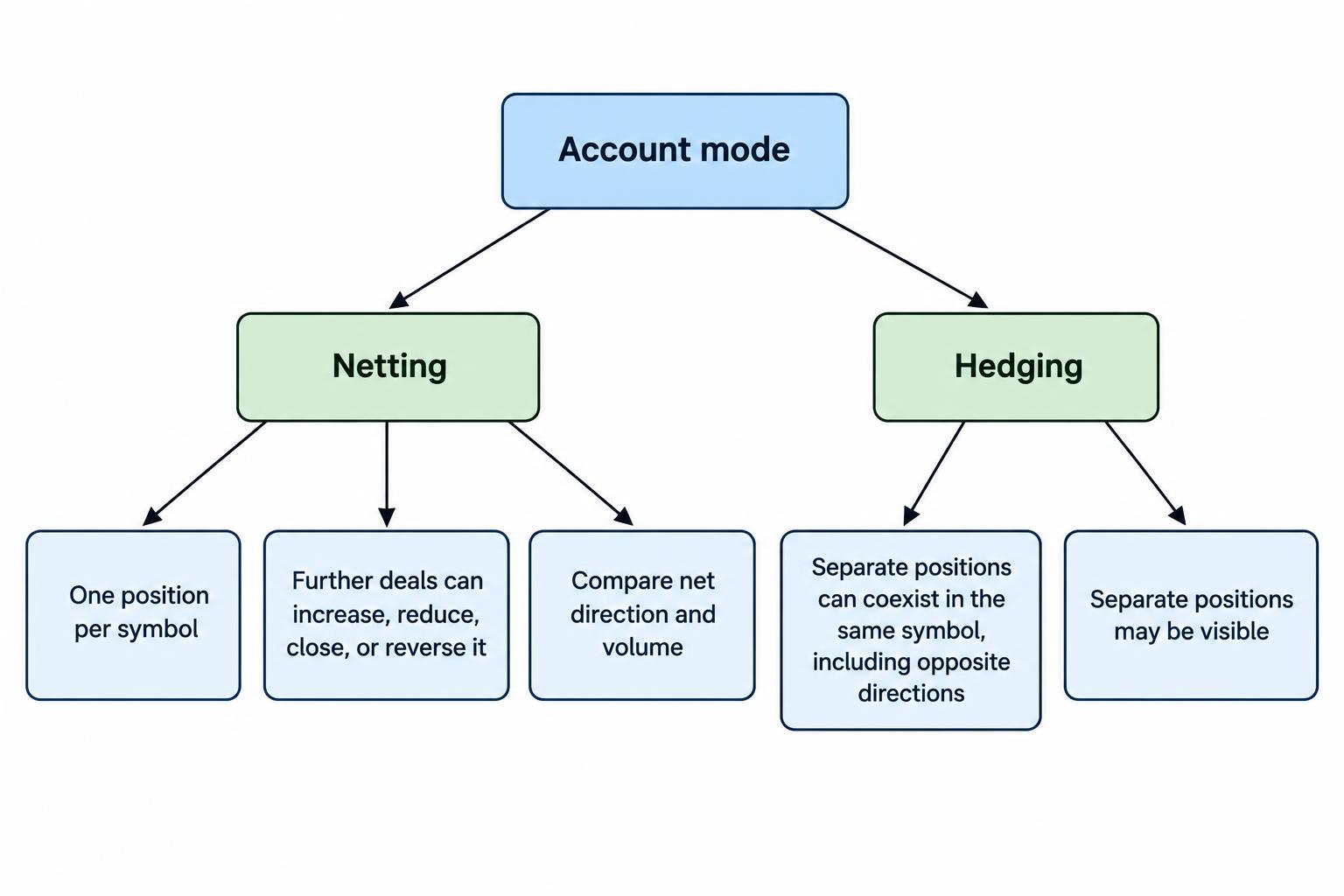
Different position counts do not automatically prove that trades are missing. An MT5 netting account holds one position per symbol: further deals can increase, reduce, close or reverse it. A hedging account can hold separate positions in the same symbol, including opposite directions. These are distinct MetaTrader 5 position accounting systems.
Check that the copier supports the source and receiver account modes. For a netting receiver, reconcile net direction and volume rather than expecting one destination position for every source ticket.
During testing, keep unrelated manual trades and other strategies away from the affected symbol. Otherwise, the reconciliation must separate copier activity from changes introduced elsewhere.
Test partial closes explicitly. Confirm both the reduction and remaining volume rather than accepting a generic “close successful” message.
Interpret MT4 and MT5 Error Codes Correctly
Record the platform with every error number. MT4 and MT5 use different code sets, and a copier may add its own application errors. The official MT4 trade error definitions identify the MT4 codes below.
| Problem | MT4 code | MT5 return code | First check |
|---|---|---|---|
| Invalid trade volume | 131 | 10014 | Calculated lots, minimum size and volume increment |
| Invalid stops | 130 | 10016 | Requested levels against destination prices and restrictions |
| Insufficient funds | 134 | 10019 | Receiver free margin and requested exposure |
| Market closed | 132 | 10018 | Destination instrument’s trading session |
| Trade timeout | 128 | 10012 | Account state and history before another submission |
| No server connection | 6 | 10031 | Receiver connection to its trading server |
The official MT5 trade server return codes also distinguish an order being placed, a completed request and partial completion. Do not treat these as identical outcomes.
Match the response to the submitted request. Avoid repeated submissions for a persistent configuration error; correct the request first. For a timeout, inspect positions and history before deciding whether a retry is appropriate.
Separate Transport Delay From Execution Delay
Measure the intervals between sender detection, receiver receipt, receiver submission and execution confirmation. This gives each delay an owner. If receipt is prompt but submission is late, investigate receiver processing. If submission is prompt but confirmation is late, investigate the execution connection and broker response.
Synchronisation does not require identical entry prices. Compare the source fill, destination quote when the request arrived and destination fill. That separates movement before submission from the eventual execution difference. Use forex spread and slippage monitoring tools for a fuller measurement workflow.
Check whether a delayed instruction was rejected, left pending or accepted at a different price. Do not widen every tolerance at once. Set an acceptable policy for stale entries and test it without changing the strategy’s risk controls.
Record stop modification timing separately from entry timing. Before labelling an update late, check the copier’s documented update schedule rather than assuming every message uses the same mechanism.
Investigate Duplicate Trades Without Blind Retries
For duplicate entries, check every running terminal process and remote desktop session, not just the windows currently visible. Compare account numbers, receiver instances, channels and any other copying service connected to the same account.
Duplicate receiver instances and retries after ambiguous broker timeouts are documented failure paths in the FX Blue Personal Trade Copier troubleshooting and recovery guide. Its recovery instructions also identify tracking files that must be preserved for certain configurations and MT5 netting accounts.
Compare the two destination orders’ timestamps with the request log. Establish whether two instructions were submitted, one instruction was retried or another system created the second trade. Do not change retry settings until that distinction is clear.
Preserve the copier’s identifiers and mapping records during diagnosis. Treat order comments as evidence rather than editing them to make positions look consistent. A restart is not a reconciliation.
Restore Service Through a Controlled Test
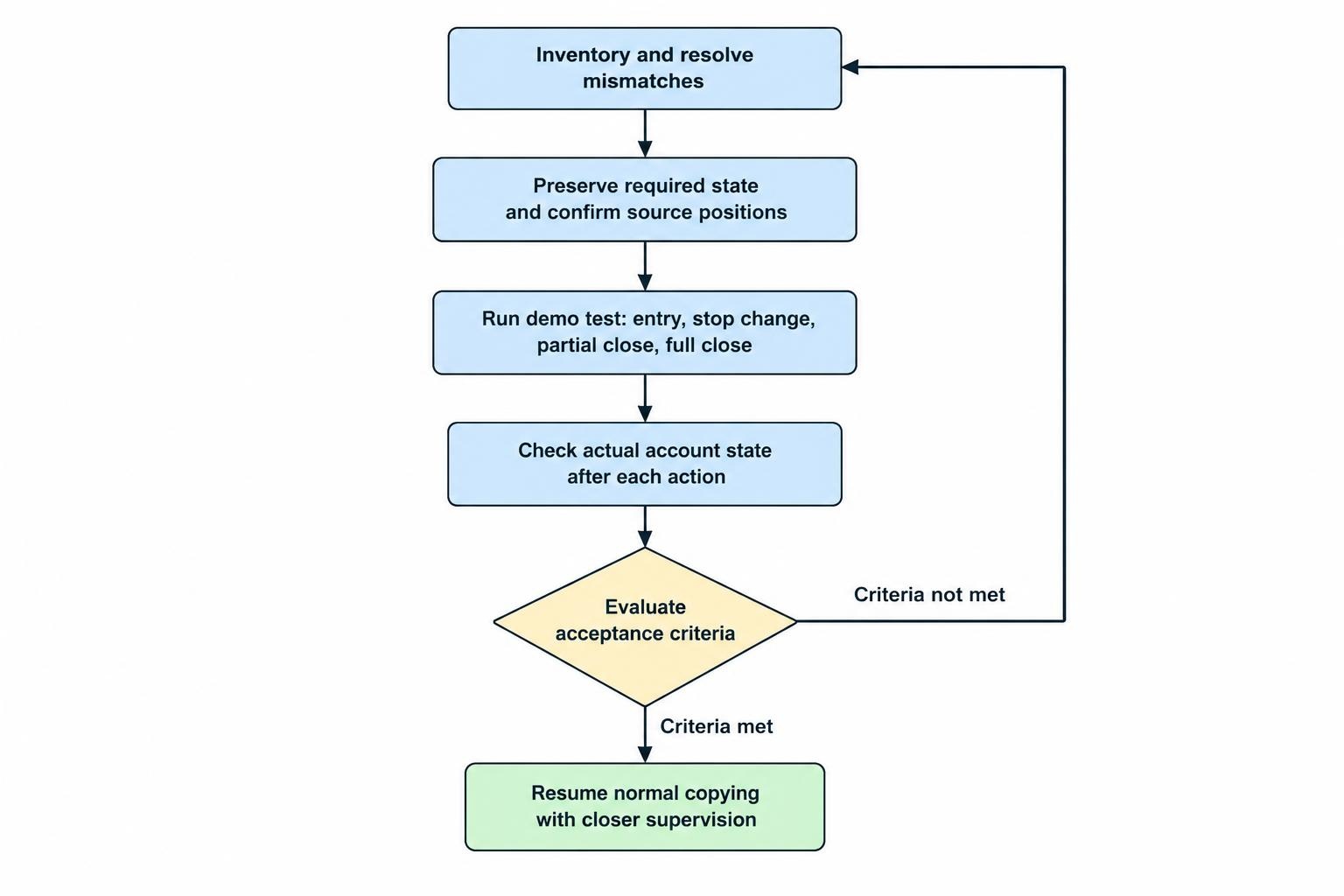
Before restarting, decide how to handle every mismatch: an orphaned receiver position, a missing entry, incorrect volume or a pending order that no longer belongs. Do not assume that reopening a missed trade at the current price recreates the original instruction.
Follow the vendor’s recovery sequence. Preserve required state files and establish the source account’s current positions before allowing the receiver to act. During a machine migration, prevent the old and replacement receivers from trading simultaneously.
If the incident followed a host restart or migration, review the operating checks covered in forex VPS hosting for trading software. Record which terminals should launch, which accounts they should use and who verifies recovery.
Run a demo test covering an entry, stop change, partial close and full close. Where supported, test pending order cancellation and a planned disconnect followed by reconnection. Check actual account state after each action, including remaining volume and protective orders.
Define acceptance before resuming normal copying: no unexplained duplicates, correct sizing, expected exit handling and a traceable response for rejected requests. Demo testing checks the workflow, not future live execution quality. Keep closer supervision after restoration and retain the incident record, including the fault, corrective change and test result.