Exporting binary options trading history turns an account screen into records you can check: what each contract cost, what it returned, when it settled and whether the account balance reconciles. A win rate alone cannot answer those questions.
The useful output is a clean trade ledger supported by original statements and a separate record of deposits and withdrawals. Whether you use a spreadsheet or other binary options software, the priority is consistent accounting, not a more attractive performance chart.
Preserve the evidence before analysing results
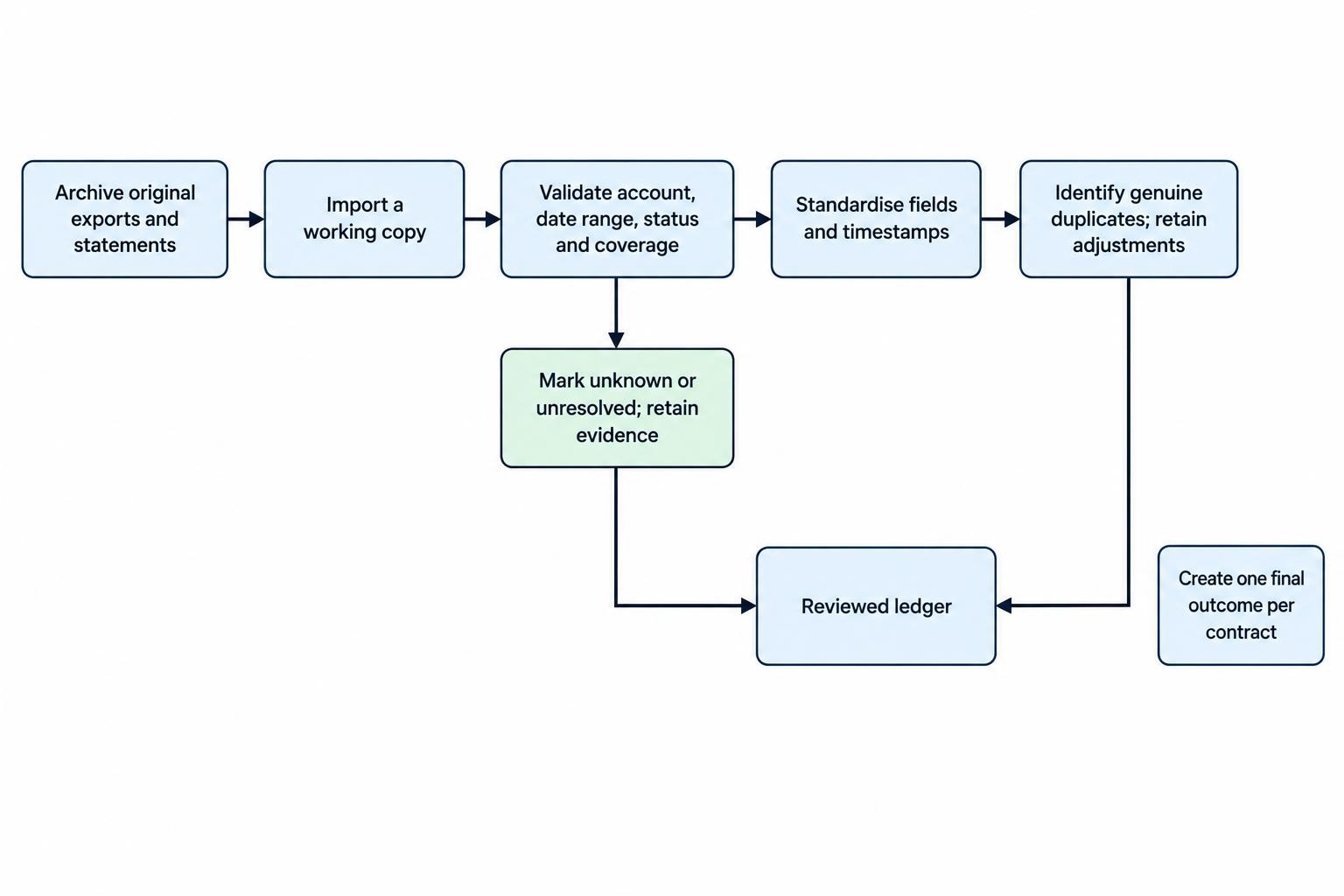
Keep an untouched copy of every downloaded statement and transaction file. Record the download date, account identifier, selected reporting period and displayed time zone. Store screenshots and support correspondence separately, especially when a settlement or withdrawal is disputed.
A platform-generated export is evidence of what the platform reported, not independent proof that its prices, balances or transactions are accurate. Complaints documented in the CFTC and SEC investor alert on binary options fraud include withheld withdrawals and software manipulation. An export button does not establish regulatory authorisation or make displayed profits withdrawable.
Export the complete account history
Export controls vary, so use the provider’s documented process rather than assuming every account has the same reporting menu. Look for transaction history, statements, closed positions or account activity. Prefer a structured CSV or spreadsheet download for calculations, while retaining any accompanying PDF statement.
Before downloading, check four settings:
- Account: Separate live and demo activity, and identify each account currency.
- Date range: Confirm whether the filter uses order placement, expiry or settlement dates.
- Status: Include refunded, cancelled, adjusted and unsettled contracts where available, not just wins and losses.
- Coverage: Check whether the download contains the full selection or only the visible page.
Export deposits, withdrawals, fees and balance adjustments as well. These may sit outside the trade report. Without them, reconciling the account becomes guesswork.
For monthly files, allow a small overlap between reporting periods, then check duplicate records carefully. A contract opened before midnight and settled afterward should not disappear between two downloads. Also save the first and last record timestamps and compare the exported count with the account screen.
If no structured export exists, request a transaction-level statement. Manual transcription from screenshots should be a fallback, with each entry checked against its original image. Mark missing fields as unknown rather than filling them with assumptions.
Fields worth retaining
Keep the provider’s original columns, then add standardised fields in a working copy. The following structure supports both performance calculations and settlement checks.
| Field group | Records to retain | Purpose |
|---|---|---|
| Identity | Account, trade ID, order ID and transaction ID | Match records without confusing separate accounts or events |
| Contract | Underlying asset, direction, strike or barrier, expiry and contract type | Identify the proposition being settled |
| Timing | Submission, execution, expiry and settlement timestamps, including time zone | Reconstruct the sequence accurately |
| Cost | Stake or premium, contract quantity, currency and fees | Establish the amount paid |
| Return | Quoted winning return, settlement credit, refund and early-exit proceeds | Separate promised terms from actual cash movements |
| Outcome | Settlement price, status, adjustment reason and recorded profit or loss | Check the result and explain exceptions |
| Context | Strategy label, manual or automated entry, demo or live account | Compare like with like |
Treat identifiers as text, even when they contain only digits. Excel can remove leading zeros and truncate long numerical values; those changes can break record matching. Use the import controls covered in Microsoft’s guidance on preserving leading zeros and large numbers before loading the file, rather than trying to repair altered IDs afterward.
Clean the data without changing its meaning
Use separate sheets or datasets for original imports, cleaned trades, cash movements and analysis. Keep a short transformation log showing which columns were renamed, converted or calculated. Someone reviewing the workbook later should be able to reproduce the totals.
Check decimal separators, negative amounts, currency symbols and percentage formats. A quoted return recorded as 80 must not enter a calculation as though it means 8,000%. Likewise, distinguish an empty settlement field from a genuine zero payment.
Save the working analysis in a workbook format rather than repeatedly overwriting the original CSV. CSV export saves only the current worksheet and does not preserve every workbook feature, as detailed in Microsoft’s text and CSV import and export instructions. Keep the original download alongside the analysis file.
Normalise timestamps and remove only genuine duplicates
Retain the original timestamp and add a normalised UTC column. If the export omits its time zone, establish it from documentation or support before converting dates. Do not assume a fixed offset across daylight saving changes.
Choose a consistent reporting basis. Settlement dates suit realised profit reporting; execution dates suit reviewing entry decisions. Both can be useful, but switching between them halfway through a monthly comparison distorts the result.
Do not delete every repeated trade ID. An order may have separate execution, settlement and correction records. Identify duplicates using the account, record type and transaction identifier where available. Preserve legitimate adjustments, then build a separate summary containing one final outcome per contract.
Reconcile cash before measuring performance
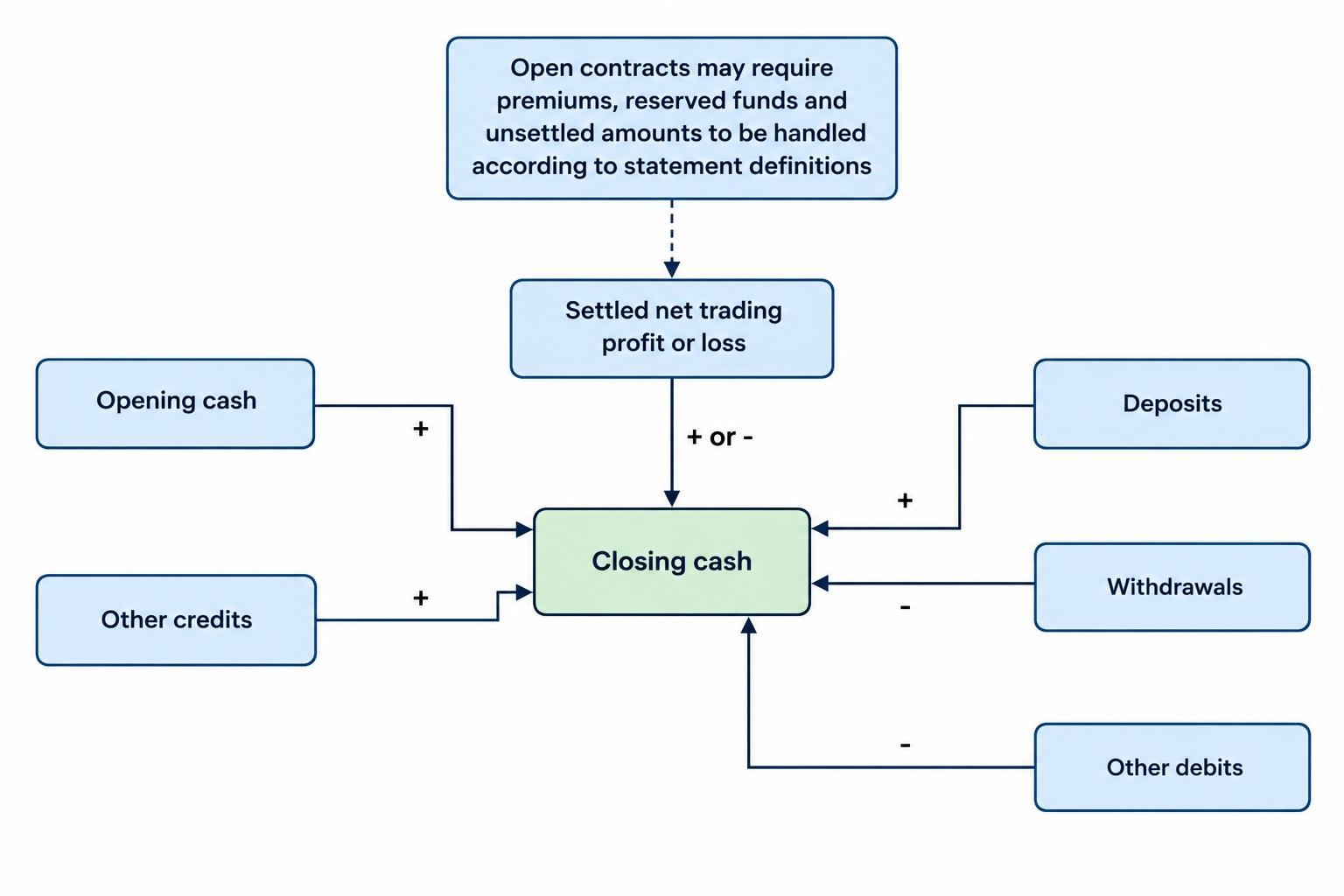
First check whether the account’s reported cash movements add up. For a period with no open contracts at either endpoint, a basic reconciliation is:
Closing cash = opening cash + deposits − withdrawals + settled net trading profit or loss + other credits − other debits.
Include each fee once. If trading profit already includes transaction fees, do not subtract those fees again. Keep withdrawal charges and other non-trading costs separate so their treatment remains visible.
Where contracts remain open, account for premiums paid, reserved funds and unsettled amounts using the statement’s definitions. Available balance, cash balance and account equity are not interchangeable labels.
Investigate any unexplained difference before producing performance charts. Check missing trades, date boundaries, currency conversions, pending withdrawals and later corrections. A deposit is not trading profit, and a withdrawal is not a trading loss. Keep separate evidence of completed withdrawals rather than treating a request as a completed payment.
Calculate profit from cash flows, not payout labels
The word “payout” needs checking. With a hypothetical $20 stake and an 80% net winning return, a winning contract earns $16 profit and returns $36 in total. Recording the full $36 as profit would count the returned stake as earnings.
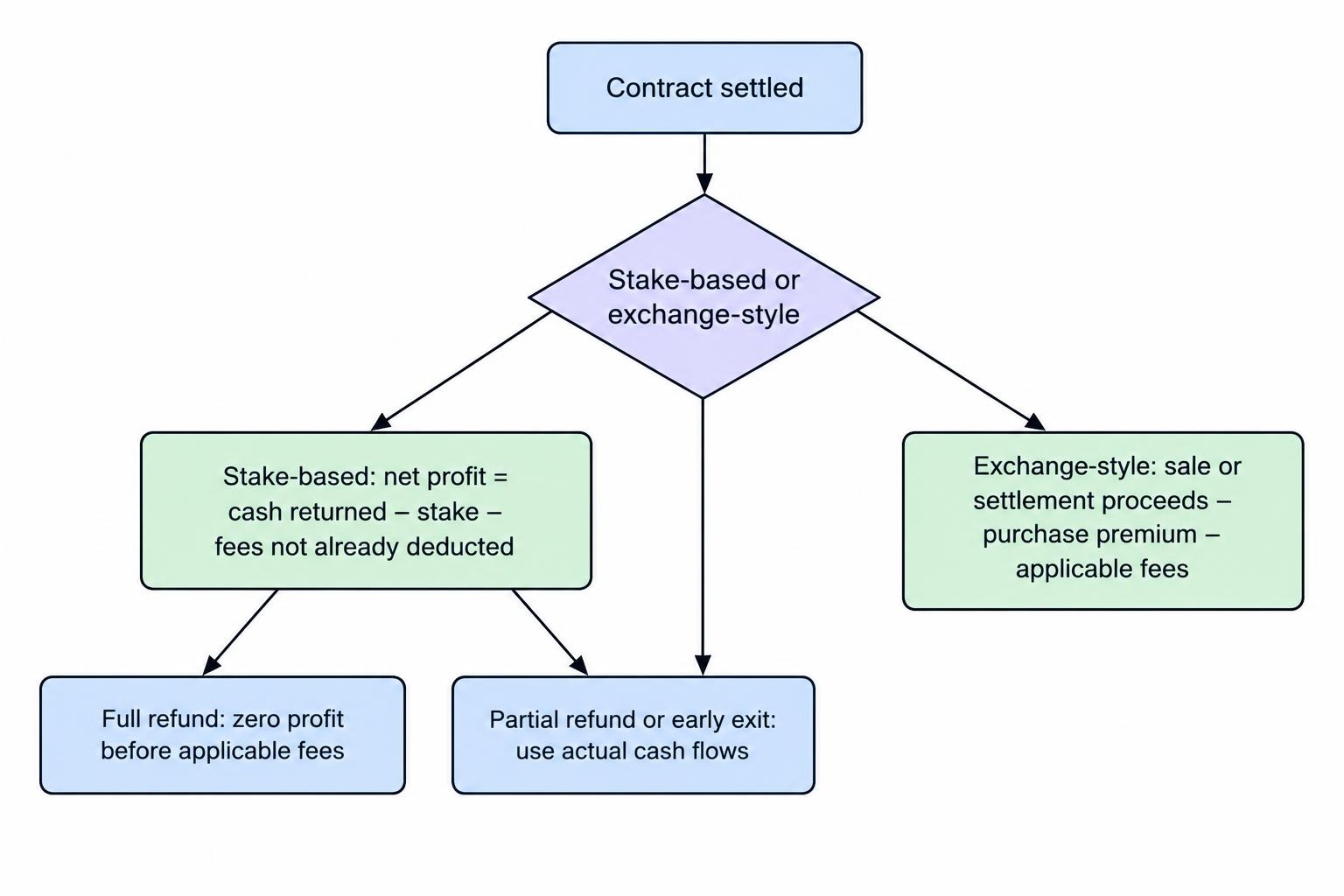
For a straightforward stake-based contract, calculate:
Net trade profit = total cash returned − stake − fees not already deducted.
A full loss returns zero. A full refund returns the stake and produces zero profit before any applicable fees. Record partial refunds and early exits using their actual cash flows rather than forcing them into the standard winning-return calculation.
For an exchange-style contract, use quantity, purchase premium, sale or settlement proceeds and fees. Do not impose a percentage-return model on a contract bought at a quoted price.
For equal stakes, a constant net winning return and complete loss of the stake on losing trades, the break-even win rate is 1 ÷ (1 + net winning return). At an 80% return, that is approximately 55.56%, before fees. Different refund terms or variable stakes require different treatment; the binary options payout and break-even calculator guide covers those calculations in more detail.
A worked trading-history example
Suppose an export contains 100 settled contracts, each with a $20 stake and an 80% net winning return. There are 58 wins, 42 losses, no refunds and no fees.
The wins generate 58 × $16 = $928 profit. The losses cost 42 × $20 = $840. Net trading profit is therefore $88, or $0.88 per contract.
Total stakes are $2,000, so profit divided by cumulative stakes is 4.4%. That is a return on stake turnover, not a return on the account balance. The same money may have funded several successive contracts.
If stakes or winning returns vary, calculate each trade individually. A single average payout can hide where the larger losses occurred.
Measure more than win rate
Build a compact report containing net profit, contract count, cumulative stakes, average profit per trade and average winning and losing amounts. Define every denominator. If win rate means wins divided by wins plus losses, show refunds and cancellations separately.
Add a cumulative settled-profit curve in settlement order. Measure its largest fall from a previous peak to a later trough as realised trading drawdown. Keep deposits and withdrawals out of this curve so transfers do not disguise losses.
Also review losing streaks and stake changes after losses. A profitable final balance can conceal a period of much larger exposure. Several overlapping contracts tied to the same asset should not be assessed as though each carried unrelated risk.
Compare results by a few preselected categories, such as expiry length, asset, return band or strategy label. Always display the trade count beside each category. A category with four wins from five contracts needs a very different reading from one with 400 wins from 500.
Allow for sampling uncertainty
In the hypothetical 58-win sample above, a 95% Wilson confidence interval for the win probability is approximately 48.2% to 67.2%, under an independent-trial model with a constant win probability. The calculation uses the method in the NIST guidance on confidence intervals for proportions.
That interval spans both sides of the 55.56% break-even threshold. The observed profit therefore does not establish a dependable advantage. Dependence between trades and changing conditions also require caution when applying the model.
Choose comparisons before reviewing results, then assess any proposed rule on later records. Avoid searching dozens of filters until one produces an attractive historical result. Keep demo and live results separate throughout.
Check disputed settlements against the contract terms
For an unexpected result, gather the contract confirmation, strike, exact expiry, stated settlement source, settlement value and any rule governing equality at the strike. Check whether the rule uses a last trade, bid, ask, midpoint or an average over an interval.
A screenshot from another chart is not automatically an equivalent comparison. Start by matching the instrument, timestamp and price convention. The guide to comparing binary options platform price feeds addresses that comparison without treating every discrepancy as proof of wrongdoing.
Keep a discrepancy log with the trade ID, issue, supporting files and response received. Leave disputed records visible and label them unresolved rather than silently changing their outcomes.
Make the review repeatable
Set a regular export schedule and repeat the same sequence: archive, import, validate, reconcile and analyse. Check recently settled contracts for corrections, and document any change in file structure or calculation method.
When assessing a claimed track record, ask whether the export covers the full period, includes every account and separates real transactions from demonstrations. A selected screenshot is not a complete ledger. Use the guide to evaluating binary options software performance claims for the broader evidence checks.
Share only the fields needed for review. Remove personal identifiers and payment details from copies, retain the originals securely and avoid giving an analysis service trading permissions when file import is sufficient.
A useful report ends with reconciled totals, clearly defined calculations and a list of unresolved issues. It does not turn historical profits into a forecast or establish that a provider is safe. Keep the broader binary options risk warning separate from the arithmetic: accurate accounting can identify losses and inconsistencies, but it cannot remove trading or counterparty risk.