Paper trading automated strategies means running a trading system against incoming market data while replacing real orders and money with simulated execution and capital. The aim is not just to produce a profitable equity curve. It is to check whether the bot makes the intended decisions, manages positions correctly and responds safely when something breaks.
Within an automated trading software workflow, paper trading should serve as a deployment rehearsal. Treat it as a controlled experiment with fixed rules, recorded results and clear acceptance criteria. A bot that makes imaginary money but loses track of its orders has not passed.
What Paper Trading Tests That Backtesting Does Not
A backtest processes historical observations. Paper trading, also called a dry run or forward test, waits for new observations to arrive. That distinction brings data handling, calculation delays and continuous operation into the test. In Freqtrade’s documentation on backtesting and dry runs, dry runs use real exchange data without opening exchange trades, and processing delays can produce different entry prices from a backtest.
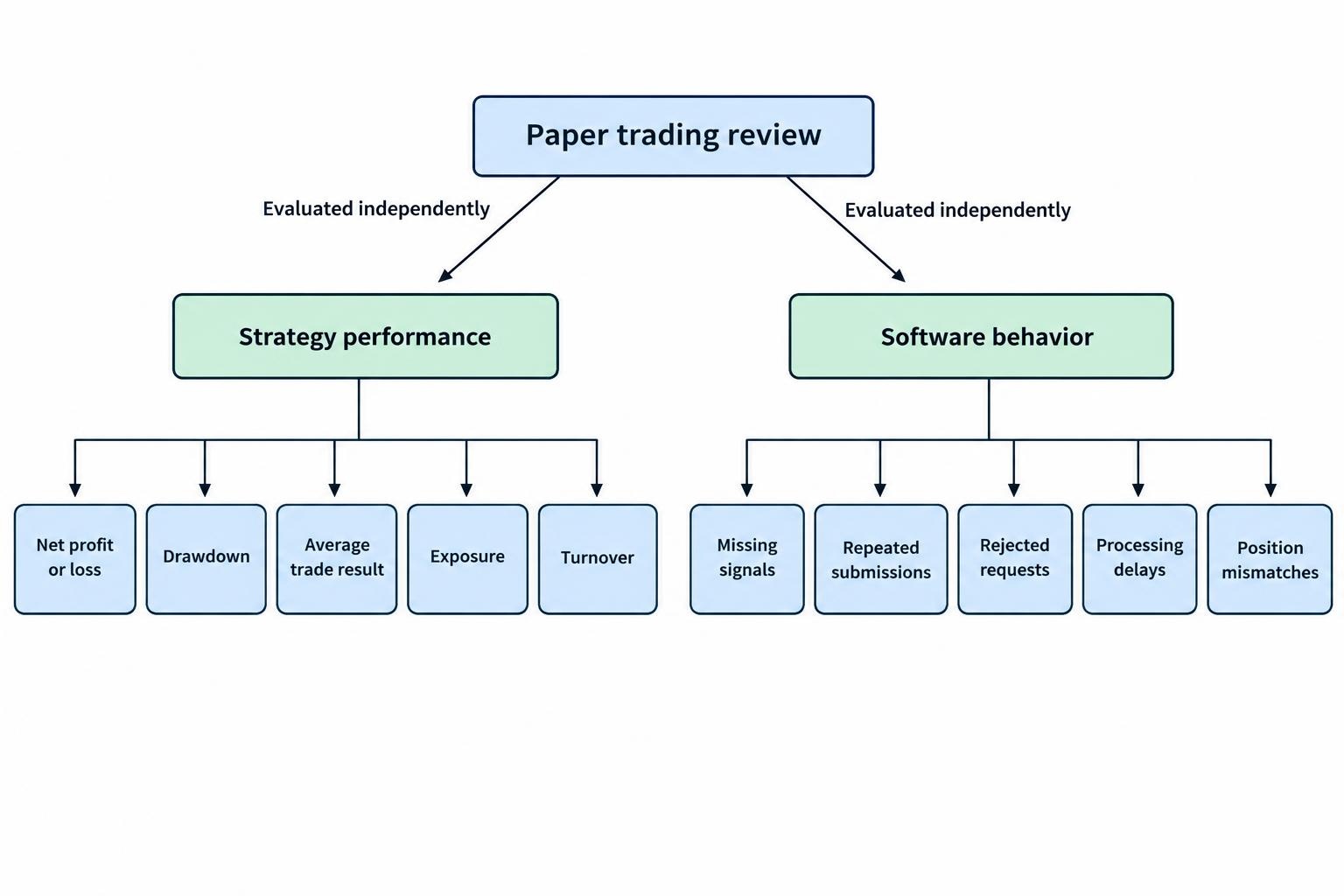
Separate two questions throughout the exercise. Does the strategy show acceptable simulated performance after costs? Does the software execute its instructions correctly? These are different tests. A losing trade can demonstrate flawless execution, while a winning trade can conceal an incorrect position size.
Paper trading is not a replacement for historical research. Use trading strategy backtesting software to assess the strategy across past periods before committing time to a forward test. Then use paper trading to inspect its behavior as events arrive, without repeatedly changing the rules to fit what just happened.
Choose an Environment That Tests the Right Workflow
Start by identifying where simulated execution takes place. A chart emulator, a local bot simulator and an API paper account do not exercise the same parts of a trading system.
| Environment | Useful testing focus | What still needs checking |
|---|---|---|
| Chart strategy emulator | Signal timing, strategy calculations and simulated orders | The external order routing and account workflow |
| Local dry run | Incoming data processing, decisions, logging and internal position tracking | Behavior of the intended broker connection |
| API paper account | Order submission, status updates and account reconciliation through a test connection | How its execution assumptions differ from real trading |
Read the execution model rather than assuming the platform reproduces market behavior. TradingView’s strategy emulator documentation states that its default historical simulation uses chart data and assumptions about price movement within each bar. A simulated stop and target therefore need to be assessed in the context of those assumptions.
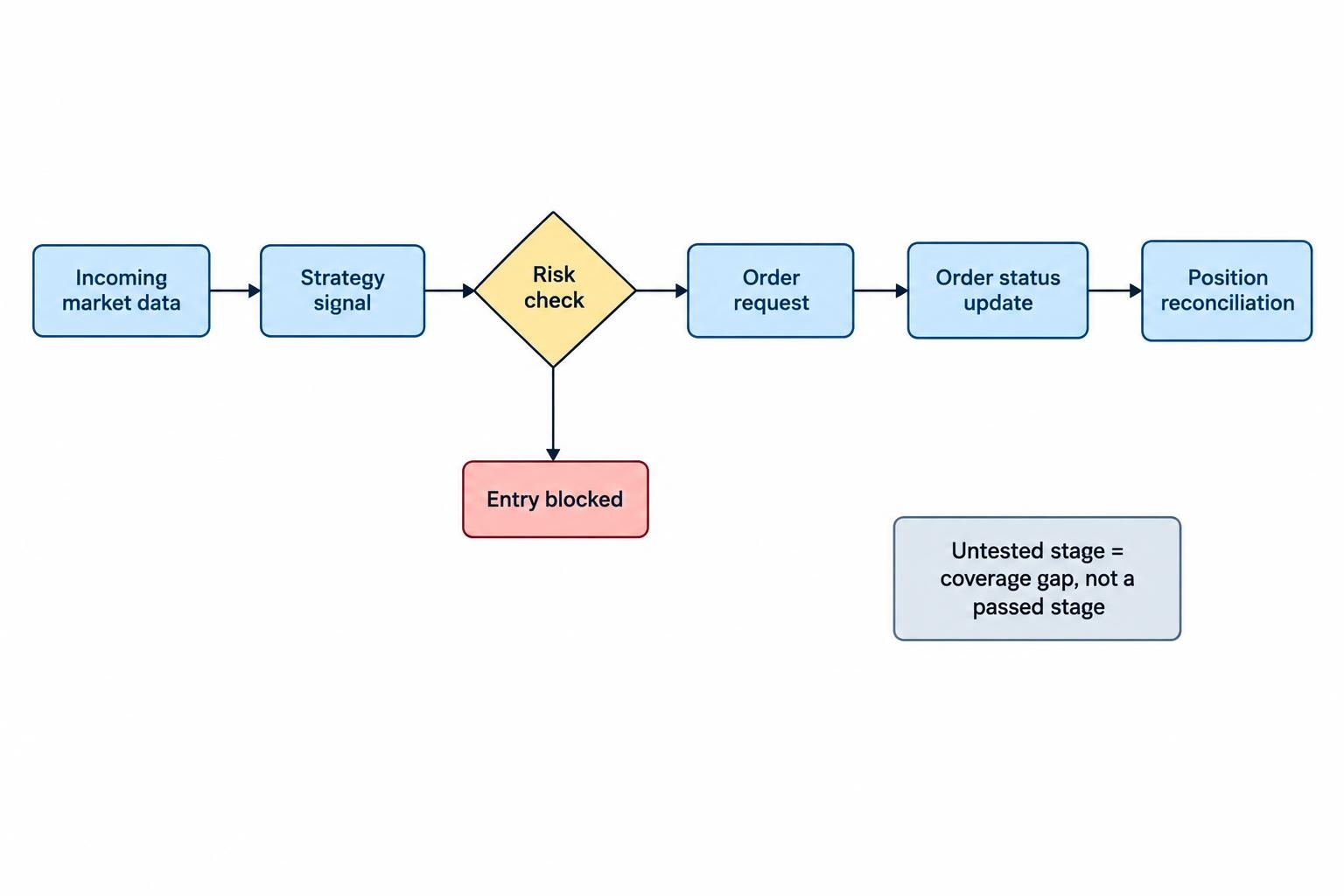
For an automated deployment rehearsal, choose an environment that can exercise the intended chain: data, signal, risk check, order request, status update and position reconciliation. Record any stage that remains untested instead of treating a successful chart simulation as proof that the whole system works.
Configure the Paper Account Like the Intended Deployment
Write a short test specification before starting. Record the strategy version, instruments, trading sessions, data source, calculation frequency, order types and position sizing rules. Include the conditions that should block an entry or stop the system.
Set virtual capital to a realistic amount. If the intended account would hold $10,000, a simulator funded with $1 million is the wrong rehearsal unless its sizing and funding constraints are adjusted. Test the planned maximum number of positions, available cash checks and behavior when there is not enough buying power.
Check default execution settings too. The QuantConnect paper trading model documentation states that its default model fills market orders immediately and completely, using bid and ask prices when available. Treat those results as model outputs, not evidence that a real order would receive the same execution.
Use separate paper credentials and endpoints wherever the provider offers them. Add a startup check that rejects an unexpected account identifier or environment. Keep real trading credentials out of the paper deployment rather than trusting a remembered checkbox.
Match operational details as well: time zones, market sessions, indicator warmup and restart settings. For a strategy intended to act only after a candle closes, verify that no entry occurs while that candle is still forming. Save the configuration beside the results so the run can be reproduced.
Make Costs and Fills Difficult Enough to Be Useful
Build a cost checklist for the instrument: commissions, spread, slippage, exchange charges, borrowing costs and overnight funding where relevant. Mark which costs the simulator already includes. Do not subtract the spread twice if it is already reflected in simulated bid and ask execution.
Run a baseline scenario and a less favorable scenario. Suppose a hypothetical strategy earns an average gross profit of $12 per completed trade. With $7 in total trading costs, the average net result is $5. At $14 in costs, it becomes a $2 loss. The signal has not changed; the economics have.
Test quantity and timing as well as price. Ask the simulator to handle partial execution, an unfilled remainder and cancellation before completion. If those features are unavailable, record that gap and test the order handling logic separately with controlled events.
For limit orders, inspect the rule that triggers a fill. Does a price touch suffice? Must price move through the order level? Does the model consider available volume? For market orders, inspect the price reference and any delay assumptions. The objective is not to choose the most pessimistic model, but to expose how much the result depends on generous execution.
Keep a register of untested conditions, including queue position and the effect of the bot’s own order size where the simulator does not model them. Do not quietly count these as passed.
Record the Decision Chain, Not Just Profit and Loss
Make every simulated position traceable from the data that triggered it to the event that closed it. Record the strategy version, instrument, data timestamp, signal time, order request time, requested quantity, status changes, simulated fill and exit reason.
Include reasons for rejected signals. “No order” should be an explainable outcome: a position cap was reached, the spread exceeded the configured threshold, data was stale, or another rule blocked entry. Otherwise, a healthy risk control and a broken signal path can look identical in the trade history.
For alert driven systems, verify that the running alert matches the version being tested. TradingView’s alert documentation states that alerts retain a snapshot of the script, inputs, symbol and timeframe when created. Changing the chart or script does not update an existing alert; recreate it when those changes need to reach the running alert.
Review two sets of measurements. For strategy performance, track net profit or loss, drawdown, average trade result, exposure and turnover. For software behavior, track missing signals, repeated submissions, rejected requests, processing delays and mismatches between internal positions and the paper account.
Break timing into stages rather than reporting one average delay. Measure data arrival to decision, decision to request, and request to acknowledgment. Use synchronized clocks for comparisons across machines, and inspect the slowest events as well as typical ones.
Finally, reconcile the bot’s position ledger against the paper account at regular intervals. Investigate every unexplained difference, even when both dashboards show a profit.
Test Failures Deliberately
A calm session will not test every recovery path. Add controlled failure exercises to the paper plan, keeping them isolated from real accounts. Begin with four cases:
- Lost connection: interrupt the connection and check that stale data blocks new entries.
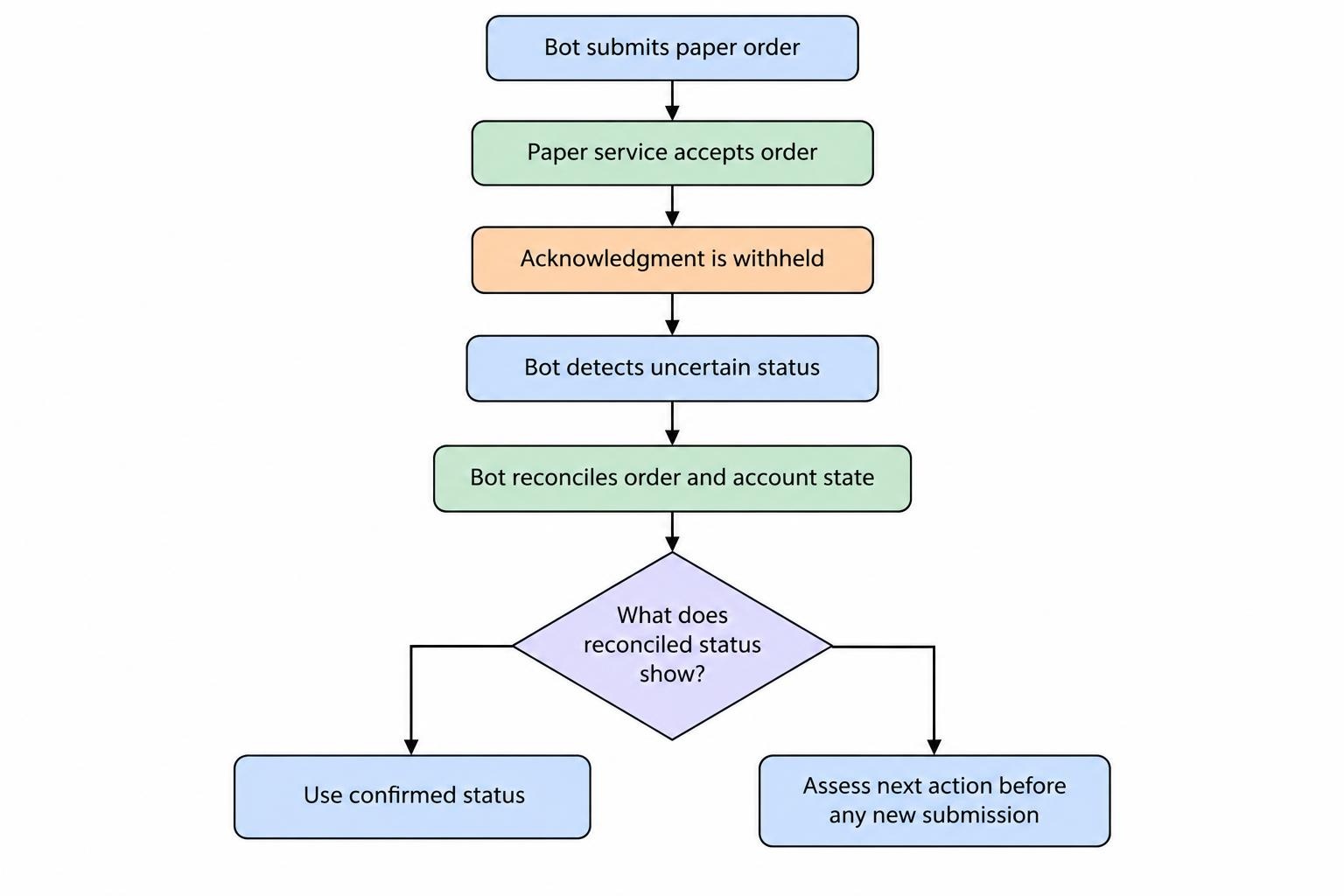
- Uncertain order status: withhold an acknowledgment and check that the bot investigates before submitting again.
- Partial execution: fill part of an order, then cancel the remainder and verify the resulting position.
- Restart with exposure: restart while a position and an unfilled order exist, then inspect recovery.
The uncertain status case deserves close attention. In the test, allow the paper service to accept an order while preventing the bot from receiving confirmation. Require reconciliation before another submission. The separate guide to failed orders, retries and duplicate trades covers that execution workflow in more detail.
Test restart behavior beyond “the process came back.” Verify recovery of positions, outstanding orders, indicator history, daily loss counters and any rule that prevents repeated entries. Make the expected result explicit for each item.
Platform restart behavior needs checking rather than assumption. QuantConnect’s deployment and restart documentation states that a restart creates a fresh algorithm instance, recovering account information but requiring other state to be rebuilt or persisted. It also distinguishes stopping the algorithm from liquidating its holdings.
Apply that distinction to the test plan. Verify separately what happens when you block new entries, cancel outstanding orders, stop the process and request position closure. Give each action a clear label. An emergency button should not require interpretation during an emergency.
How Long Should an Automated Strategy Stay in Paper Trading?
Set duration through coverage goals, not a calendar deadline alone. Decide which sessions, order events, recovery exercises and strategy behaviors must be observed before the run begins.
Consider two hypothetical bots: one trades several times per session, while another enters only once a week. Giving both a 30 day test would produce very different amounts of execution evidence. Neither should pass just because the date has arrived.
Keep operational confidence separate from confidence in returns. Passing a planned disconnect test supports the recovery procedure. It says little about whether the strategy’s trading logic will remain profitable. Likewise, many related trades during one market move should not be treated as broad evidence across market conditions.
Freeze the trading rules during each evaluation run. If you alter the entry logic, sizing or filters after observing results, label the revised version and begin a new evaluation period. Use a separate walk-forward testing process for structured strategy development rather than turning the paper account into a running optimization exercise.
Keep failed runs. Their records explain what changed, why it changed and whether the repair actually addressed the original problem.
Set Acceptance Criteria Before Considering Real Capital
Write pass and fail conditions before seeing the results. Require reconciled positions, explainable order outcomes, working risk limits and successful recovery exercises. Classify unresolved issues by consequence: an incorrect dashboard label is not equivalent to an order that doubles exposure.
Judge simulated performance against the prewritten plan, including costs and adverse execution assumptions. Examine whether one trade or instrument accounts for most of the result. Do not lower the acceptance threshold because the bot has been running for longer than expected.
Complete the operating procedures too. Assign responsibility for alerts, account checks, software changes and incident response. Test trading bot monitoring and emergency stop controls during the paper phase, including what happens when nobody acknowledges a warning.
A successful paper run supports a decision about further testing; it does not guarantee live profitability or matching execution. If real capital is later introduced, keep exposure constrained by a separate risk plan and compare actual behavior against the paper assumptions. Any unexplained position, duplicate order or failed safeguard is a reason to stop and investigate, not increase the stakes.