Trading bot monitoring should answer three questions: Is the system working, is its trading behavior within limits, and can you stop it without creating another problem? A running process and a green connection icon are not enough. The bot may still be using stale prices, missing fills or building exposure that its dashboard has not recorded.
Emergency controls belong in the design of automated trading software, not on a list of improvements for later. Define what each stop command does, how you confirm its effects and who may authorize a restart. These controls reduce operational risk; they do not make a strategy profitable or guarantee a maximum loss.
Monitor Trading Behavior, Not Just Server Uptime
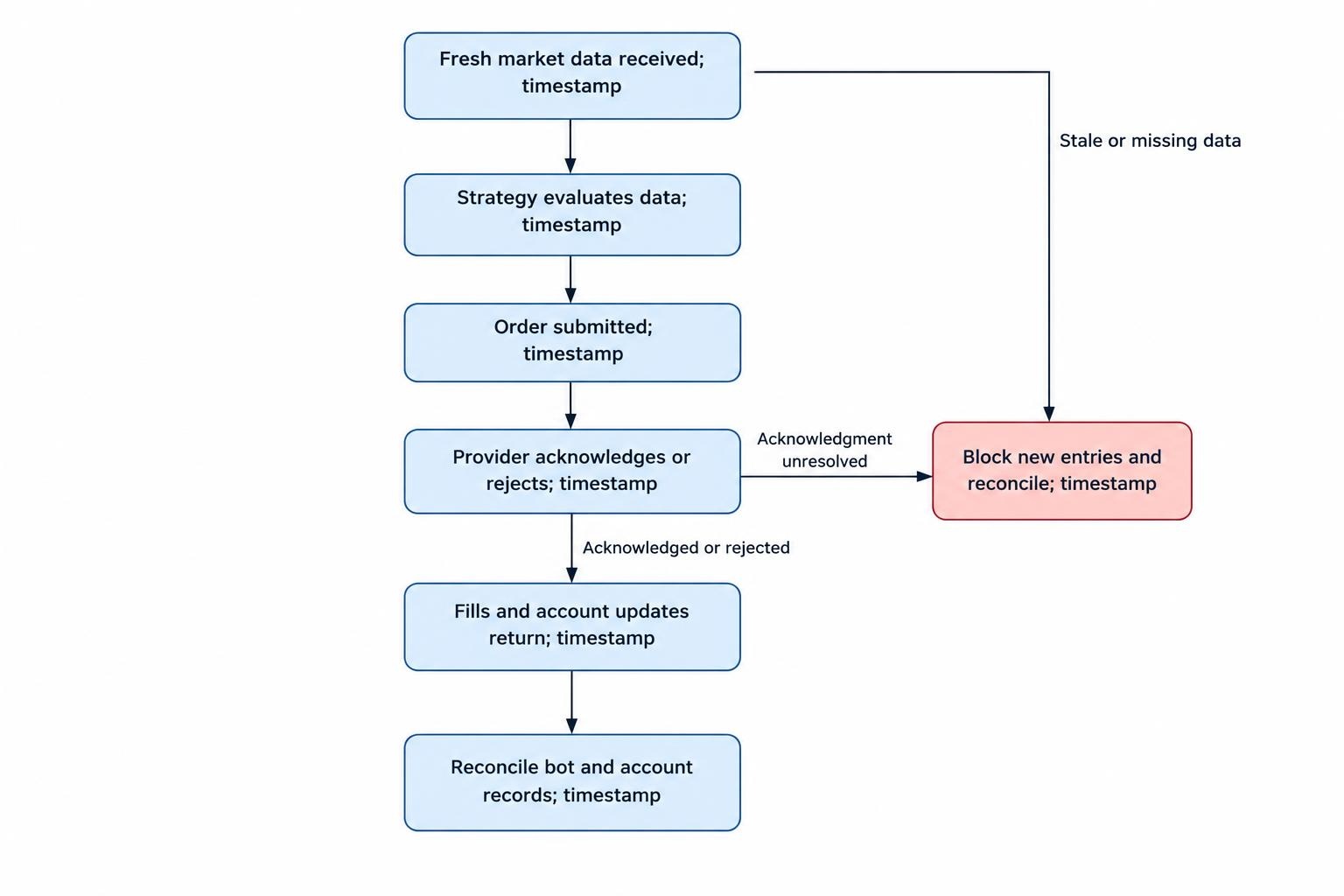
Build monitoring around the path from market data to confirmed account activity. Track when prices arrive, when the strategy evaluates them, when orders leave and when acknowledgments and fills return. Record timestamps at each stage so a delay does not disappear inside a single “connected” status.
Separate process health from trading health. A heartbeat confirms that something is responding. It does not prove that the strategy loop is advancing, account updates are arriving or cancellation requests are succeeding. Check progress as well as availability.
| Monitoring area | What to measure | Possible response |
|---|---|---|
| Market data | Price age, missing updates and feed status | Block entries that require fresh prices |
| Order execution | Acknowledgment delays, rejections and unresolved orders | Suspend affected trading and reconcile |
| Account risk | Positions, working orders, margin and losses | Enforce strategy and account limits |
| Infrastructure | Heartbeats, queue delays, resource use and clock drift | Alert the operator and restrict unsafe activity |
| Safety controls | Stop status, cancellation results and alert delivery | Escalate incomplete emergency actions |
Reconcile the bot’s records with broker or exchange account records. Flag unexplained differences rather than replacing one figure silently. Include manual trades and activity from other bots when checking account exposure.
Controls, alerts, reconciliation and mechanisms for rapidly disabling algorithms are established supervisory practices for securities firms. They appear in FINRA’s guidance on algorithmic trading supervision. For an individual operator, they also provide a useful engineering baseline, rather than a claim of regulatory compliance.
Set Thresholds With a Defined Response
Every monitored limit needs a measurement, an evaluation interval and an action. “Alert when losses become excessive” leaves too much undecided. Specify the account currency, included costs, reset time and whether the calculation uses realized losses, unrealized losses or both.
As an illustration, an operator might configure a warning at $150 of daily losses and block new exposure at $250. Those figures are not recommended defaults. A trigger at $250 also does not cap losses there: open positions, delayed execution and trading costs can carry the result beyond it.
Do not rely on profit and loss alone. Add limits for order quantity, working order count, message rate, instrument exposure and account margin usage. Evaluate proposed orders before submission, including the exposure that existing working orders could create if filled. The guide to configuring position limits and exposure alerts covers that broader risk framework.
Apply controls at both strategy and account level. Several bots can each remain within their own allowance while exceeding the account’s capacity. Where relevant, inspect gross exposure as well as net exposure; offsetting positions should not automatically make every risk measure read zero.
Use warning periods for tolerable disturbances, not for hard breaches. A brief latency spike may justify observation. An order above the permitted quantity should be rejected before it reaches execution.
Make Alerts Actionable and Test Their Delivery
Divide notifications into information, warnings and emergencies. Routine reconnects can go into an event log. A position mismatch or failed emergency cancellation needs an operator’s attention. Give every urgent alert a named recipient, a response deadline and an escalation route.
Include the affected account, strategy, observed value, threshold, timestamp and action already taken. “Bot error” is not a useful incident message. “Account A: new entries blocked; three orders remain unconfirmed” gives the operator somewhere to start.
Group repeated symptoms into an incident instead of sending hundreds of identical messages. Use persistence windows where a short disturbance is acceptable, but keep immediate safety actions separate from notification delays.
Test the complete delivery path, including the receiving device. A successful alert evaluation does not prove that anyone received it. Prometheus alerting guidance recommends actionable alerts and end to end checks of monitoring infrastructure. Treat missing monitoring data as its own condition, not evidence that trading is healthy.
Define What the Emergency Stop Actually Does
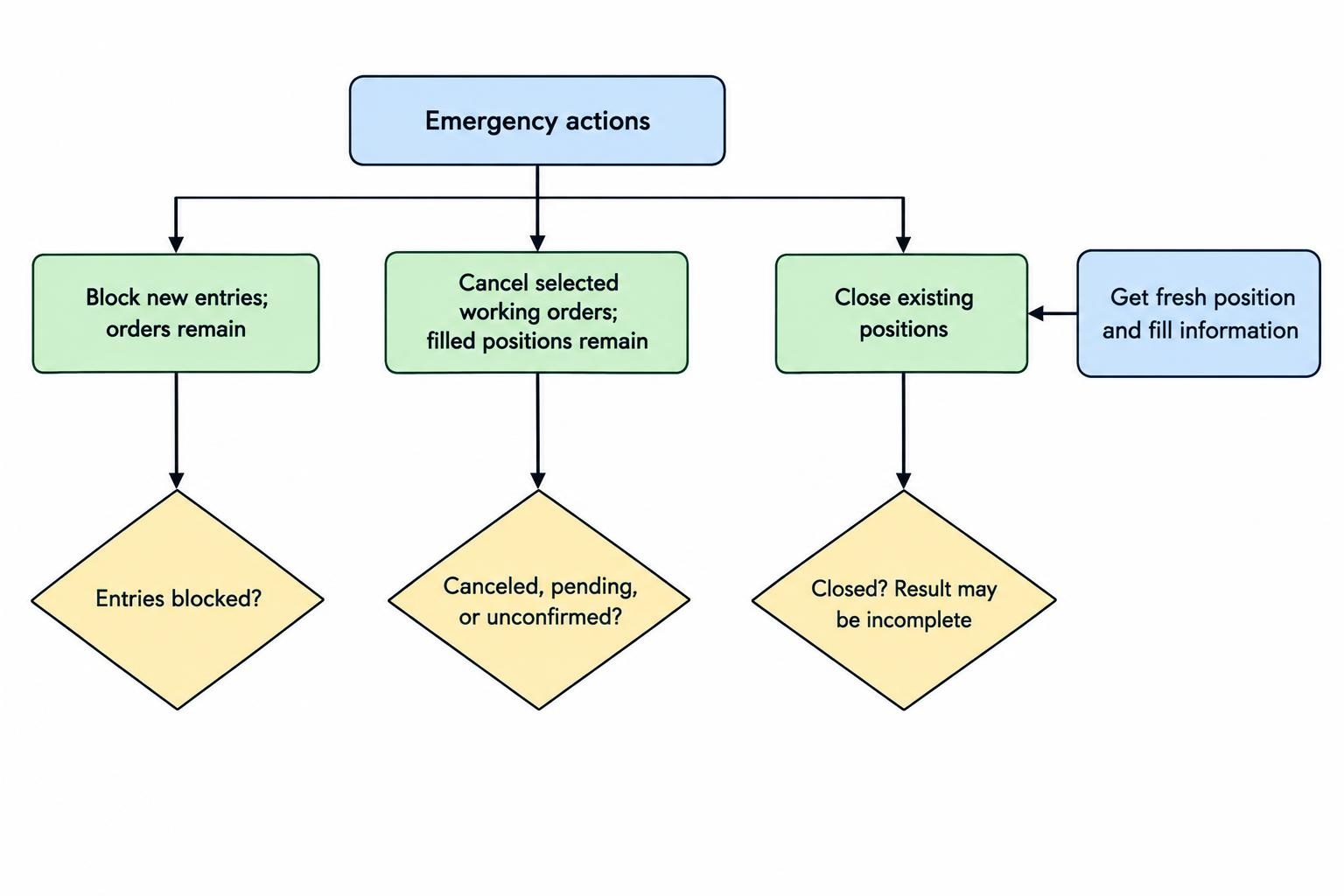
Stopping the bot, canceling orders and closing positions are different operations. Label them separately. A single button called “Stop everything” hides decisions that become rather important when money is still moving.
Pause Strategy Decisions and Block New Exposure
A strategy pause stops new decisions. An execution block rejects new exposure even if a strategy continues generating signals. Prefer both layers for serious incidents, so an overlooked process cannot keep sending orders through another route.
Define whether cancellations and authorized risk reducing orders remain available. Avoid a blanket local shutdown that removes your only working exit route. Conversely, do not let an unrestricted “exit” exception become a way to bypass the risk gate.
Cancel Working Orders
Distinguish canceling entry orders from canceling every order. A mass cancellation may remove protective stop orders as well as unwanted entries. Decide in advance how protection will be maintained if positions remain open.
Verify provider behavior rather than assuming every kill switch works alike. CME’s documented kill switch prohibits new order entry and cancels eligible orders, but excludes mass quotes and has cancellation exceptions when markets are closed or within the final 30 seconds before an open. Blocking and completed cancellation are not the same confirmation.
Close Existing Positions
Flattening requires further execution. Canceling working orders does not itself close filled positions. Before submitting exits, obtain the freshest available position and fill records, including fills that arrived during cancellation.
Use reduce only instructions where supported and appropriate, after checking their documented behavior. Without such protection, an oversized or repeated exit can create a position in the opposite direction. Avoid automatic flattening from an unverified position snapshot.
Display the requested action and confirmed result separately: entries blocked, cancellations pending, positions remaining or flattening incomplete. Do not show “safe” because the emergency button accepted a click.
Keep Emergency Controls Independent of the Strategy
Place the execution risk gate outside the strategy’s decision logic where practical. A strategy bug should not also disable the mechanism intended to contain it. For unattended operation, consider a separate watchdog and an operator access route that does not depend on the bot’s dashboard.
Independence needs a failure review. A watchdog on the same machine still shares power and operating system failures. A separate service using the same network connection still shares that connection. Document what remains available during each outage.
Make serious emergency stops latch: restoring connectivity or restarting a process should not automatically resume trading. Persist the stopped state, and prevent a standby instance from taking over while the account is halted.
Unresolved requests need special handling. A timeout does not establish that an order failed, and an unanswered cancellation does not establish that it succeeded. Keep that uncertainty visible. The execution workflow belongs in handling failed orders, retries and duplicate trades; the monitor’s job is to detect and escalate unresolved states.
If the trading connection fails, use the predefined fallback access route. Do not assume disconnecting the bot cancels resting orders unless the provider explicitly supports that behavior for the relevant session and order types.
Secure Stop Controls and Trading Credentials
Separate permission to view monitoring, activate an emergency stop, change risk limits and resume trading. Someone who can stop a malfunctioning strategy does not necessarily need authority to increase its exposure allowance.
Protect administrative access with strong authentication and keep credentials out of alerts, screenshots and ordinary logs. Give monitoring services read access only where that is sufficient. Where a service must cancel orders, restrict its permissions as far as the provider allows.
Maintain a documented credential revocation procedure. Stopping a process is not a substitute for invalidating compromised credentials. Minimum permissions, revocation and auditable secret handling are covered in the OWASP Secrets Management Cheat Sheet.
Record who changed a threshold, activated a stop or authorized resumption, with timestamps and reasons. Keep the incident record outside the strategy process so a crash does not remove the evidence needed to reconstruct events.
Test Failures Before Depending on the Controls
Test the safety system separately from strategy profitability. A backtest showing acceptable drawdown says nothing about whether an operator receives an emergency message or whether the software handles a cancellation timeout correctly.
In a controlled environment, interrupt market data while keeping the process running. Disconnect order updates, introduce delayed acknowledgments, simulate partial fills and restart the bot while its emergency stop is active. Check that a second instance cannot resume trading around the stop.
Measure the interval from fault detection to entry blocking, cancellation confirmation and operator notification. Record incomplete actions as well as successful ones. An emergency routine that works only when every dependency is healthy has missed the point.
Start these exercises with paper trading automated strategies. Treat simulated results as evidence about the tested workflow, not proof of live execution behavior. Confirm provider features and test any live operational procedure under tightly controlled conditions.
Consider a hypothetical partial fill: the bot requests ten units, receives four, then loses its update stream. The monitor should block fresh exposure and investigate the remaining order. It should not assume either zero or ten units filled and send an exit based on that guess.
Require a Controlled Restart
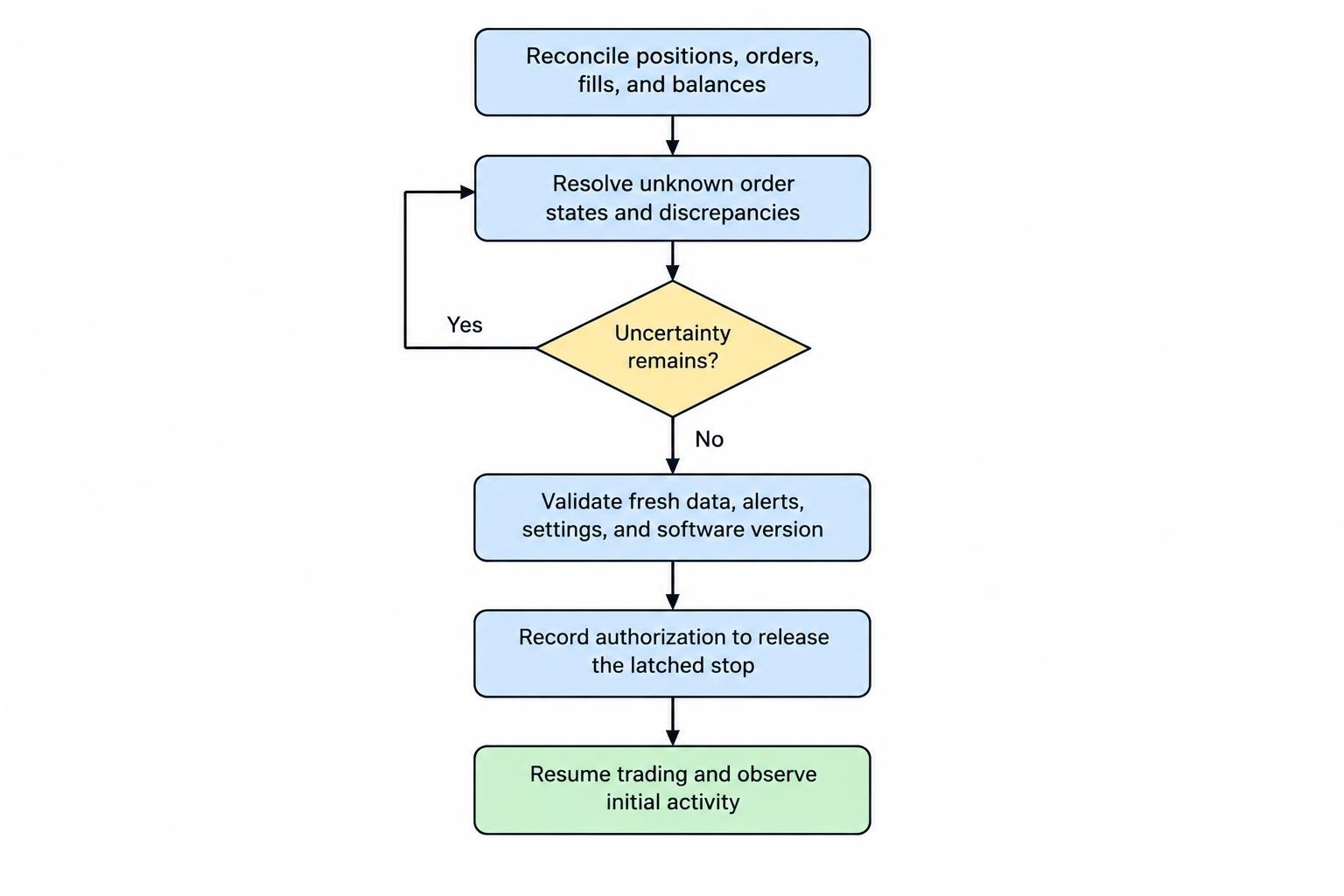
A recovered connection is not a recovered trading system. Before resuming, establish what happened during the incident and whether the account state is now reliable.
- Reconcile: Check positions, working orders, recent fills and balances against account records.
- Resolve uncertainty: Investigate unknown order states, pending cancellations and unexplained differences.
- Validate: Confirm fresh data, working notifications, approved settings and the intended software version.
- Authorize: Record approval to release the latched stop, with reduced operating limits where appropriate.
- Observe: Monitor the first trading activity closely before returning to normal operation.
Do not clear a daily loss stop simply because the software restarted. Preserve the loss calculation and its reset policy independently of process uptime. Correcting a technical fault does not replenish the account’s risk allowance.
Evaluate Controls Before Choosing Software
Ask a software provider to demonstrate emergency behavior, not just show a red button. Establish whether limits are enforced locally or at the execution endpoint, what happens during an internet outage, which orders a cancellation reaches and how the system reports incomplete actions. Check whether audit records and incident data can be exported.
Keep regulatory claims in scope. The SEC’s market access risk control requirements address covered broker dealers and include controls intended to prevent orders exceeding preset financial thresholds or appearing erroneous. A retail bot’s monitoring panel does not establish compliance with those requirements.
Choose controls you can verify: fresh account records, enforced exposure limits, an independent stop route and a restart procedure that requires approval. A polished dashboard helps an operator see trouble. Reliable emergency controls must also contain it.